Hi Experst
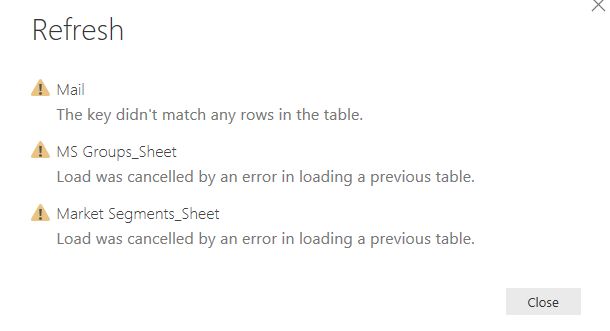
I am getting a error upon exporting attachment (Excel) file from microft exhange, i have created the all filter in edit query and its working fine on first stage, however when am receiving updat email next date I am getting error.
let
Source = Exchange.Contents("m.sarz@mhj.com"),
Mail1 = Source{[Name="Mail"]}[Data],
#"Expanded Sender" = Table.ExpandRecordColumn(Mail1, "Sender", {"Name", "Address"}, {"Sender.Name", "Sender.Address"}),
#"Filtered Rows" = Table.SelectRows(#"Expanded Sender", each [Sender.Address] = "replies-abc@aol.com"),
#"Filtered Rows1" = Table.SelectRows(#"Filtered Rows", each Text.EndsWith([Subject], "Madinah Data BI")),
#"Filtered Rows2" = Table.SelectRows(#"Filtered Rows1", let latest = List.Max(#"Filtered Rows1"[DateTimeSent]) in each [DateTimeSent] = latest),
#"AAMkAGJiMTg2OGMzLWRlZDEtNDI0MC04OTlhLThiZDFiMWU1OTA0YgBGAAAAAACHHKVnuh1TTIzR3yhL8aLKBwAEgYm+4YUCSZJ3jmvsPvxCAAz6v6+nAAClbRZez8mURKjGea9RW6QMAAJK9RBeAAA=" = #"Filtered Rows2"{[Id="AAMkAGJiMTg2OGMzLWRlZDEtNDI0MC04OTlhLThiZDFiMWU1OTA0YgBGAAAAAACHHKVnuh1TTIzR3yhL8aLKBwAEgYm+4YUCSZJ3jmvsPvxCAAz6v6+nAAClbRZez8mURKjGea9RW6QMAAJK9RBeAAA="]}[Attachments],
AttachmentContent = #"AAMkAGJiMTg2OGMzLWRlZDEtNDI0MC04OTlhLThiZDFiMWU1OTA0YgBGAAAAAACHHKVnuh1TTIzR3yhL8aLKBwAEgYm+4YUCSZJ3jmvsPvxCAAz6v6+nAAClbRZez8mURKjGea9RW6QMAAJK9RBeAAA="{0}[AttachmentContent],
#"Imported Excel" = Excel.Workbook(AttachmentContent),
Hotel_Sheet = #"Imported Excel"{[Item="Hotel",Kind="Sheet"]}[Data],
#"Promoted Headers" = Table.PromoteHeaders(Hotel_Sheet, [PromoteAllScalars=true]),
#"Changed Type" = Table.TransformColumnTypes(#"Promoted Headers",{{"Property Name", type text}, {"Account ID", type text}, {"DOW", type text}, {"Occupancy Date", Int64.Type}, {"Special Event (Impact Forecast = Yes)", type text}, {"User Forecast Rooms Sold", type text}, {"User Forecast Room Revenue (SAR)", type text}}),
#"Changed Type with Locale" = Table.TransformColumnTypes(#"Changed Type", {{"Occupancy Date", type date}}, "en-NZ")
in
#"Changed Type with Locale"


