cancel
Showing results for 
Search instead for 
Did you mean: 

The Power BI Data Visualization World Championships is back! Get ahead of the game and start preparing now! Learn more

Reply
wrwillits
Helper III
Helper III

Error in FIND function

I am trying to use the Find Function but keep getting an error message every time I try to save the calculated column. I am trying to find the "(" text within a text column and PBI throws an error stating that "The Search Text provided to function "FIND" could not be found in the given text." Here's an example of the column for the "given text":


Aircraft (Serial #)      Aircraft Type

AS365 (65533)

AW139 (399443)

S-92 (7649246)


I am trying to pull out the "Aircraft" type from the "Aircraft (Serial #)" column so my formula is:


Aircraft Type =

                     LEFT( [Aircraft (Serial #)],

                               FIND( "(", [Aircraft (Serial #)] ) - 1

                            )


It seems that the FIND function in DAX will not accept the "(" as the text to find, and instead assumes that the "(" is part of the formula. It of course works fine in Excel.


1 ACCEPTED SOLUTION
v-haibl-msft
Microsoft Employee
Microsoft Employee

@wrwillits


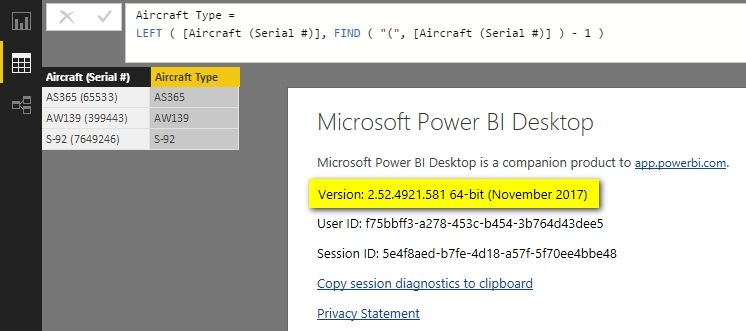
Please make sure that you're using the latest version of PBI Desktop. I just tested with your formula and it worked well on my side as following screenshot.


Error in FIND function_1.jpg


@trevor


You need to change 0 to 1 in your formula.


Best Regards,
Herbert

View solution in original post

3 REPLIES 3
v-haibl-msft
Microsoft Employee
Microsoft Employee

@wrwillits


Please make sure that you're using the latest version of PBI Desktop. I just tested with your formula and it worked well on my side as following screenshot.


Error in FIND function_1.jpg


@trevor


You need to change 0 to 1 in your formula.


Best Regards,
Herbert

I updated to the Nov release and it now works.


Thanks!

trevor
Helper I
Helper I

Similarly, I am having trouble with the FIND function,  I have a Text column [Cost Type] in a table and am trying to find if the word "Freight" appears in the value:


find("FREIGHT",[Cost Type],0)


Power BI is telling me "An argument of function 'FIND' has the wrong data type or has an invalid value."


It seems the function won't accept "Freight" as an argument either, so it's not limited to the ( character.

Helpful resources

Announcements
Power BI DataViz World Championships

Power BI Dataviz World Championships

The Power BI Data Visualization World Championships is back! Get ahead of the game and start preparing now!

December 2025 Power BI Update Carousel

Power BI Monthly Update - December 2025

Check out the December 2025 Power BI Holiday Recap!

FabCon Atlanta 2026 carousel

FabCon Atlanta 2026

Join us at FabCon Atlanta, March 16-20, for the ultimate Fabric, Power BI, AI and SQL community-led event. Save $200 with code FABCOMM.