cancel
Showing results for 
Search instead for 
Did you mean: 

Learn from the best! Meet the four finalists headed to the FINALS of the Power BI Dataviz World Championships! Register now

Reply
Anonymous
Not applicable

Error Refreshing Excel Data

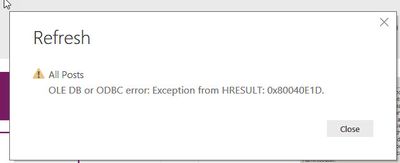
I am trying to refresh data from an excel spreadsheet, but I keep getting the below error message. I've never seen this error pop up before and it isn't clear what the problem is or how to fix it. Does anyone have any ideas?Power BI error message.jpg

1 ACCEPTED SOLUTION
v-yuta-msft
Community Support
Community Support

@Anonymous ,


This may caused by the data format change, you can refer to this similar case below:

https://community.powerbi.com/t5/Desktop/Getting-the-dreaded-OLE-DB-or-ODBC-error-Exception-from-HRESULT/td-p/147194


Community Support Team _ Jimmy Tao

If this post helps, then please consider Accept it as the solution to help the other members find it more quickly.

View solution in original post

2 REPLIES 2
v-yuta-msft
Community Support
Community Support

@Anonymous ,


This may caused by the data format change, you can refer to this similar case below:

https://community.powerbi.com/t5/Desktop/Getting-the-dreaded-OLE-DB-or-ODBC-error-Exception-from-HRESULT/td-p/147194


Community Support Team _ Jimmy Tao

If this post helps, then please consider Accept it as the solution to help the other members find it more quickly.

Anonymous
Not applicable

@v-yuta-msft


Thanks for linking to this. I was able to fix the refresh problem before I read this by deleting the file path and adding it back in the advanced editor. I have no idea why that worked because it was exactly the same file path. But once the data refreshed, everything went haywire. When it refreshed, the date was suddenly formatted as a serial date, as in the example you linked to, and Power BI would not recognize it as a date. However, that is not how my original data source was formatted, so I have no idea why it did that. I reformatted it and haven't had any problems with refreshing, though, so I don't know if something about the date had been causing the problem or not. Another thing that went haywire after I refreshed is that one of my slicers is not pulling in all the data from the column it references. This is really bizarre, because that slicer is linked to slicers on other pages that are not having that problem. No matter how many times I delete and add back the slicer to that page, it only has one option instead of the four it should have. Also, all my number columns were formatted as text when I refreshed even though they weren't before, so I had to change that in modeling for each of them. Aside from the slicer, everything is working more or less ok now, but this was really weird. I'm going to mark your response as the solution, but I don't know that anyone has been able to really find the root of this problem yet.

Helpful resources

Announcements
Join our Fabric User Panel

Join our Fabric User Panel

Share feedback directly with Fabric product managers, participate in targeted research studies and influence the Fabric roadmap.

February Power BI Update Carousel

Power BI Monthly Update - February 2026

Check out the February 2026 Power BI update to learn about new features.

FabCon Atlanta 2026 carousel

FabCon Atlanta 2026

Join us at FabCon Atlanta, March 16-20, for the ultimate Fabric, Power BI, AI and SQL community-led event. Save $200 with code FABCOMM.