
Join us at FabCon Atlanta from March 16 - 20, 2026, for the ultimate Fabric, Power BI, AI and SQL community-led event. Save $200 with code FABCOMM.
Register now!The Power BI Data Visualization World Championships is back! Get ahead of the game and start preparing now! Learn more
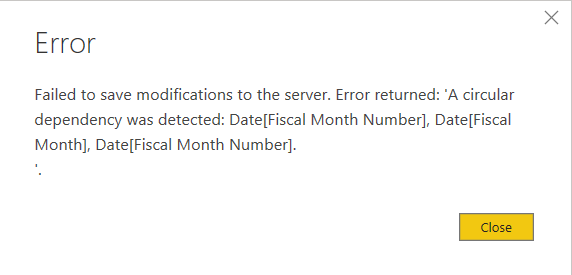
Hello! I am getting an error when trying to sort by column in my Date table to have Fiscal Year & Month show in the correct order on visual. I am using the method found here https://www.youtube.com/watch?v=0peKz7XjEdw&feature
I need to be able to sort the Fiscal Month, starting with fiscal month number 1 but the last step is to Sort by Column which throws the error. Any ideas? or alternative methods?
Date table:
Date =
GENERATE(
CALENDARAUTO(),
VAR YYYY =
YEAR ([Date])
VAR MMMM =
MONTH ([Date])
RETURN
ROW (
"Year", CONCATENATE("CY ", YYYY),
"Month", FORMAT([Date], "mmmm"),
"Month Number", MMMM,
"Fiscal Year", CONCATENATE("FY ", IF (MMMM <= 6, YYYY - 1, YYYY))
)
) Fiscal Month Number:
Fiscal Month Number =
IF (
'Date'[Month Number] <= 6,
'Date'[Month Number] + 6,
'Date'[Month Number] - 6
)Fiscal Month:
Fiscal Month = 'Date'[Month]
Solved! Go to Solution.
Hi @Anonymous ,
As tested here,I didnt find the same issue.Have you selected "Fiscal Month" then choosed to sort by "Fiscal Month number"?
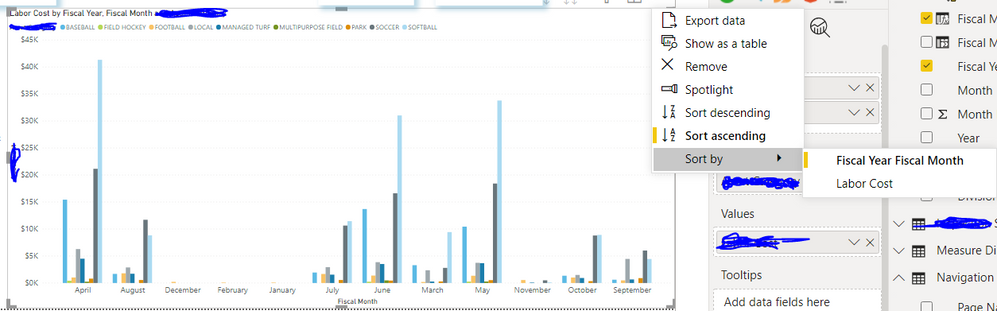
Is below order what you want?
According to your method,it works fine here,you may check my sample .pbix file attached.
Best Regards,
Kelly
Did I answer your question? Mark my post as a solution!
@Anonymous , not very clear with your screenshoot. But make sure both fiscal month year and fiscal month year sort are coming from the same base column, they should not create each other
You can get any fiscal month calendar from here - https://community.powerbi.com/t5/Community-Blog/Creating-Financial-Calendar-Decoding-Date-and-Calendar-1-5-Power/ba-p/1187441
or refer to my video :https://www.youtube.com/watch?v=w4U6Bi_fPek
Hello,
Thanks for the reply! I'm not sure what you mean by the same base column?
Hi @Anonymous ,
As tested here,I didnt find the same issue.Have you selected "Fiscal Month" then choosed to sort by "Fiscal Month number"?
Is below order what you want?
According to your method,it works fine here,you may check my sample .pbix file attached.
Best Regards,
Kelly
Did I answer your question? Mark my post as a solution!
Check out the November 2025 Power BI update to learn about new features.
Advance your Data & AI career with 50 days of live learning, contests, hands-on challenges, study groups & certifications and more!