cancel
Showing results for 
Search instead for 
Did you mean: 

The Power BI Data Visualization World Championships is back! Get ahead of the game and start preparing now! Learn more

Reply
krishak77
Helper I
Helper I

Enter value in new column based on value from existing column

Hello All,


Can anyone help me with the below requirement with DAX formula?


the below values if we have on the column "user status" of cell it has to mention value as "Friction by design", "Frictionless" in new column and not only single value even with multiple value .

Below values are friction by design "GTIC GTKP GTKS GTMO GTNO GTNT GTOM GTPC GTPL GTSM GTRF C2AF C2BD C2BF CC1F CCAF CCAI CCDA CAPA"

Below values are Frictionless "TDDAT ATDD EDRP ZTAX DMFI"

Rest all the other values if we have on the column user status except above should be called as “Friction” If there are multiple values in same row below should be considered

“Friction by design” values with “Friction” value then it should be called as “Friction”

“Frictionless” values with “Friction” value then it should be called as “Friction”

“Friction by design” values with “Frictionless” value then it should be called as “Friction by design”


Below few samples

User StatusNew Column
GTPL C2AFFriction by design
GTIC TDDATFriction by design
TDDAT ATDDFrictionless
CCMT HDOMFriction
CCMT GTPL C2AFFriction
EDRPFrictionless
GTOMFriction by design


Thank you in advance

1 ACCEPTED SOLUTION
Anonymous
Not applicable

@lbendlin Thanks for your contribution on this thread.

Hi @krishak77 ,

I created a sample pbix file(see the attachment), please check if that is what you want.

1. Create a dimension table as below
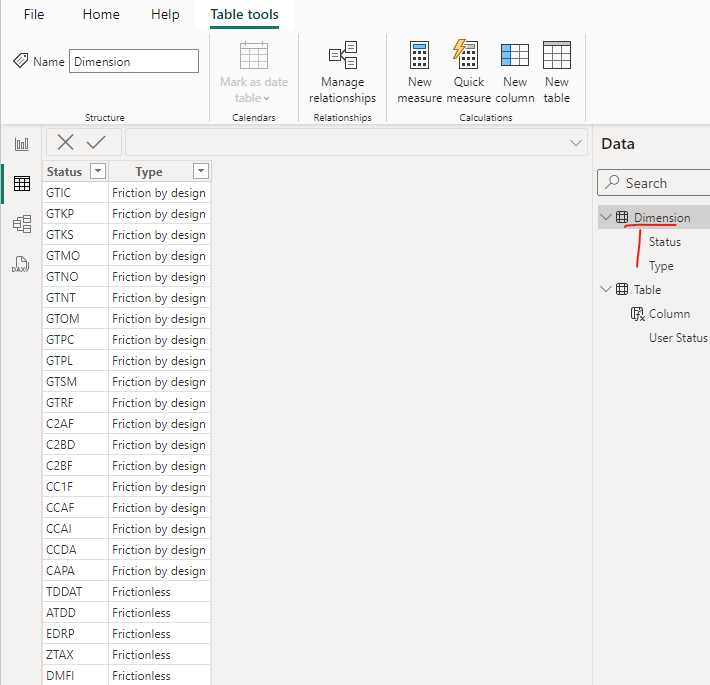
vyiruanmsft_0-1711346892365.png

2. Create a calculated column as below in your fact table

Column = 
VAR design =
    CALCULATE (
        MAX ( 'Dimension'[Type] ),
        FILTER (
            'Dimension',
            SEARCH ( 'Dimension'[Status], 'Table'[User Status], 1, 0 ) > 0
                && 'Dimension'[Type] = "Friction by design"
        )
    )
VAR frictionless =
    CALCULATE (
        MAX ( 'Dimension'[Type] ),
        FILTER (
            'Dimension',
            SEARCH ( 'Dimension'[Status], 'Table'[User Status], 1, 0 ) > 0
                && 'Dimension'[Type] = "Frictionless"
        )
    )
VAR _other =
    CALCULATE (
        MAX ( 'Dimension'[Type] ),
        FILTER (
            'Dimension',
            SEARCH ( 'Dimension'[Status], 'Table'[User Status], 1, 0 ) > 0
        )
    )
VAR TextValue = [User Status]
VAR TextLength =
    LEN ( TextValue )
VAR TextNoSpaces =
    SUBSTITUTE ( TextValue, " ", "" )
VAR TextNoSpacesLength =
    LEN ( TextNoSpaces )
VAR SpaceCount = TextLength - TextNoSpacesLength
RETURN
    IF (
        NOT ( ISBLANK ( design ) ) && NOT ( ISBLANK ( frictionless ) ),
        "Friction by design",
        IF ( ISBLANK ( _other ), "Friction", _other )
    )
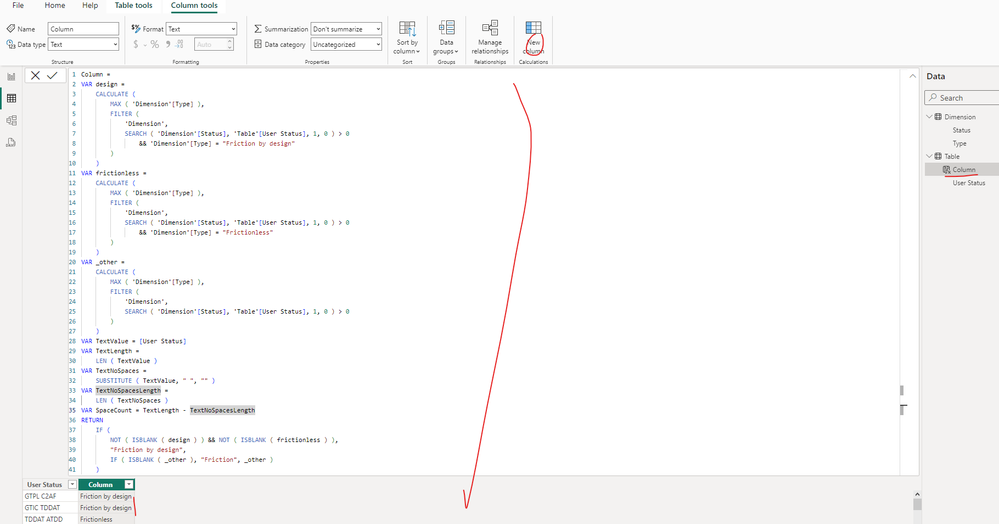
vyiruanmsft_1-1711347153701.png

If the above one can't help you figure out, please provide some sample data and expected result just as @lbendlin suggested. Thank you.

Best Regards

View solution in original post

2 REPLIES 2
Anonymous
Not applicable

@lbendlin Thanks for your contribution on this thread.

Hi @krishak77 ,

I created a sample pbix file(see the attachment), please check if that is what you want.

1. Create a dimension table as below

vyiruanmsft_0-1711346892365.png

2. Create a calculated column as below in your fact table

Column = 
VAR design =
    CALCULATE (
        MAX ( 'Dimension'[Type] ),
        FILTER (
            'Dimension',
            SEARCH ( 'Dimension'[Status], 'Table'[User Status], 1, 0 ) > 0
                && 'Dimension'[Type] = "Friction by design"
        )
    )
VAR frictionless =
    CALCULATE (
        MAX ( 'Dimension'[Type] ),
        FILTER (
            'Dimension',
            SEARCH ( 'Dimension'[Status], 'Table'[User Status], 1, 0 ) > 0
                && 'Dimension'[Type] = "Frictionless"
        )
    )
VAR _other =
    CALCULATE (
        MAX ( 'Dimension'[Type] ),
        FILTER (
            'Dimension',
            SEARCH ( 'Dimension'[Status], 'Table'[User Status], 1, 0 ) > 0
        )
    )
VAR TextValue = [User Status]
VAR TextLength =
    LEN ( TextValue )
VAR TextNoSpaces =
    SUBSTITUTE ( TextValue, " ", "" )
VAR TextNoSpacesLength =
    LEN ( TextNoSpaces )
VAR SpaceCount = TextLength - TextNoSpacesLength
RETURN
    IF (
        NOT ( ISBLANK ( design ) ) && NOT ( ISBLANK ( frictionless ) ),
        "Friction by design",
        IF ( ISBLANK ( _other ), "Friction", _other )
    )

vyiruanmsft_1-1711347153701.png

If the above one can't help you figure out, please provide some sample data and expected result just as @lbendlin suggested. Thank you.

Best Regards

lbendlin
Super User
Super User

Please provide a more detailed explanation of what you are aiming to achieve. What have you tried and where are you stuck?

Helpful resources

Announcements
Power BI DataViz World Championships

Power BI Dataviz World Championships

The Power BI Data Visualization World Championships is back! Get ahead of the game and start preparing now!

December 2025 Power BI Update Carousel

Power BI Monthly Update - December 2025

Check out the December 2025 Power BI Holiday Recap!

FabCon Atlanta 2026 carousel

FabCon Atlanta 2026

Join us at FabCon Atlanta, March 16-20, for the ultimate Fabric, Power BI, AI and SQL community-led event. Save $200 with code FABCOMM.