
cancel
Showing results for 
Search instead for 
Did you mean: 

The Power BI Data Visualization World Championships is back! Get ahead of the game and start preparing now! Learn more

Reply
kateryna
Regular Visitor

Enter Data with Formulas

Hello Everybody!


I have just started exploring PBI world and need to solve the following task: add formula to a cell in a table, which was added with the help of "Enter Data" tool. The purpose is to create a calculated cell referring to another imported table.


If anyone has an idea how to do that, I would be very-very grateful!


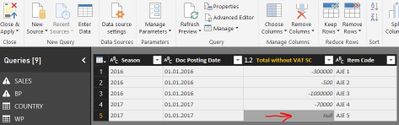
Printscreen is below:

Example.JPG


5 REPLIES 5
v-ljerr-msft
Microsoft Employee
Microsoft Employee

Hi @kateryna,


In Power BI Desktop, there is no option to add formula to a cell to create a calculated cell in a table.


In your scenario, you should create new calculate column instead. You can do it with DAX under Modeling tab, or with Power Query(M) with Query Editor > Add Column tab. For more details about how to create calculated columns in Power BI Desktop, you can refer to this article.


If you have any question about the formula to create the new column, just post your table structures with some sample data and your expected result here. Smiley Happy


Regards

Hello @v-ljerr-msft!

Thank you for replying to me! Got back from short vacation and just saw your advice.

I am afraid that creating a calculated column would not be enough to complete the task. Let me give you a detailed example.


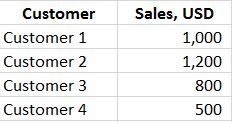
1. I import data on Sales from SBO

Pic 1.JPG


2. I created calculated column on estimated rebates to customers with the help of other related tables


Pic 2.JPG


3. In the report I would like to see Estimated rebates Total in the rows as below:


Pic 3.JPG


Is there any way to get this result?


Very appreciate your ideas.


Best regards,

   Kateryna

Hi @kateryna,


I assume you already have a table called "Table1" like below.

t1.PNG

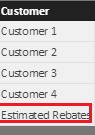
To get your expected result, you need to add a new table("Table2") with a single column like below(using Enter Data or Import it from Excel etc). 

t2.PNG

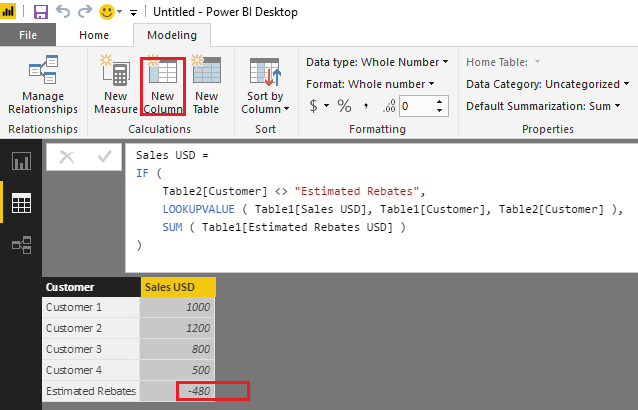
Then you should be able to use the formula below to create a new calculate column in Table2. Smiley Happy

Sales USD = 
IF (
    Table2[Customer] <> "Estimated Rebates",
    LOOKUPVALUE ( Table1[Sales USD], Table1[Customer], Table2[Customer] ),
    SUM ( Table1[Estimated Rebates USD] )
)

c1.PNG


Regards

Dear @v-ljerr-msft,


Thank you for the details. I was almost sure it is solved, but here is where I am stuck:


Table 2 - this is example of visual report, which can be based on Customer, Product, Terms of Payment etc...so creating additional tables with vlookup will probably overload PBI.

What I have done - created a new table 2 with line Est Reb and created new calculated column Sales_SC. After I have appended table 2 with table 1, but the problem is that in column Sales_SC/ row Est Reb there is no values. I guess the problem is related to the fact that this is calculated column and not added one.

Is there any other way to incorporate somehow this additional line with calculated column into table 1?


Best regards,

  Kateryna

Hi @kateryna,


Table 2 - this is example of visual report, which can be based on Customer, Product, Terms of Payment etc...so creating additional tables with vlookup will probably overload PBI.

What I have done - created a new table 2 with line Est Reb and created new calculated column Sales_SC. After I have appended table 2 with table 1, but the problem is that in column Sales_SC/ row Est Reb there is no values. I guess the problem is related to the fact that this is calculated column and not added one.


Nice solution!


To make this solution work:


1. Created a new table 2 with line Est Reb and created new calculated column Sales USD, and another calculate column Estimated Rebates USD.

Sales USD = SUM(Table1[Estimated Rebates USD])
Estimated Rebates USD = SUM(Table1[Estimated Rebates USD])

t2.PNG


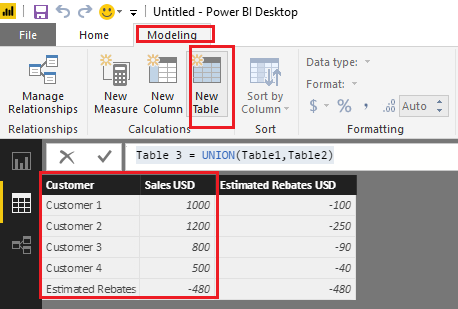
2. Then you should be able to use UNION function to create a new calculate table "Table3" to join Table1 and Table2.

Table 3 = UNION(Table1,Table2)

t3.PNG


Regards

Helpful resources

Announcements
Power BI DataViz World Championships

Power BI Dataviz World Championships

The Power BI Data Visualization World Championships is back! Get ahead of the game and start preparing now!

December 2025 Power BI Update Carousel

Power BI Monthly Update - December 2025

Check out the December 2025 Power BI Holiday Recap!

FabCon Atlanta 2026 carousel

FabCon Atlanta 2026

Join us at FabCon Atlanta, March 16-20, for the ultimate Fabric, Power BI, AI and SQL community-led event. Save $200 with code FABCOMM.