FabCon is coming to Atlanta
Join us at FabCon Atlanta from March 16 - 20, 2026, for the ultimate Fabric, Power BI, AI and SQL community-led event. Save $200 with code FABCOMM.
Register now!- Power BI forums
- Get Help with Power BI
- Desktop
- Service
- Report Server
- Power Query
- Mobile Apps
- Developer
- DAX Commands and Tips
- Custom Visuals Development Discussion
- Health and Life Sciences
- Power BI Spanish forums
- Translated Spanish Desktop
- Training and Consulting
- Instructor Led Training
- Dashboard in a Day for Women, by Women
- Galleries
- Data Stories Gallery
- Themes Gallery
- Contests Gallery
- QuickViz Gallery
- Quick Measures Gallery
- Visual Calculations Gallery
- Notebook Gallery
- Translytical Task Flow Gallery
- TMDL Gallery
- R Script Showcase
- Webinars and Video Gallery
- Ideas
- Custom Visuals Ideas (read-only)
- Issues
- Issues
- Events
- Upcoming Events
The Power BI Data Visualization World Championships is back! Get ahead of the game and start preparing now! Learn more
- Power BI forums
- Forums
- Get Help with Power BI
- Desktop
- End of month running total
- Subscribe to RSS Feed
- Mark Topic as New
- Mark Topic as Read
- Float this Topic for Current User
- Bookmark
- Subscribe
- Printer Friendly Page

- Mark as New
- Bookmark
- Subscribe
- Mute
- Subscribe to RSS Feed
- Permalink
- Report Inappropriate Content
End of month running total
Hi there,
I have two table Date with Datekey and CashFlow with CashFlow Amount and DateKey
One think to remember is my CashFlow date is the end of month date and I would like to calculate running total for my Cashflow
My date table start from 2015 to 2020 so not all projects start from 2015 some start 2016 and end 2018 some start 2015 and in 2019
and some start 2019 and still continue
I created a measure
Why is that? because is end of month only? (I'v tried also with Date[Date] column but same results
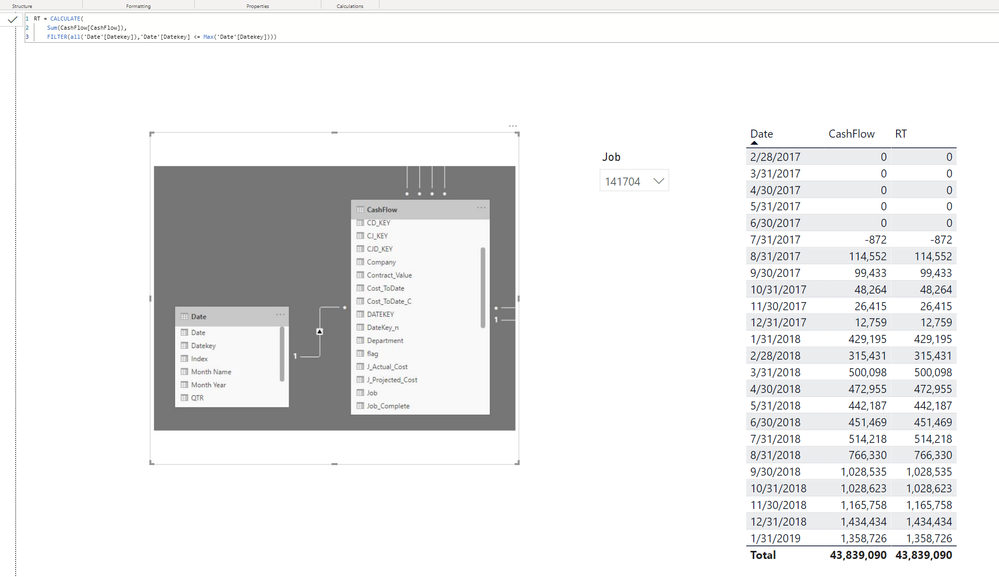 Running Total
Solved! Go to Solution.

- Mark as New
- Bookmark
- Subscribe
- Mute
- Subscribe to RSS Feed
- Permalink
- Report Inappropriate Content
@Anonymous
As per @FrankAT solution, the problem is with the Running Total calculation (in particular the SUM('Cashflow'[Cashflow]).
To solve it just create a first measure for:
Sum of Cashflow = SUM(CashFlow[CashFlow])
Cashflow Running Total =
CALCULATE([Sum of Cashflow],
FILTER(ALL('Date Table'),
'Date Table'[Datekey] <= MAX('Date Table'[Datekey])))
Btw it doesn't work if you try to use a VAR for the Sum of Cashflow either (even if you wrap it in a CALCULATE function). They need to be separate measures.
Did I answer your question? Mark my post as a solution!
In doing so, you are also helping me. Thank you!
Proud to be a Super User!
Paul on Linkedin.

- Mark as New
- Bookmark
- Subscribe
- Mute
- Subscribe to RSS Feed
- Permalink
- Report Inappropriate Content
Hi @Anonymous
is this what you are looking for?
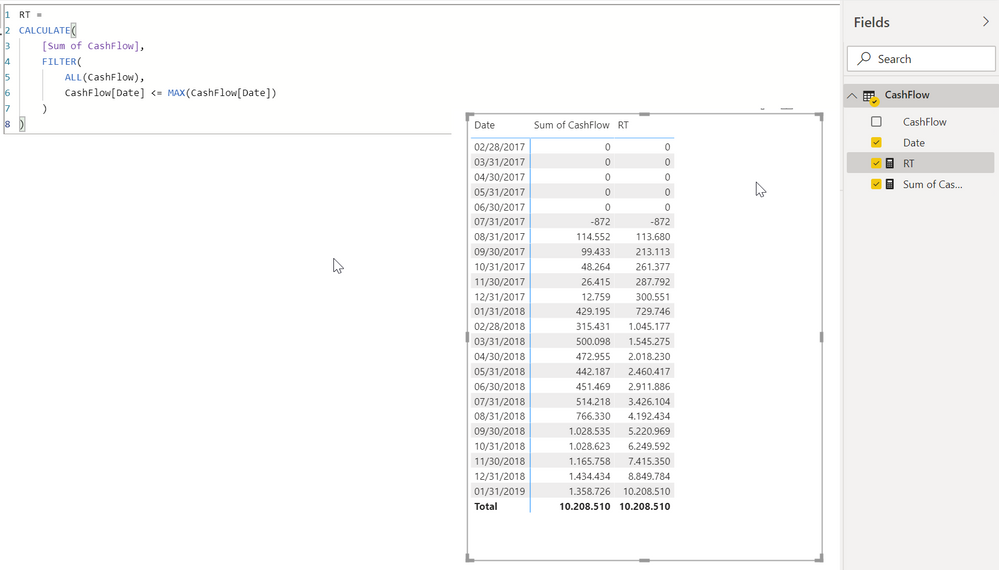
RT =
CALCULATE(
    [Sum of CashFlow],
    FILTER(
        ALL(CashFlow),
        CashFlow[Date] <= MAX(CashFlow[Date])
    )
)
With kind regards from the town where the legend of the 'Pied Piper of Hamelin' is at home
FrankAT (Proud to be a Datanaut)
- Mark as New
- Bookmark
- Subscribe
- Mute
- Subscribe to RSS Feed
- Permalink
- Report Inappropriate Content
Paul,
You have a different file, is not working the last row of Rt need to the the sum of the cash flow amount and when I'm using the job slicer the amount dosen't change? the date table is not taking in concideration from some reson.
Thanks,
Oded Dror
- Mark as New
- Bookmark
- Subscribe
- Mute
- Subscribe to RSS Feed
- Permalink
- Report Inappropriate Content
@Anonymous
Can you provide a sampe dataset or sample PBIX file?
(BTW, this may be a silly question but are all date fields set as a date?)
Did I answer your question? Mark my post as a solution!
In doing so, you are also helping me. Thank you!
Proud to be a Super User!
Paul on Linkedin.
- Mark as New
- Bookmark
- Subscribe
- Mute
- Subscribe to RSS Feed
- Permalink
- Report Inappropriate Content
- Mark as New
- Bookmark
- Subscribe
- Mute
- Subscribe to RSS Feed
- Permalink
- Report Inappropriate Content
@Anonymous
As per @FrankAT solution, the problem is with the Running Total calculation (in particular the SUM('Cashflow'[Cashflow]).
To solve it just create a first measure for:
Sum of Cashflow = SUM(CashFlow[CashFlow])
Cashflow Running Total =
CALCULATE([Sum of Cashflow],
FILTER(ALL('Date Table'),
'Date Table'[Datekey] <= MAX('Date Table'[Datekey])))
Btw it doesn't work if you try to use a VAR for the Sum of Cashflow either (even if you wrap it in a CALCULATE function). They need to be separate measures.
Did I answer your question? Mark my post as a solution!
In doing so, you are also helping me. Thank you!
Proud to be a Super User!
Paul on Linkedin.
- Mark as New
- Bookmark
- Subscribe
- Mute
- Subscribe to RSS Feed
- Permalink
- Report Inappropriate Content
Paul,
I added additional job filter and it works
- Mark as New
- Bookmark
- Subscribe
- Mute
- Subscribe to RSS Feed
- Permalink
- Report Inappropriate Content
Paul,
How do I insert PBIX?
Thanks,
Oded Dror
- Mark as New
- Bookmark
- Subscribe
- Mute
- Subscribe to RSS Feed
- Permalink
- Report Inappropriate Content
@Anonymous
The best way is to upload to a cloud service (Onedrive, Dropbox, Google Drive, iCloud...) and share from there
Did I answer your question? Mark my post as a solution!
In doing so, you are also helping me. Thank you!
Proud to be a Super User!
Paul on Linkedin.
- Mark as New
- Bookmark
- Subscribe
- Mute
- Subscribe to RSS Feed
- Permalink
- Report Inappropriate Content
Paul,
Thank for quick response and yes date columns are dates and date table marked as date table with date column.
I can't provide you this one but let me create same value and dataset and I will contact you again give me few minutes
Thanks
Oded Dror
Helpful resources

Power BI Dataviz World Championships
The Power BI Data Visualization World Championships is back! Get ahead of the game and start preparing now!

Power BI Monthly Update - November 2025
Check out the November 2025 Power BI update to learn about new features.

FabCon Atlanta 2026
Join us at FabCon Atlanta, March 16-20, for the ultimate Fabric, Power BI, AI and SQL community-led event. Save $200 with code FABCOMM.

| User | Count |
|---|---|
| 59 | |
| 43 | |
| 42 | |
| 23 | |
| 17 |


| User | Count |
|---|---|
| 190 | |
| 122 | |
| 96 | |
| 66 | |
| 47 |


