cancel
Showing results for 
Search instead for 
Did you mean: 

Get Fabric Certified for FREE during Fabric Data Days. Don't miss your chance! Request now

Reply
Anonymous
Not applicable

Emulating an NPS graphic using Power Bi

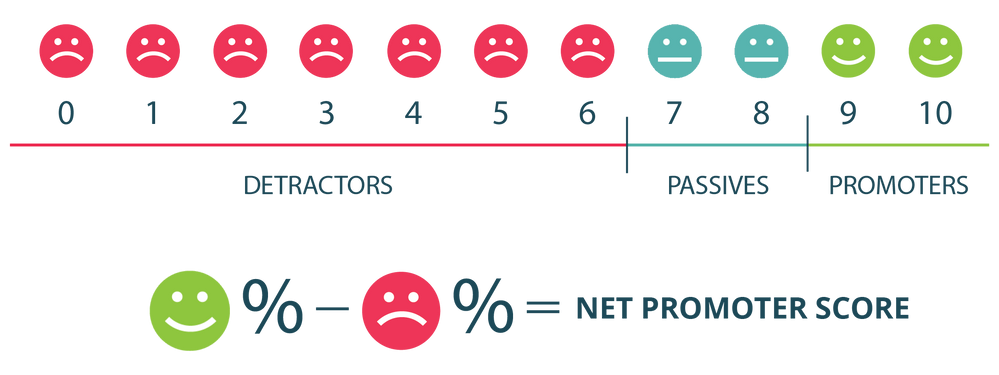
Hello Community -  Any guidance on how to build this in Power Bi?  Just the indicator line and emojis...not the bottom part with the percents.    I'd like to add this to a Power Bi report, but I would rather create it than just cut and paste it from a visual, this way I can specifically format the colors and/or the choic of emojis.  


NPS ratings.png

1 REPLY 1
KerKol
Power Participant
Power Participant

Will it be a static visual? Or do you intend to make it dynamic and bind certain elements to data?

There are a number of options available, but I'd probably recommend PureViz:

PureViz Infographic - for PowerPoint to Power BI (microsoft.com)


Did I answer your question? Mark my post as a solution!

Proud to be a Super User!


Helpful resources

Announcements
November Power BI Update Carousel

Power BI Monthly Update - November 2025

Check out the November 2025 Power BI update to learn about new features.

Fabric Data Days Carousel

Fabric Data Days

Advance your Data & AI career with 50 days of live learning, contests, hands-on challenges, study groups & certifications and more!

FabCon Atlanta 2026 carousel

FabCon Atlanta 2026

Join us at FabCon Atlanta, March 16-20, for the ultimate Fabric, Power BI, AI and SQL community-led event. Save $200 with code FABCOMM.

Top Solution Authors
Top Kudoed Authors