Join us at FabCon Atlanta from March 16 - 20, 2026, for the ultimate Fabric, Power BI, AI and SQL community-led event. Save $200 with code FABCOMM.
Register now!The Power BI Data Visualization World Championships is back! Get ahead of the game and start preparing now! Learn more
Hey all
I am just seeing if there is a way to edit a date column with the format of DD/MM/YY to just be MM/YY? The reason for this is because I am trying to filter spend for a given month but it's hard to do when everyone has a different bill day.
Solved! Go to Solution.
Hi,
In the Calendar Table, create 2 additional columns for Year and Month
Year = YEAR(Calendar[Date])
Month = FORMAT(Calendar[Date],"mmmm")
Drag these columns to your visual
You may also try this calculated column in the Calendar Table
Year-Month = FORMAT(Calendar[Date],"YYY-MM")
Hope this helps.
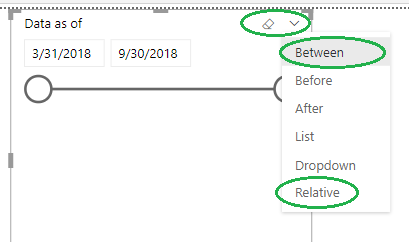
If you need this for filters alone, the dates field when used in a Slicer visual allows other useful features like dates between (start and end), or Relative (like, in the last/this/next x days/months/years, etc).
Hi,
In the Calendar Table, create 2 additional columns for Year and Month
Year = YEAR(Calendar[Date])
Month = FORMAT(Calendar[Date],"mmmm")
Drag these columns to your visual
You may also try this calculated column in the Calendar Table
Year-Month = FORMAT(Calendar[Date],"YYY-MM")
Hope this helps.
The Power BI Data Visualization World Championships is back! Get ahead of the game and start preparing now!
| User | Count |
|---|---|
| 38 | |
| 38 | |
| 36 | |
| 28 | |
| 28 |
| User | Count |
|---|---|
| 124 | |
| 88 | |
| 74 | |
| 66 | |
| 65 |