FabCon is coming to Atlanta
Join us at FabCon Atlanta from March 16 - 20, 2026, for the ultimate Fabric, Power BI, AI and SQL community-led event. Save $200 with code FABCOMM.
Register now!- Power BI forums
- Get Help with Power BI
- Desktop
- Service
- Report Server
- Power Query
- Mobile Apps
- Developer
- DAX Commands and Tips
- Custom Visuals Development Discussion
- Health and Life Sciences
- Power BI Spanish forums
- Translated Spanish Desktop
- Training and Consulting
- Instructor Led Training
- Dashboard in a Day for Women, by Women
- Galleries
- Data Stories Gallery
- Themes Gallery
- Contests Gallery
- Quick Measures Gallery
- Notebook Gallery
- Translytical Task Flow Gallery
- TMDL Gallery
- R Script Showcase
- Webinars and Video Gallery
- Ideas
- Custom Visuals Ideas (read-only)
- Issues
- Issues
- Events
- Upcoming Events
Join the Fabric FabCon Global Hackathon—running virtually through Nov 3. Open to all skill levels. $10,000 in prizes! Register now.
- Power BI forums
- Forums
- Get Help with Power BI
- Desktop
- Earliest Date of a Case and Change in count betwee...
- Subscribe to RSS Feed
- Mark Topic as New
- Mark Topic as Read
- Float this Topic for Current User
- Bookmark
- Subscribe
- Printer Friendly Page


- Mark as New
- Bookmark
- Subscribe
- Mute
- Subscribe to RSS Feed
- Permalink
- Report Inappropriate Content
Earliest Date of a Case and Change in count between dates
So I have the following type of data:
| Location | Date | Case Count | Earliest Date |
| A | 1/1/2020 | 0 | |
| A | 1/2/2020 | 3 | 1/2/2020 |
| A | 1/3/2020 | 10 | 1/3/2020 |
| B | 1/1/2020 | 0 | |
| B | 1/2/2020 | 0 | |
| B | 1/3/2020 | 1 | 1/3/2020 |
| B | 1/4/2020 | 8 | 1/4/2020 |
I want to show the earliest date and not have it change: This is the code I used to calculate the earliest date:
| Location | Date | Case Count | Earliest Date | Change in Count |
| A | 1/1/2020 | 0 | -- | |
| A | 1/2/2020 | 3 | 1/2/2020 | 3 |
| A | 1/3/2020 | 10 | 1/2/2020 | 7 |
| B | 1/1/2020 | 0 | -- | |
| B | 1/2/2020 | 0 | -- | |
| B | 1/3/2020 | 1 | 1/3/2020 | 1 |
| B | 1/4/2020 | 8 | 1/3/2020 | 7 |
Solved! Go to Solution.


- Mark as New
- Bookmark
- Subscribe
- Mute
- Subscribe to RSS Feed
- Permalink
- Report Inappropriate Content
Hi @william_johnson ,
You may create measures like DAX below.
Earliest Date = CALCULATE( MIN('Table'[Date]), FILTER(ALLEXCEPT('Table', 'Table'[Location]), 'Table'[Case Count] > 0 &&'Table'[Date] <= MAX('Table'[Date])))


Change in Count = Var d= CALCULATE(SUM('Table'[Case Count]),FILTER(ALLEXCEPT('Table','Table'[Location]),'Table'[Date]=[Earliest Date]))

return

IF(MAX('Table'[Case Count])<>0, IF(MAX('Table'[Date])=[Earliest Date],d , SUM('Table'[Case Count])-d))
Result:
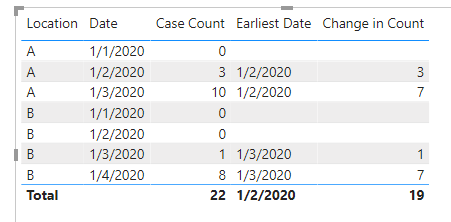
Best Regards,
Amy
Community Support Team _ Amy
If this post helps, then please consider Accept it as the solution to help the other members find it more quickly.
- Mark as New
- Bookmark
- Subscribe
- Mute
- Subscribe to RSS Feed
- Permalink
- Report Inappropriate Content
Hi @william_johnson ,
You may create measures like DAX below.
Earliest Date = CALCULATE( MIN('Table'[Date]), FILTER(ALLEXCEPT('Table', 'Table'[Location]), 'Table'[Case Count] > 0 &&'Table'[Date] <= MAX('Table'[Date])))


Change in Count = Var d= CALCULATE(SUM('Table'[Case Count]),FILTER(ALLEXCEPT('Table','Table'[Location]),'Table'[Date]=[Earliest Date]))

return

IF(MAX('Table'[Case Count])<>0, IF(MAX('Table'[Date])=[Earliest Date],d , SUM('Table'[Case Count])-d))
Result:
Best Regards,
Amy
Community Support Team _ Amy
If this post helps, then please consider Accept it as the solution to help the other members find it more quickly.


- Mark as New
- Bookmark
- Subscribe
- Mute
- Subscribe to RSS Feed
- Permalink
- Report Inappropriate Content
Hi @william_johnson ,
Please share the expected output. It will help provide a fastr resolution.
Regards,
Harsh Nathani
- Mark as New
- Bookmark
- Subscribe
- Mute
- Subscribe to RSS Feed
- Permalink
- Report Inappropriate Content
Thanks, changed! First time post, I'm a newbie!
- Mark as New
- Bookmark
- Subscribe
- Mute
- Subscribe to RSS Feed
- Permalink
- Report Inappropriate Content
Hi @william_johnson ,
Thanks a lot. Here you go.
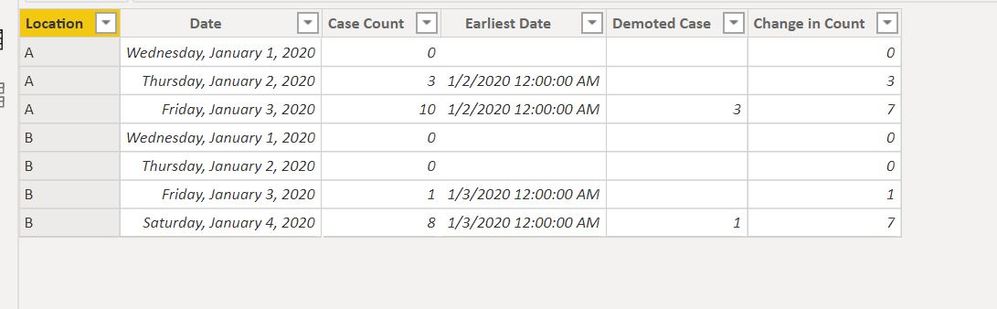
Create Calculated Columns
- Mark as New
- Bookmark
- Subscribe
- Mute
- Subscribe to RSS Feed
- Permalink
- Report Inappropriate Content
The demoted case only returns an answer of 1 rather than the actual number of cases on day 2 minus the number of cases on day 1 by location, and so-on.
- Mark as New
- Bookmark
- Subscribe
- Mute
- Subscribe to RSS Feed
- Permalink
- Report Inappropriate Content

Helpful resources

Power BI Monthly Update - September 2025
Check out the September 2025 Power BI update to learn about new features.

FabCon Atlanta 2026
Join us at FabCon Atlanta, March 16-20, for the ultimate Fabric, Power BI, AI and SQL community-led event. Save $200 with code FABCOMM.


