Join us at FabCon Atlanta from March 16 - 20, 2026, for the ultimate Fabric, Power BI, AI and SQL community-led event. Save $200 with code FABCOMM.
Register now!The Power BI Data Visualization World Championships is back! Get ahead of the game and start preparing now! Learn more
Greeting lovely members .
i have a simple power bi report that i want to make it Dynamic .
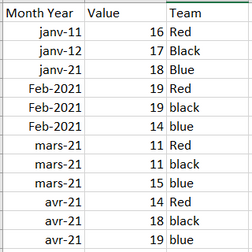
My data base is simple , here is a sample :
let's say this is the table where it contains the data that i will use in my visuals , i have also a Date table and table for the teams .
what's im trying to make here is a measure that will filter automatically on the current month - 1 .
Ex : since we are in march , in one of my visual i want to show only the data of the current month - 1 which is Febrary . how can i acheive this .
also is it possible to set the YTD function dynamically ? stop the count at the current month-1 ?
Thanks all in advance .
Solved! Go to Solution.
Here is the trick :
Hi, @Anonymous
I hope I understand your question correctly.
please try to follow the below.
if it does not work, please let me know.
First of all Thanks for you answer .
i think i find a way to solve it , i was thinking to add a column in my Date table called Previous Month that have values (True or false) and based on that column i filter my visuals , can u help me build that calculated columns .
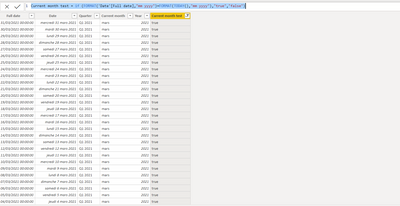
i was able to create a column that return true or false for the current month using this Dax funtion :
Here is the trick :
The Power BI Data Visualization World Championships is back! Get ahead of the game and start preparing now!
| User | Count |
|---|---|
| 38 | |
| 37 | |
| 33 | |
| 32 | |
| 29 |
| User | Count |
|---|---|
| 132 | |
| 88 | |
| 82 | |
| 68 | |
| 64 |