Get Fabric or SQL Certified for Free.
Get certified for free when you join Fabric Data Days 2026 and dive into Fabric, Power BI, SQL, AI, and other essential data skills.
Join now- Power BI forums
- Get Help with Power BI
- Desktop
- Service
- Report Server
- Power Query
- Mobile Apps
- Developer
- DAX Commands and Tips
- Custom Visuals Development Discussion
- Health and Life Sciences
- Power BI Spanish forums
- Translated Spanish Desktop
- Training and Consulting
- Instructor Led Training
- Dashboard in a Day for Women, by Women
- Galleries
- Data Stories Gallery
- Themes Gallery
- Contests Gallery
- QuickViz Gallery
- Quick Measures Gallery
- Visual Calculations Gallery
- Notebook Gallery
- Translytical Task Flow Gallery
- TMDL Gallery
- R Script Showcase
- Webinars and Video Gallery
- Ideas
- Custom Visuals Ideas (read-only)
- Issues
- Issues
- Events
- Upcoming Events
July 7 - July 17 | Round 2 of the Power BI Dataviz World Championships. Don't miss your chance! Learn more
- Power BI forums
- Forums
- Get Help with Power BI
- Desktop
- Dynamic week end date
- Subscribe to RSS Feed
- Mark Topic as New
- Mark Topic as Read
- Float this Topic for Current User
- Bookmark
- Subscribe
- Printer Friendly Page


- Mark as New
- Bookmark
- Subscribe
- Mute
- Subscribe to RSS Feed
- Permalink
- Report Inappropriate Content
Dynamic week end date
Looking for a way to create a calculated column that will change the week ending date starting with Yesterday. So for instance
| Date | Week End |
| 9/2/2017 | 9/2/2017 |
| 9/1/2017 | 9/2/2017 |
| 8/31/2017 | 9/2/2017 |
| 8/30/2017 | 9/2/2017 |
| 8/29/2017 | 9/2/2017 |
| 8/28/2017 | 9/2/2017 |
| 8/27/2017 | 9/2/2017 |
| 8/26/2017 | 8/26/2017 |
| 8/25/2017 | 8/26/2017 |
| 8/24/2017 | 8/26/2017 |
| 8/23/2017 | 8/26/2017 |
| 8/22/2017 | 8/26/2017 |
| 8/21/2017 | 8/26/2017 |
| 8/20/2017 | 8/26/2017 |
| 8/19/2017 | 8/19/2017 |
| 8/18/2017 | 8/19/2017 |
| 8/17/2017 | 8/19/2017 |
| 8/16/2017 | 8/19/2017 |
| 8/15/2017 | 8/19/2017 |
| 8/14/2017 | 8/19/2017 |
| 8/13/2017 | 8/19/2017 |
But then when the date changes to tomorrow it will basically shift everything one day. so then the week end will start on 9/3/17 and then go back from there.
Thank you,
Joseph
Solved! Go to Solution.

- Mark as New
- Bookmark
- Subscribe
- Mute
- Subscribe to RSS Feed
- Permalink
- Report Inappropriate Content

- Mark as New
- Bookmark
- Subscribe
- Mute
- Subscribe to RSS Feed
- Permalink
- Report Inappropriate Content
Hi @joschultz,
I'd like to share a simple formula to get current week end date.(based on your data, it seems like saturday?)
Calculate column formula:
Week End = [Date]+ 7-WEEKDAY([Date],1)
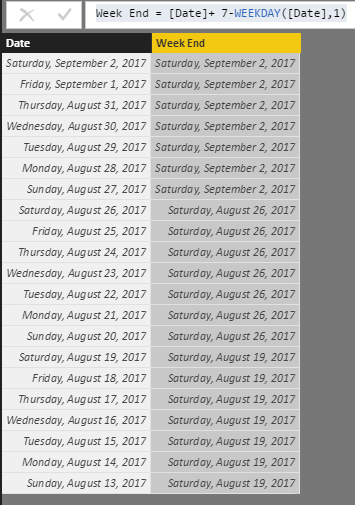
Notice: weekday will get day of week.(1~7, 1= sunday, 7 saturday), if you want modify the week end date, you only need to modify '7' to which you wanted.
Regards,
Xiaoxin Sheng
- Mark as New
- Bookmark
- Subscribe
- Mute
- Subscribe to RSS Feed
- Permalink
- Report Inappropriate Content
Hi @joschultz,
I'd like to share a simple formula to get current week end date.(based on your data, it seems like saturday?)
Calculate column formula:
Week End = [Date]+ 7-WEEKDAY([Date],1)
Notice: weekday will get day of week.(1~7, 1= sunday, 7 saturday), if you want modify the week end date, you only need to modify '7' to which you wanted.
Regards,
Xiaoxin Sheng


- Mark as New
- Bookmark
- Subscribe
- Mute
- Subscribe to RSS Feed
- Permalink
- Report Inappropriate Content
Hi @joschultz
What I would suggest doing is to create a column in the Query Editor instead of a calcuated column in the Power BI Data model. It is a lot easier to do this.
For your example you could create the column in the Query Editor with the following syntax. In the Query Editor you can click on the Add Column Ribbon and then select Custom Column.
Date.AddDays(DateTime.Date(DateTime.LocalNow()),-1)
That will ensure everytime you refresh your data, it will get the previous date.
- Mark as New
- Bookmark
- Subscribe
- Mute
- Subscribe to RSS Feed
- Permalink
- Report Inappropriate Content
It is a date dim table. I can refresh it every day which is what I will do. I have a solution using a relative day field and then using if then statements but its not dymanic in the sense that I need to create a huge if then statment to go back the amount of time I want to. Which is fine but looking for something easier. Here is what I have done so far.
Calculated Column for Relative day
a Relative Day = datedim[DAY_IN_YEAR_NUM] - CALCULATE(SUM(datedim[DAY_IN_YEAR_NUM]),ALL(datedim),TODAY()=datedim[DATE_VALUE])
Then to change the week end date.
Week End = IF( AND(datedim[Relative Day]<0,datedim[Relative Day]>-8),TODAY()-1,IF( AND(datedim[Relative Day]<-7,datedim[Relative Day]>-15),TODAY()-8,IF( AND(datedim[Relative Day]<-14,datedim[Relative Day]>-22),TODAY()-15,IF(AND(datedim[Relative Day]<-21,datedim[Relative Day]>-29),TODAY()-22,IF(AND(datedim[Relative Day]<-28,datedim[Relative Day]>-36),TODAY()-29,IF(AND(datedim[Relative Day]<-35,datedim[Relative Day]>-43),TODAY()-36,IF(AND(datedim[Relative Day]<-42,datedim[Relative Day]>-50),TODAY()-43,TODAY()-50)))))))
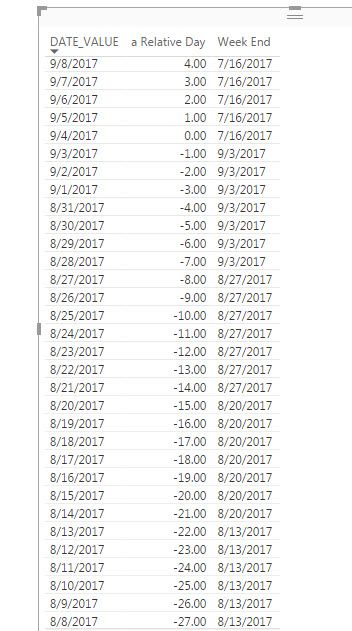
But I want to go back two years and while I can keep the if statement going. I would rather try and find a simplier solution.
Thank you,
Joseph
- Mark as New
- Bookmark
- Subscribe
- Mute
- Subscribe to RSS Feed
- Permalink
- Report Inappropriate Content
- Mark as New
- Bookmark
- Subscribe
- Mute
- Subscribe to RSS Feed
- Permalink
- Report Inappropriate Content
Hi Joseph,
Please calrify.
a) How is this table populated ?
b) Is this a Calendar Table that gets dynamically populated with starting date as (????????) and ending date as today ?
Let me know then I can try to work out a solution for you.
Cheers
CheenuSing
Helpful resources

FabCon & SQLCon – Barcelona 2026
Join us in Barcelona for FabCon and SQLCon, the Fabric, Power BI, SQL, and AI community event. Save €200 with code FABCMTY200.

Data Days 2026
Join Fabric Data Days 2026: 60 days of free live/on-demand sessions, challenges, study groups, and certification opportunities.

Power BI DataViz World Championships - June 2026
A new Power BI DataViz World Championship is coming this June! Don't miss out on submitting your entry.

| User | Count |
|---|---|
| 22 | |
| 20 | |
| 17 | |
| 13 | |
| 13 |


| User | Count |
|---|---|
| 62 | |
| 40 | |
| 38 | |
| 38 | |
| 38 |


