Join us at FabCon Atlanta from March 16 - 20, 2026, for the ultimate Fabric, Power BI, AI and SQL community-led event. Save $200 with code FABCOMM.
Register now!Get Fabric Certified for FREE during Fabric Data Days. Don't miss your chance! Request now
Hello All,
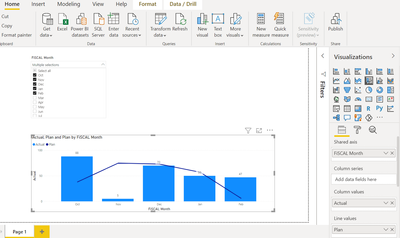
I have an requirement, currently Oct, Nov, Dec, Jan, Feb data is selected in the slicer and , data is showing in the graph.
So when for next month the end date will reach the slicer should automatically select March month, and the data should display in the graph.
End date is showing in below table for each month .
So I would like to make slicer dynamic based on the condition of when end date meet and should display the data in graph.
| FiSCAL Month | MCAL_PERIOD | START_DATE | END_DATE | Actual | Plan |
| Jan | 4 | 1/2/2021 | 4/30/2021 | 50 | 57 |
| Feb | 5 | 1/30/2021 | 2/26/2021 | 47 | 6 |
| Mar | 6 | 2/27/2021 | 4/2/2021 | 51 | 4 |
| Apr | 7 | 4/3/2021 | 4/30/2021 | 72 | 9 |
| May | 8 | 5/1/2021 | 5/28/2021 | 46 | 5 |
| Jun | 9 | 5/9/2021 | 7/2/2021 | 37 | 39 |
| Jul | 10 | 7/3/2021 | 7/30/2021 | 66 | 13 |
| Aug | 11 | 7/31/2021 | 8/27/2021 | 56 | 3 |
| Sep | 12 | 8/28/2021 | 10/1/2021 | 56 | 8 |
| Oct | 1 | 3-Oct | 10/30/2020 | 88 | 38 |
| Nov | 2 | 31-Oct | 11/27/2020 | 5 | 75 |
@Anonymous , That not possible, You can have a flag like
last six month =
Switch( True(),
[Date] >= eomonth(today(),-6)+1 && [Date] <= eomonth(today(),0) ,"Last Six" ,
[Date] & ""
)
and select that.
Check out the November 2025 Power BI update to learn about new features.
Advance your Data & AI career with 50 days of live learning, contests, hands-on challenges, study groups & certifications and more!