cancel
Showing results for 
Search instead for 
Did you mean: 

Learn from the best! Meet the four finalists headed to the FINALS of the Power BI Dataviz World Championships! Register now

Reply
RGR
Frequent Visitor

Dynamic date

Hello everyone,

I would like to ask the questions below, maybe someone can help.

I have a table with the min & max outdoor temperature per day (since 1961).
What I would like to display is the following:


-1- Avg max temp. in the current month
-2- Avg. max temp. during the same period last year
-3- Avg. max temp. during the same period this decade
-4- Avg. max temp. in the same period since the 1st measurement


The above based on a dynamic date.
What I mean is that on 07-12-2022 automatically the calculation is done for:

-1- Avg. max temp. 01-12-2022 untill 06-12-2022 (this year)
-2- Avg. max, temp. 01-12-2021 untill 06-12-2021 (last year)
-3- Avg. max temp. same period (01-12 untill 06-12) (this decade)
-4- Avg. max temp. same period (01-12 untill 06-12) since first measure.


And for tomorrow the period would be automatically changed to 01-12 untill 07-12 (same for month and year, when they change).


Hope anyone of you is able to help.
Lot of thanks in advance!!
RGR

2 REPLIES 2
RGR
Frequent Visitor

Thank you very much for your reply!!

In the meantime, I created this yesterday:

-1- First of all i added an calculated column using this code:

Current month =
IF (
MONTH ( PowerBi[datum].[Date] ) = MONTH ( TODAY () )
&& (PowerBi[datum].[Dag]) <= Day(today() -1) ,
"Yes",
"No"
)

-2- Then I made this measure:

History aver-max =

CALCULATE(AVERAGE(PowerBi[max]), all(), (PowerBi[yearnr] = 2021),

FILTER(
VALUES('PowerBi'[Huidige maand]),
[Huidige maand] = "YES")
)

This works fine, but now I would like to make the "(PowerBi[yearnr] = 2021)" to
become dynamic, something like "(PowerBi[yearnr] = today(),-1 year)"

I cannot figure out how to do this, even not with the Edate you mentioned....

Help would be appreciated a lot.
Best regards RGR

v-xiaotang
Community Support
Community Support

Hi @RGR 

Thanks for reaching out to us.

>> 

What I mean is that on 07-12-2022 automatically the calculation is done for:

-1- Avg. max temp. 01-12-2022 untill 06-12-2022 (this year)
-2- Avg. max, temp. 01-12-2021 untill 06-12-2021 (last year)

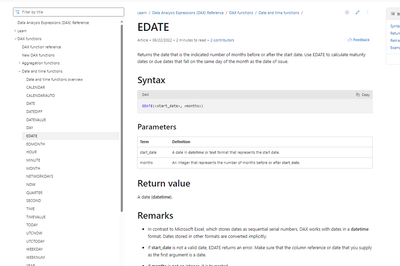
you can use EDATE() function, here is its tutorial,

EDATE function (DAX) - DAX | Microsoft Learn

vxiaotang_0-1670925049933.png


Best Regards,

Community Support Team _Tang

If this post helps, please consider Accept it as the solution to help the other members find it more quickly.

Helpful resources

Announcements
New to Fabric survey Carousel

New to Fabric Survey

If you have recently started exploring Fabric, we'd love to hear how it's going. Your feedback can help with product improvements.

Power BI DataViz World Championships carousel

Power BI DataViz World Championships - June 2026

A new Power BI DataViz World Championship is coming this June! Don't miss out on submitting your entry.

Join our Fabric User Panel

Join our Fabric User Panel

Share feedback directly with Fabric product managers, participate in targeted research studies and influence the Fabric roadmap.

March Power BI Update Carousel

Power BI Community Update - March 2026

Check out the March 2026 Power BI update to learn about new features.