cancel
Showing results for 
Search instead for 
Did you mean: 

The Power BI Data Visualization World Championships is back! Get ahead of the game and start preparing now! Learn more

Reply
Segun
Frequent Visitor

Dynamic date input

Hello ,


I need help in furing out how to write a Dax for dynamic date input.

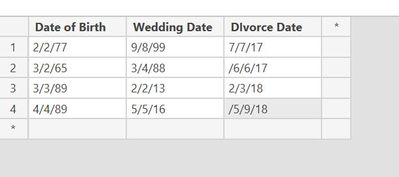
As shown in the table below, I would like to select my input date column usind a slicer

E.g 

Date of Birth

Wedding Date

Divorce Date


And then use the specific date data to build my visualization. The user can then be able to select which of thses dates they want to plot.


Thanks,

Dates.JPG

1 ACCEPTED SOLUTION
v-juanli-msft
Community Support
Community Support

Hi @Segun 

Based on my understanding:

First, you would like to select from three date columns using a slicer,

Second, users can select from some dates of one column to plot a visual.


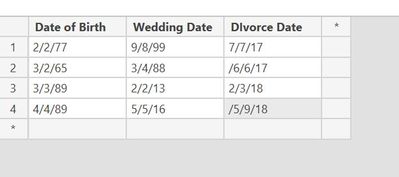
For example, I use the following dataset as a test.

1.png


First, from “Sheet1”, create three new tables

Table1 =
SUMMARIZE ( Sheet1, [Date of Birth], [numnber], [value] )
Table2 =
SUMMARIZE ( Sheet1, [Wedding Date], [numnber], [value] )
Table 3 =
SUMMARIZE ( Sheet1, [Divorce Date], [numnber], [value] )


Second, create “Date Type” columns in three tables separately.

In Table1

Date Type =
IF ( [Date of Birth] <> BLANK (), "Date of Birth" )

In Table2

Date Type =
IF ( [Wedding Date] <> BLANK (), "Wedding Date" )


In Table3
Date Type =
IF ( [Divorce Date] <> BLANK (), "Divorce Date" )


Third, union three new tables and rename column name as you wanted.

Table 4 =
UNION ( 'Table1', Table2, 'Table 3' )

2.png


Finally, in Report View, we could add columns “Date Type” and “Date” to slicers.
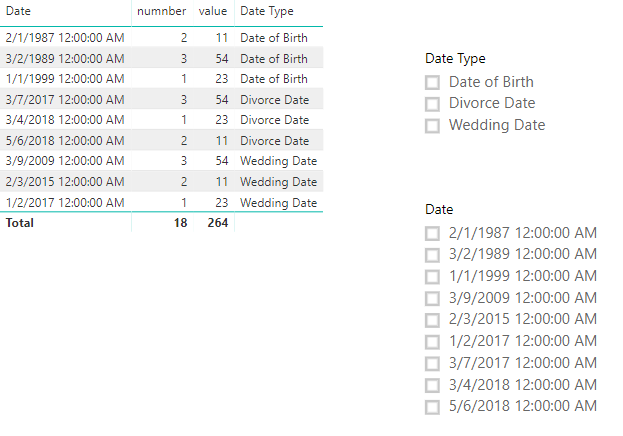
3.png


Best Regards

Maggie

View solution in original post

3 REPLIES 3
v-juanli-msft
Community Support
Community Support

Hi @Segun 

Based on my understanding:

First, you would like to select from three date columns using a slicer,

Second, users can select from some dates of one column to plot a visual.


For example, I use the following dataset as a test.

1.png


First, from “Sheet1”, create three new tables

Table1 =
SUMMARIZE ( Sheet1, [Date of Birth], [numnber], [value] )
Table2 =
SUMMARIZE ( Sheet1, [Wedding Date], [numnber], [value] )
Table 3 =
SUMMARIZE ( Sheet1, [Divorce Date], [numnber], [value] )


Second, create “Date Type” columns in three tables separately.

In Table1

Date Type =
IF ( [Date of Birth] <> BLANK (), "Date of Birth" )

In Table2

Date Type =
IF ( [Wedding Date] <> BLANK (), "Wedding Date" )


In Table3
Date Type =
IF ( [Divorce Date] <> BLANK (), "Divorce Date" )


Third, union three new tables and rename column name as you wanted.

Table 4 =
UNION ( 'Table1', Table2, 'Table 3' )

2.png


Finally, in Report View, we could add columns “Date Type” and “Date” to slicers.

3.png


Best Regards

Maggie

Thank you! I really appreciate!

Segun
Frequent Visitor

I'm trying to create a chart with dynamic date input. 

The user would be able to select a date category with a slicer option and the visualization will automatically be populated

The input dates category look like something in the picture below. Thanks for your help.Dates.JPG

Helpful resources

Announcements
Power BI DataViz World Championships

Power BI Dataviz World Championships

The Power BI Data Visualization World Championships is back! Get ahead of the game and start preparing now!

December 2025 Power BI Update Carousel

Power BI Monthly Update - December 2025

Check out the December 2025 Power BI Holiday Recap!

FabCon Atlanta 2026 carousel

FabCon Atlanta 2026

Join us at FabCon Atlanta, March 16-20, for the ultimate Fabric, Power BI, AI and SQL community-led event. Save $200 with code FABCOMM.