FabCon is coming to Atlanta
Join us at FabCon Atlanta from March 16 - 20, 2026, for the ultimate Fabric, Power BI, AI and SQL community-led event. Save $200 with code FABCOMM.
Register now!- Power BI forums
- Get Help with Power BI
- Desktop
- Service
- Report Server
- Power Query
- Mobile Apps
- Developer
- DAX Commands and Tips
- Custom Visuals Development Discussion
- Health and Life Sciences
- Power BI Spanish forums
- Translated Spanish Desktop
- Training and Consulting
- Instructor Led Training
- Dashboard in a Day for Women, by Women
- Galleries
- Data Stories Gallery
- Themes Gallery
- Contests Gallery
- QuickViz Gallery
- Quick Measures Gallery
- Visual Calculations Gallery
- Notebook Gallery
- Translytical Task Flow Gallery
- TMDL Gallery
- R Script Showcase
- Webinars and Video Gallery
- Ideas
- Custom Visuals Ideas (read-only)
- Issues
- Issues
- Events
- Upcoming Events
The Power BI Data Visualization World Championships is back! Get ahead of the game and start preparing now! Learn more
- Power BI forums
- Forums
- Get Help with Power BI
- Desktop
- Dynamic date filter to be implement as on yesterd...
- Subscribe to RSS Feed
- Mark Topic as New
- Mark Topic as Read
- Float this Topic for Current User
- Bookmark
- Subscribe
- Printer Friendly Page

- Mark as New
- Bookmark
- Subscribe
- Mute
- Subscribe to RSS Feed
- Permalink
- Report Inappropriate Content
Dynamic date filter to be implement as on yesterday
Hi,
I have requirement to be shown in report whenever the report is opened in service it has to show yesterday's mtd,then they can search from there .
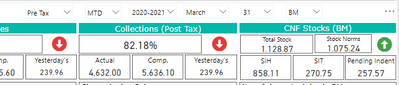
3 different slicers i,m using for year,month and day i need that to change dynamically when i check-in to report in service.
How is it possible ????
Solved! Go to Solution.


- Mark as New
- Bookmark
- Subscribe
- Mute
- Subscribe to RSS Feed
- Permalink
- Report Inappropriate Content
Hi @Anonymous
You can create a MTD measure like below. When a specific date is selected with the slicers, calculate the MTD of that date, otherwise calculate yesterday's MTD.
MTD =
VAR _yesterday = TODAY()-1
VAR _endDate = SELECTEDVALUE(DimDate[Date],_yesterday)
VAR _startOfMonth = EOMONTH(_endDate,-1)+1
RETURN
CALCULATE(SUM('Table'[Value]),DATESBETWEEN(DimDate[Date],_startOfMonth,_endDate))
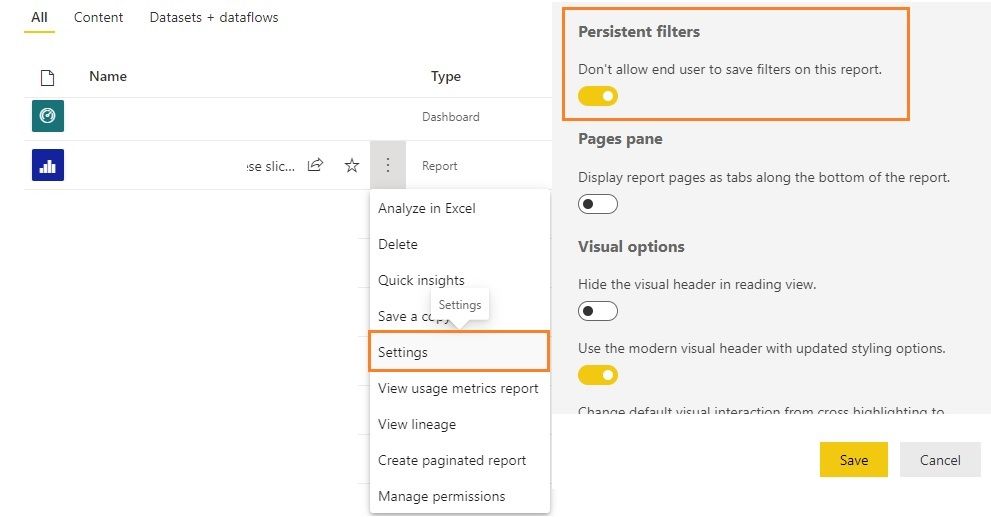
Before you publish the report, ensure the slicers don't select a date. After publishing the report to service, enter the report's settings pane and turn on the option Don't allow end users to save filters on this report under Persistent filters. Save the settings. Take note that this setting is working on the whole report.
Regards,
Community Support Team _ Jing
If this post helps, please Accept it as the solution to help other members find it.
- Mark as New
- Bookmark
- Subscribe
- Mute
- Subscribe to RSS Feed
- Permalink
- Report Inappropriate Content
Hi @Anonymous
You can create a MTD measure like below. When a specific date is selected with the slicers, calculate the MTD of that date, otherwise calculate yesterday's MTD.
MTD =
VAR _yesterday = TODAY()-1
VAR _endDate = SELECTEDVALUE(DimDate[Date],_yesterday)
VAR _startOfMonth = EOMONTH(_endDate,-1)+1
RETURN
CALCULATE(SUM('Table'[Value]),DATESBETWEEN(DimDate[Date],_startOfMonth,_endDate))
Before you publish the report, ensure the slicers don't select a date. After publishing the report to service, enter the report's settings pane and turn on the option Don't allow end users to save filters on this report under Persistent filters. Save the settings. Take note that this setting is working on the whole report.
Regards,
Community Support Team _ Jing
If this post helps, please Accept it as the solution to help other members find it.
- Mark as New
- Bookmark
- Subscribe
- Mute
- Subscribe to RSS Feed
- Permalink
- Report Inappropriate Content
Hi
I have requirement to show dynamic change of date,whenever You open the report in service it should be show as on yesterday.
For date I used 3slicers year,month &dayFor suppose if i open report today(12th july 2021) the date should be shown as (11th july 2021),
if i open report on(1st july 2021) the date should be shown as (30th june 2021)
- Mark as New
- Bookmark
- Subscribe
- Mute
- Subscribe to RSS Feed
- Permalink
- Report Inappropriate Content
Hi @Anonymous
You can refer to below videos:
Set Default Slicer Selection to Current Year or Month in Power BI - YouTube
How to set a DATE SLICER to TODAY by default in Power BI - YouTube
The problem is that at present slicers are not able to change selected item dynamically, so all these workarounds are using a specific string like "Default", "Today" to replace the default selected date in a column, and use this column in the slicer to replace the original date column.
Regards,
Jing
- Mark as New
- Bookmark
- Subscribe
- Mute
- Subscribe to RSS Feed
- Permalink
- Report Inappropriate Content
Thank You for Reply
I tried "Today" calculated column in slicer but it is in text format ,but all my measures are used "day" which is in integer so it causing error.
- Mark as New
- Bookmark
- Subscribe
- Mute
- Subscribe to RSS Feed
- Permalink
- Report Inappropriate Content
Hi @Anonymous
You could use "Today" column in slicer, but use original date columns in your measures.
Regards,
Jing
- Mark as New
- Bookmark
- Subscribe
- Mute
- Subscribe to RSS Feed
- Permalink
- Report Inappropriate Content
Helpful resources

Power BI Monthly Update - November 2025
Check out the November 2025 Power BI update to learn about new features.

Fabric Data Days
Advance your Data & AI career with 50 days of live learning, contests, hands-on challenges, study groups & certifications and more!

FabCon Atlanta 2026
Join us at FabCon Atlanta, March 16-20, for the ultimate Fabric, Power BI, AI and SQL community-led event. Save $200 with code FABCOMM.

| User | Count |
|---|---|
| 57 | |
| 44 | |
| 42 | |
| 20 | |
| 18 |


