Join us at FabCon Atlanta from March 16 - 20, 2026, for the ultimate Fabric, Power BI, AI and SQL community-led event. Save $200 with code FABCOMM.
Register now!View all the Fabric Data Days sessions on demand. View schedule
Hello everyone,
Sorry I am new to Power BI - it might be obvious.
I want to create a dynamic title that display a text only if one option of my slicer is selected.
For example, if Project 2 [column project definitin] is selected I want the title to display the description [column project description]. However, blanck if there is multiple selection.
Thank you in advance.
Solved! Go to Solution.
You should be able to just put a measure in a card with this expression.
Description = SELECTEDVALUE(Table[Description Column])
If you want to concatenate it with text you can too.
Description = "The description for this project is: " & SELECTEDVALUE(Table[Description Column])
Regards,
Pat
To learn more about Power BI, follow me on Twitter or subscribe on YouTube.
Hi @julrua ,
If you only want to show the title in the card visual, you can create a measure like this:
Title =
IF (
NOT ( ISFILTERED ( 'Table'[definition] ) ),
BLANK (),
SELECTEDVALUE ( 'Table'[description] )
)
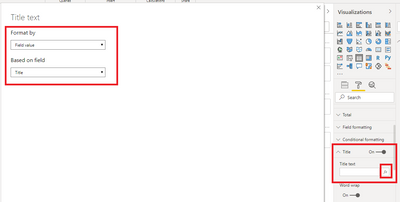
If you want to show the title dynamically in other visuals(for example table visual), enable the title in the visual and apply conditional format for it:
Attached a sample file in the below, hopes to help you.
Best Regards,
Community Support Team _ Yingjie Li
If this post helps, then please consider Accept it as the solution to help the other members find it more quickly.
Hi @julrua ,
If you only want to show the title in the card visual, you can create a measure like this:
Title =
IF (
NOT ( ISFILTERED ( 'Table'[definition] ) ),
BLANK (),
SELECTEDVALUE ( 'Table'[description] )
)
If you want to show the title dynamically in other visuals(for example table visual), enable the title in the visual and apply conditional format for it:
Attached a sample file in the below, hopes to help you.
Best Regards,
Community Support Team _ Yingjie Li
If this post helps, then please consider Accept it as the solution to help the other members find it more quickly.
You should be able to just put a measure in a card with this expression.
Description = SELECTEDVALUE(Table[Description Column])
If you want to concatenate it with text you can too.
Description = "The description for this project is: " & SELECTEDVALUE(Table[Description Column])
Regards,
Pat
To learn more about Power BI, follow me on Twitter or subscribe on YouTube.
Check out the November 2025 Power BI update to learn about new features.
Advance your Data & AI career with 50 days of live learning, contests, hands-on challenges, study groups & certifications and more!