Join us at FabCon Atlanta from March 16 - 20, 2026, for the ultimate Fabric, Power BI, AI and SQL community-led event. Save $200 with code FABCOMM.
Register now!The Power BI Data Visualization World Championships is back! Get ahead of the game and start preparing now! Learn more
Hey Friends,
I've got request from a user that I can't seem to fulfill correctly:
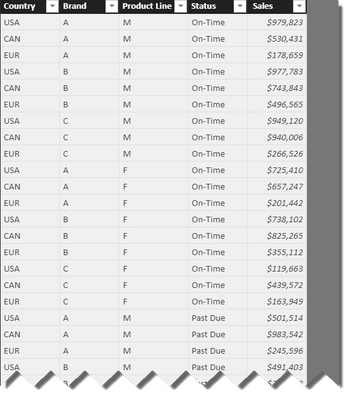
I've got a data set that looks like:
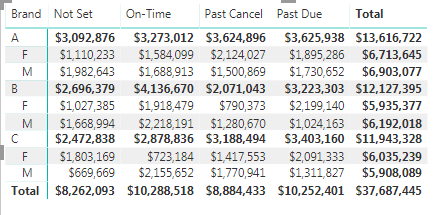
They've asked for some "Matrix" to add to the visuals. The first is a dynamic matrix that includes sales. The Matrix works great for this. I created a hierarch with "Brand" (A,B,C) and beneath it is the Product Line (F or M).
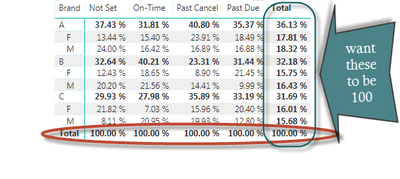
The Problem is that they have now asked to have all the values replaced with a percent of total. I wrote the following DAX measure:
% of Total =
DIVIDE (
SUM ( Data[ Sales ] ),
CALCULATE (
SUM ( Data[ Sales ] ),
ALL ( Data[Brand],Data[Product Line] )
),
0
)
When I use this measure, it totals the columns to 100, but I need the rows to add up to 100.
I think it's because it's Friday afternoon, but I can't for the life of me get this to work....
Solved! Go to Solution.
Hi @Teige,
Based on my test, here we just need to update your formula as below, then we can get the result as we excepted.
% of Total1 = DIVIDE ( SUM ( Data[Sales] ), CALCULATE ( SUM ( Data[Sales] ), ALLEXCEPT(Data,Data[Brand]) ))
For more details, please check the pbix as attached.
https://www.dropbox.com/s/cf2ri8l4e7rlt9x/Dynamic%20Percent%20of%20Total%20in%20a%20Matrix.pbix?dl=0
Regards,
Frank
Hi @Teige,
Based on my test, here we just need to update your formula as below, then we can get the result as we excepted.
% of Total1 = DIVIDE ( SUM ( Data[Sales] ), CALCULATE ( SUM ( Data[Sales] ), ALLEXCEPT(Data,Data[Brand]) ))
For more details, please check the pbix as attached.
https://www.dropbox.com/s/cf2ri8l4e7rlt9x/Dynamic%20Percent%20of%20Total%20in%20a%20Matrix.pbix?dl=0
Regards,
Frank
Thanks! Yes! Allexcept!
Thanks so much!
The Power BI Data Visualization World Championships is back! Get ahead of the game and start preparing now!
| User | Count |
|---|---|
| 161 | |
| 132 | |
| 117 | |
| 79 | |
| 54 |