cancel
Showing results for 
Search instead for 
Did you mean: 

Vote for your favorite vizzies from the Power BI Dataviz World Championship submissions. Vote now!

Reply
Maria_Ga
Regular Visitor

Dynamic KPI Targets

Hello, I've been searching for a solution and i can't seem to find it. I've been working with power pivot for the last three months.

My metric named A% is the result of the following calculated field = CALCUALTE(Divide([Reduction in margin], [total Net revenues])).

I have quarterly targets for A% - absolute number for the last 5 years. This is Q1 FY15 5%, Q2 FY15 6%, so on..

How can i create the KPI that is linked to my table with the quarterly targets? Hope anyone can help! Cheers

3 REPLIES 3
v-yulgu-msft
Microsoft Employee
Microsoft Employee

Hi @Maria_Ga,


Do you mean you are trying to create a KPI visual with dynamic targets in PowerBI desktop? What is dynamic KPI targets in your scenario?


If you mean the KPI target should be dynamically changed based on selection (Q1 FY15 , Q2 Fy15, etc), please refer to this article: Compare KPI to a Custom Defined Baseline in Power BI


If I misunderstood your requirement, please share some sample data and screenshots to describe how you create your report and what is your expect output.


Thanks,
Yuliana Gu

Community Support Team _ Yuliana Gu
If this post helps, then please consider Accept it as the solution to help the other members find it more quickly.

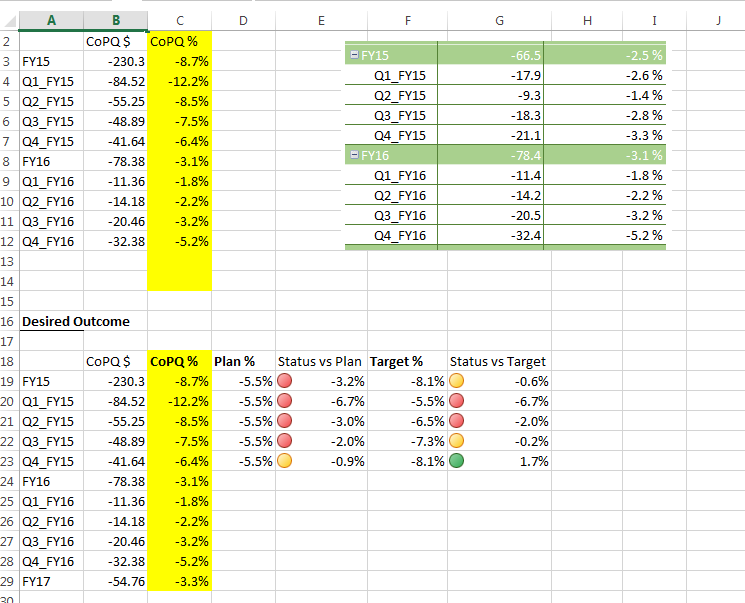
Hello Yuliana, Thanks for contacting. In the attachment you will find what i am envisioning.


You will see my power pivot table transformed to values and a screenshot of how actually looks. I have slicers that filter these results by Geo, by dollar amount and others.


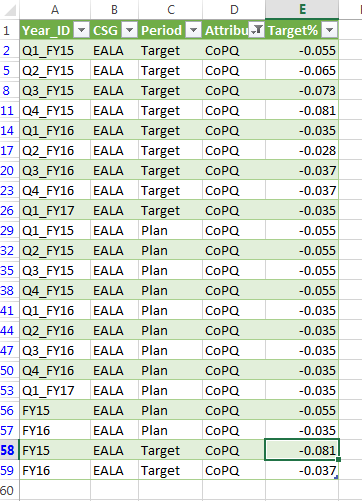
So i have my CoPQ% metric (actual results) which needs to be compared against two targets: one called "Plan" and another called "Target". These two are set every quarter by Geo and by Fiscal Year.


In the second table below I'm showing what I'm after. i would like to set two KPIs (one for Plan and another one for the Target) against the measure CoPQ% and have the status displayed with coloured icons.


On table three you'll find the targets (Plan & Target) for only one Geo. But in reality i have more than 15 geos for more than 5 fiscal years.


Hope this helps,

Kind Regards


image.pngimage2.png


Helpful resources

Announcements
Power BI DataViz World Championships

Power BI Dataviz World Championships

Vote for your favorite vizzies from the Power BI World Championship submissions!

Sticker Challenge 2026 Carousel

Join our Community Sticker Challenge 2026

If you love stickers, then you will definitely want to check out our Community Sticker Challenge!

January Power BI Update Carousel

Power BI Monthly Update - January 2026

Check out the January 2026 Power BI update to learn about new features.

FabCon Atlanta 2026 carousel

FabCon Atlanta 2026

Join us at FabCon Atlanta, March 16-20, for the ultimate Fabric, Power BI, AI and SQL community-led event. Save $200 with code FABCOMM.