cancel
Showing results for 
Search instead for 
Did you mean: 

The Power BI Data Visualization World Championships is back! Get ahead of the game and start preparing now! Learn more

Reply
Anonymous
Not applicable

Dynamic Graphs Titles

Hello,

could you please answer the below: 

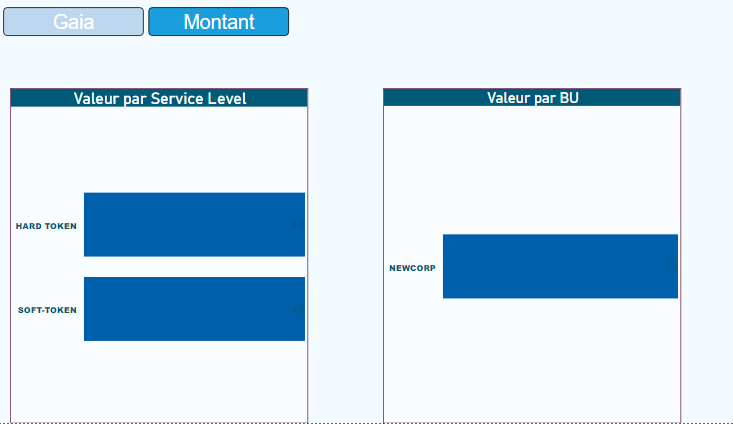
is it possible to have a dynamic graph title? in other words, when i choose Gaia, the graphs titles will be Gaia by Service Level and Gaia by BU?


Thank you in advance,


dynamic title..PNG


1 ACCEPTED SOLUTION
JirkaZ
Solution Specialist
Solution Specialist

@Anonymous 

Step 1: Create a measure which would result in the title text (probably using the slicer selection etc.)

Step 2: In the visual formatting properties go to the Title section, next to the Title text click on the three dots and select Conditional Formatting
Step 3: In the formatting dialog choose the measure from step one


DONE

View solution in original post

1 REPLY 1
JirkaZ
Solution Specialist
Solution Specialist

@Anonymous 

Step 1: Create a measure which would result in the title text (probably using the slicer selection etc.)

Step 2: In the visual formatting properties go to the Title section, next to the Title text click on the three dots and select Conditional Formatting
Step 3: In the formatting dialog choose the measure from step one


DONE

Helpful resources

Announcements
Power BI DataViz World Championships

Power BI Dataviz World Championships

The Power BI Data Visualization World Championships is back! Get ahead of the game and start preparing now!

November Power BI Update Carousel

Power BI Monthly Update - November 2025

Check out the November 2025 Power BI update to learn about new features.

FabCon Atlanta 2026 carousel

FabCon Atlanta 2026

Join us at FabCon Atlanta, March 16-20, for the ultimate Fabric, Power BI, AI and SQL community-led event. Save $200 with code FABCOMM.