Join us at FabCon Atlanta from March 16 - 20, 2026, for the ultimate Fabric, Power BI, AI and SQL community-led event. Save $200 with code FABCOMM.
Register now!The Power BI Data Visualization World Championships is back! It's time to submit your entry. Live now!
Hello,
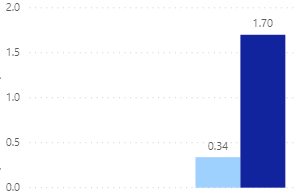
I have a question. I am using a KPI card to display some information. I have a "Actual Sales" which is my indicator, the trend axis is "State" and "Target Sales" is my target goal. (I also have it built as a ratio)
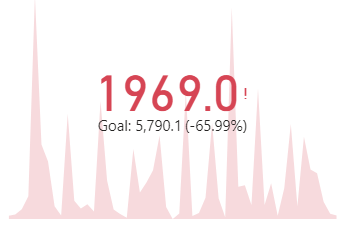
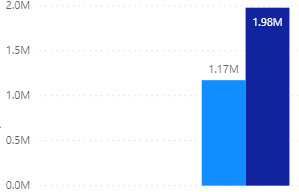
At the aggregate level my data looks wrong. It is summary sales, so I do not have date as a dimension. This is what I expected to see.
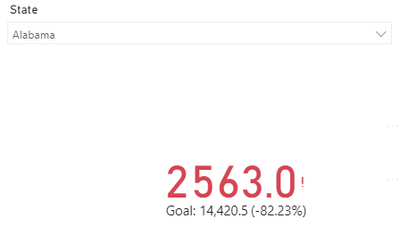
My expectation is to see the total, but I have no idea where the KPI numbers are coming from. Once I use a splicer to drill down to the state, the KPI functions properly.
I should be getting 1.17M and 0.34 but the KPI is giving me 1969 and 0.15. Where are these numbers coming from.
My goal should be 1.98M but the KPI is giving me 5790.
Is there someway to fix this or switch out a card? My though was to show the chart with the page is unfiltered by state. and when a state is selected, switch it to the KPI card. So it would look like this.
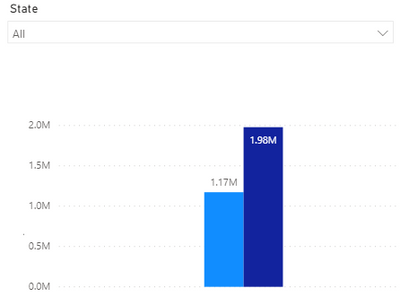
Is there a way to show or hide cards based on a condition, parameter or function?
Is it possible?
What would that look like and how can it be accomplished?
Or is there a way to fix the KPI configuration so that it shows indicators of 1.19M and 0.34 with targets of 1.98M and 1.7?
I know it has something to do with the State measure but can't figure it out? Can you add an "All" to the state dimension?
Solved! Go to Solution.
Hi @Anonymous ,
The KPI chart shows the number of the last axis value.
For example, your axis(state) have too many values, AXXX, BXXX,..... ZXXX.
Then when you put it to the KPI axis, the KPI value will show the sum of sales which state = ZXXX.
Hope I have clarified it.
I think you can try to use a custom visual for your request, or you can use two Cards to show actually and target(normally I will use this method).
Please try.
Aiolos Zhao
Hi @Anonymous ,
According to my understanding, your question is similar to this post.
You can refer to the explanation here: Re: KPI card visual. if you are not very clear about @Anonymous 's explanation.
Best Regards,
Icey
If this post helps, then please consider Accept it as the solution to help the other members find it more quickly.
Hi @Anonymous ,
The KPI chart shows the number of the last axis value.
For example, your axis(state) have too many values, AXXX, BXXX,..... ZXXX.
Then when you put it to the KPI axis, the KPI value will show the sum of sales which state = ZXXX.
Hope I have clarified it.
I think you can try to use a custom visual for your request, or you can use two Cards to show actually and target(normally I will use this method).
Please try.
Aiolos Zhao
The Power BI Data Visualization World Championships is back! It's time to submit your entry.
Check out the January 2026 Power BI update to learn about new features.
| User | Count |
|---|---|
| 66 | |
| 44 | |
| 34 | |
| 26 | |
| 23 |
| User | Count |
|---|---|
| 137 | |
| 118 | |
| 58 | |
| 40 | |
| 35 |