Hi All,
I am trying to build a dynamic (able to filter by other data in the sheet) burndown chart with a "Plan" line and an "Actual" line. Here is a sample of my data:
| Systemization - Subsystem ID | Tableau Planned Date | Submitted Date | test |
| U-UST001-213-01 | 12/1/2020 | 1/8/2021 | 1 |
| U-UST002-206-01 | 9/1/2021 | 1/8/2021 | 1 |
| U-UST003-826-01 | 11/1/2020 | 1/7/2021 | 1 |
| U-UAR201-781-01 | 12/1/2020 | | 0 |
| U-UAU002-781-01 | 12/1/2020 | | 0 |
Here is my measure for the "Plan" line - which seems to work just fine.
Baseline Profile =
CALCULATE (
    COUNT ( 'Tableau MC Skyline'[Systemization - Subsystem ID] ),
    FILTER (
        ALLSELECTED ('MC Skyline'),
        'GCGV Tableau MC Skyline'[Tableau Planned Date] >= MAX ( 'Tableau MC Skyline'[Tableau Planned Date] )
    )
)
As you can see, the baseline starts properly, but my actual line does not start from the same point, because i am using my test values. Below is a sample of my current chart as well as my DAX for the actual line. How do i get the actual to start at the top near baseline and have the delta at the bottom? Also, is there a way to make the actual line visually stop at today's date?
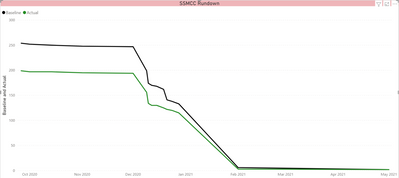
Actual =
CALCULATE(
    SUM('Tableau MC Skyline'[test]),
    FILTER(
        ALLSELECTED('Tableau MC Skyline'),
        'Tableau MC Skyline'[Tableau Planned Date] >= MAX ('Tableau MC Skyline'[Tableau Planned Date])
    )
Any help is appreciated.


