cancel
Showing results for 
Search instead for 
Did you mean: 

The Power BI Data Visualization World Championships is back! Get ahead of the game and start preparing now! Learn more

Reply
Anonymous
Not applicable

Dwell time analysis of network

Hi, I have data by transport transactions. A parcel can travel mutiple legs before it reach the end location. I want to make a dwell time analysis of the nodes in the network the parcels passes. For each location (A, B, C, etc) how long time are the parcel staying there in average?


Article  Leg start location Start time Leg End location Arrival time
1 A2020-01-01 B2020-01-03
 B2020-01-05 C2020-01-06
2 A2020-01-01 B2020-01-03
2 B2020-01-04 C2020-01-05
3 A2020-01-01 B2020-01-03
3 B2020-01-04 D2020-01-04
3 D2020-01-05 C2020-01-06


Any good idea?

1 ACCEPTED SOLUTION
V-lianl-msft
Community Support
Community Support

Hi @Anonymous ,


First, I added index columns to the query editor to get the last arrival time.

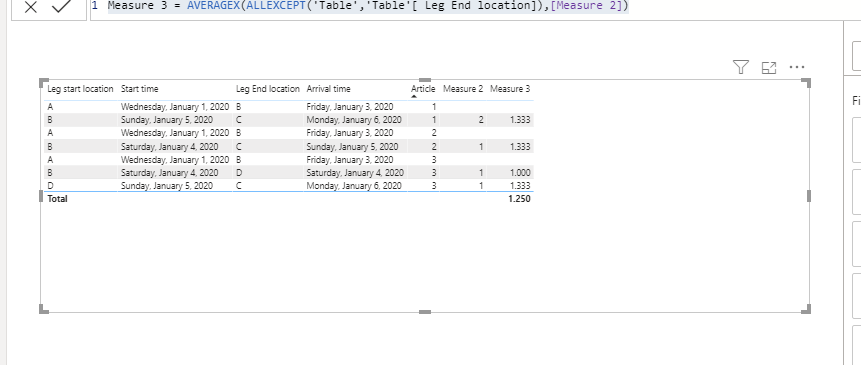
Create measure to get the last arrival time and calculate the time difference.

Measure 2 =
VAR current_index =
    SELECTEDVALUE ( 'Table'[Index] )
VAR last_a_date =
    CALCULATE (
        FIRSTNONBLANK ( 'Table'[ Arrival time], 1 ),
        FILTER (
            ALLEXCEPT ( 'Table', 'Table'[Article] ),
            'Table'[Index] = current_index - 1
        )
    )
RETURN
    DATEDIFF ( last_a_date, MAX ( 'Table'[ Start time] ), DAY )

Calculate the average time of each location.

Measure 3 = AVERAGEX(ALLEXCEPT('Table','Table'[ Leg End location]),[Measure 2])

test_Dwell time analysis of network.PNG

Sample .pbix


Best Regards,
Liang
If this post helps, then please consider Accept it as the solution to help the other members find it more quickly.

View solution in original post

1 REPLY 1
V-lianl-msft
Community Support
Community Support

Hi @Anonymous ,


First, I added index columns to the query editor to get the last arrival time.

Create measure to get the last arrival time and calculate the time difference.

Measure 2 =
VAR current_index =
    SELECTEDVALUE ( 'Table'[Index] )
VAR last_a_date =
    CALCULATE (
        FIRSTNONBLANK ( 'Table'[ Arrival time], 1 ),
        FILTER (
            ALLEXCEPT ( 'Table', 'Table'[Article] ),
            'Table'[Index] = current_index - 1
        )
    )
RETURN
    DATEDIFF ( last_a_date, MAX ( 'Table'[ Start time] ), DAY )

Calculate the average time of each location.

Measure 3 = AVERAGEX(ALLEXCEPT('Table','Table'[ Leg End location]),[Measure 2])

test_Dwell time analysis of network.PNG

Sample .pbix


Best Regards,
Liang
If this post helps, then please consider Accept it as the solution to help the other members find it more quickly.

Helpful resources

Announcements
Power BI DataViz World Championships

Power BI Dataviz World Championships

The Power BI Data Visualization World Championships is back! Get ahead of the game and start preparing now!

December 2025 Power BI Update Carousel

Power BI Monthly Update - December 2025

Check out the December 2025 Power BI Holiday Recap!

FabCon Atlanta 2026 carousel

FabCon Atlanta 2026

Join us at FabCon Atlanta, March 16-20, for the ultimate Fabric, Power BI, AI and SQL community-led event. Save $200 with code FABCOMM.