I am struggling with multiple dates in my fact table. Originally I had duplicated date tables for each date in the fact table so I had an active relationship for each date. However, I got stuck with certain formula calculations where I needed to put dates next to eachother, so i remodelled my data to have one date table with multiple inactive relationships.
An issue I have now is that I have a barchart with sales per month, and I want to be able to drillthrough into each month to see the deals where the sales date was that month. But because I do not have an active relationship between the date table (that i use for the axis in the barchart) and each deal, I will see all deals unrelated to their sales date in the drillthrough table.
How do I somehow make sure the drillthrough table ONLY shows the months that I drillhthrough in from the barchart?
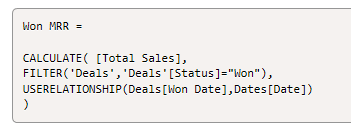
The total sales number in the bar chart is calculated as follows. I added sample data in the bottom.
Won MRR =

CALCULATE( [Total Sales],
FILTER('Deals','Deals'[Status]="Won"),
USERELATIONSHIP(Deals[Won Date],Dates[Date])
)
Example of output I want when drilling through on the month march in my bar chart (left) and what I am currently seeing (right): 

Date,ID,Value
2020-01-02 00:00:00,17103,$899.00
2020-01-02 00:00:00,17220,$899.00
2020-01-08 00:00:00,17216,$75.00
2020-01-08 00:00:00,17257,$395.00
2020-01-08 00:00:00,17258,$295.00
2020-01-08 00:00:00,17339,$995.00
2020-01-09 00:00:00,17263,$695.00
2020-01-09 00:00:00,17268,$995.00
2020-01-09 00:00:00,17269,$100.00
2020-01-10 00:00:00,6852,$799.00
2020-01-13 00:00:00,12677,$1799.00
2020-01-13 00:00:00,17291,$0.00
2020-01-13 00:00:00,17502,$0.00
2020-01-14 00:00:00,13986,$699.00
2020-01-15 00:00:00,17218,$900.00
2020-01-15 00:00:00,17320,$1700.00
2020-01-17 00:00:00,17366,$0.00
2020-01-17 00:00:00,17367,$0.00
2020-01-17 00:00:00,17368,$0.00
2020-01-17 00:00:00,17369,$0.00
2020-01-18 00:00:00,17330,$0.00
2020-02-24 00:00:00,17732,$700.00
2020-02-27 00:00:00,17762,$2750.00
2020-02-27 00:00:00,17763,$0.00
2020-02-27 00:00:00,17764,$0.00
2020-02-27 00:00:00,17765,($100.00)
2020-02-27 00:00:00,17766,($850.00)
2020-02-27 00:00:00,17767,($1700.00)
2020-02-28 00:00:00,13831,$2450.00
2020-02-28 00:00:00,14323,$599.00
2020-02-28 00:00:00,17768,$375.00
2020-02-28 00:00:00,17772,$0.00
2020-02-28 00:00:00,17773,$0.00
2020-02-28 00:00:00,17774,$0.00
2020-02-28 00:00:00,17775,$0.00
2020-02-28 00:00:00,17776,$0.00
2020-02-28 00:00:00,17777,$0.00
2020-02-29 00:00:00,17769,$375.00
2020-02-29 00:00:00,17770,$375.00
2020-02-29 00:00:00,17806,$0.00
2020-02-29 00:00:00,17807,$0.00
2020-02-29 00:00:00,17808,$0.00
2020-03-02 00:00:00,16237,$500.00
2020-03-02 00:00:00,17771,$599.00
2020-03-02 00:00:00,17794,$0.00
2020-03-02 00:00:00,17795,$0.00
2020-03-02 00:00:00,17796,$0.00
2020-03-02 00:00:00,17797,$0.00
2020-03-02 00:00:00,17798,$0.00
2020-03-02 00:00:00,3852,$1800.00
2020-03-04 00:00:00,16110,$500.00
2020-03-04 00:00:00,3233,$899.00
2020-03-05 00:00:00,17761,$599.00
2020-03-05 00:00:00,17814,$0.00
2020-03-06 00:00:00,17459,$0.00