cancel
Showing results for 
Search instead for 
Did you mean: 

The Power BI Data Visualization World Championships is back! Get ahead of the game and start preparing now! Learn more

Reply
Anonymous
Not applicable

Drilling filters other visuals bug

Hello, 


I have a bar chart with 2 levels of drill-down. I have ticked the checkbox labelled "Drilling filters other visuals". When I click on the top level items in the bar chart, they get drilled down to the 2nd level and all visuals/kpi's get filtered as expected. 


However, when I click on any item in the 2nd level now, nothing happens to the visuals & kpi's. It's as if they have been "stucked" on the 1st level item clicked.


Shouldn't the 2nd level items also filter the visuals & kpi's as well?


Thanks in advance for your assistance!


Kind regards, 

Yogesh

6 REPLIES 6
adamlagerstrom
Regular Visitor

Hi,


Has there been any progress here?

I am facing the same issue, but with different visualisations instead. E.g., drilling down in one visuals "drills" the other visuals to the first level of the hiearchy (in my case Quarters/Months/Days). Thereafter, it only filters as I drill down further in the first visual, displaying only Quarters in the visualisation, but shows the correct value. So apparently, it filters correctly, but does not "drill down" visualize wise.


Best


v-xjiin-msft
Solution Sage
Solution Sage

Hi @Anonymous,


Per my understanding about your description, you have created a hierarchy which is containging a Parent (Top) level -> First down level -> Second down level. Right?


So when you click on the Top level, it will drill down to the First down level successfully. However when you click on the First down level, it will not drill down to the Second down level. Right?


And generally, it should also filter the visual as well. So please verify that if there exists value in the Second down level.


By the way, if you can share us some screenshots about how you define the hierarchy column or your visual. It will help us more to troubleshoot your issue.


Thanks,
Xi Jin.

Anonymous
Not applicable

Hello Xi Jin, 


Thanks for your reply.


Indeed, first level drills down and filters all other visuals & figures successfully.


The data comes from the FACT table which is at the most granular level (e.g. date), so yes, there exists data in the next levels of date hierarchy (Quarter, Month, Week & Date).


It's only at the last level of drilling that the other visuals & KPI's do not get filtered when I click on any "last-level item" in my bar chart.


Kind regards, 

Yogesh

Anonymous
Not applicable

Hello Xi Jin, 


Please find the screenshots attached.


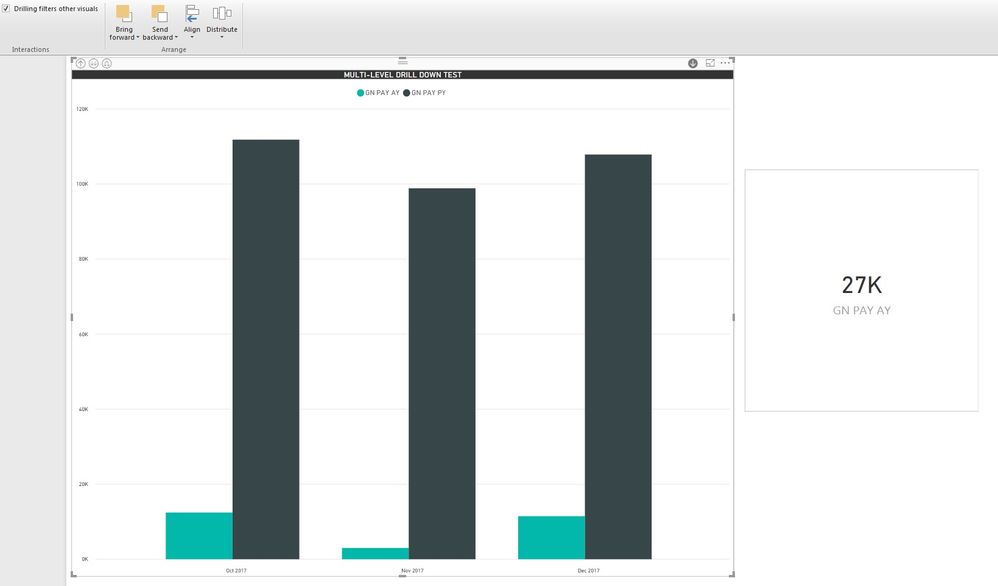
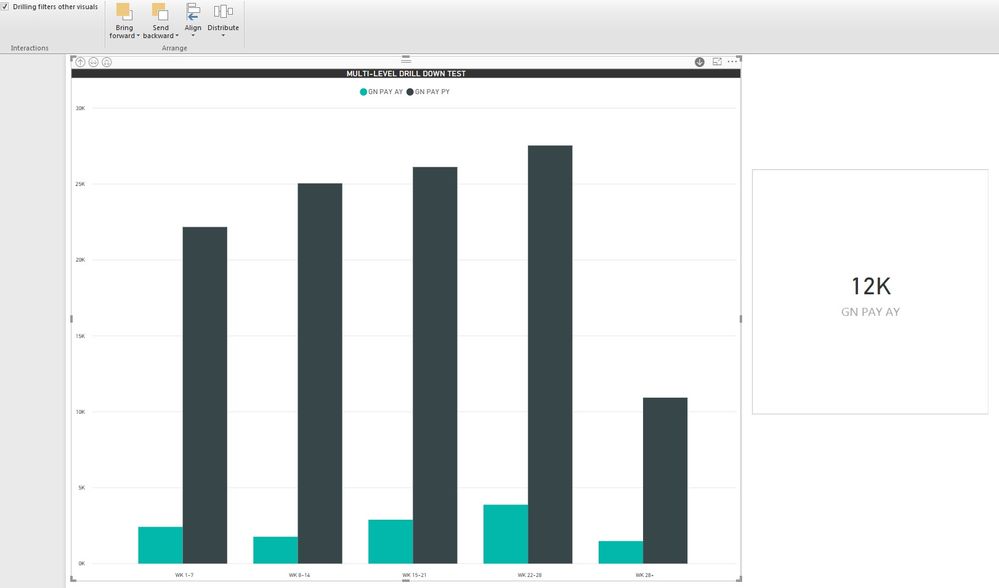
The KPI gets updated for all top levels (Quarter, Month and Week) but when I click on any DATE in the last level, the KPI does not change accordingly; it remains fixed for the total of the Week selected.

Top Level: KPI applies to the total of all QuartersTop Level: KPI applies to the total of all QuartersLevel 2: KPI gets updated for the selected QuarterLevel 2: KPI gets updated for the selected QuarterLevel 3: KPI gets updated for the selected MonthLevel 3: KPI gets updated for the selected MonthLevel 4: Clicking on any Date in the bar has no effect on the KPILevel 4: Clicking on any Date in the bar has no effect on the KPI

Kind regards,

Yogesh

Anonymous
Not applicable

Hello Xi Jin, 


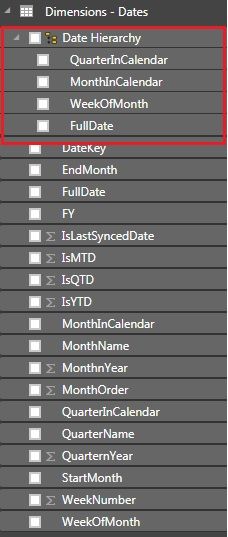
Unfortunately it is not possible for me to share the PBIX file, however, I have attached a screenshot of the date hierarchy below.


Date HierarchyDate Hierarchy

The date relationship with my FACT table is the DateKey field of this Date Dimension, so, yes, there should be data at the most granular level.


Kind regards, 

Yogesh

Anonymous
Not applicable

As far as I can see, every time the top level is drilled down, the KPI's get updated for the whole group (my previous screenshots refer)


For example, Bar Chart with Quarter -> Month -> Week -> Days


When nothing is drilled, the KPI shows the total value of all the Quarters => OK


When a particular Quarter is drilled down to the different Months, the KPI shows the total of all the months in the selected Quarter => OK


When a particular Month is drilled down to the different Weeks, the KPI shows the total of all the weeks in the selected Month => OK


When a particular Week is drilled down to the different Days, the KPI shows the total of all the days in the selected Week => OK


This is good so far.


However, when you click on any of the Days in the bar chart now, the KPI remains unchanged, i.e. it still refers to the total of all the days in the selected Week which has been drilled down.


Kind regards,

Yogesh

Helpful resources

Announcements
Power BI DataViz World Championships

Power BI Dataviz World Championships

The Power BI Data Visualization World Championships is back! Get ahead of the game and start preparing now!

December 2025 Power BI Update Carousel

Power BI Monthly Update - December 2025

Check out the December 2025 Power BI Holiday Recap!

FabCon Atlanta 2026 carousel

FabCon Atlanta 2026

Join us at FabCon Atlanta, March 16-20, for the ultimate Fabric, Power BI, AI and SQL community-led event. Save $200 with code FABCOMM.