Don't miss your chance to take exam DP-600 or DP-700 on us!
Request nowLearn from the best! Meet the four finalists headed to the FINALS of the Power BI Dataviz World Championships! Register now
Hi all,
I want to downsample my data from every second to every minute/hour. I have splitted the Date and Time from DateTime and tried grouping it by per min/hour but I cannot figure out how to select, say 12:00:00am data in the 12:00:00pm - 12:00:59pm, and every minute data after. I just want to take out a data at a fixed interval without the need to sum, average or do any other operations to be shown in the visual.
| DateTime | Date | Time | min | hour | Sensor | Value |
| 1/8/2021 12:00:00 pm | 1/8/2021 | 12:00:00 pm | 0 | 12 | A | 843 |
| 1/8/2021 12:00:01 pm | 1/8/2021 | 12:00:01 pm | 0 | 12 | A | 994 |
| 1/8/2021 12:00:02 pm | 1/8/2021 | 12:00:02 pm | 0 | 12 | A | 994 |
| ... | ... | ... | ... | ... | ... | ... |
| 1/8/2021 12:00:03 pm | 1/8/2021 | 12:00:59 pm | 0 | 12 | A | 873 |
| 1/8/2021 12:01:00 pm | 1/8/2021 | 12:01:00 pm | 1 | 12 | A | 692 |
| ... | ... | ... | ... | ... | ||
| 1/8/2021 01:00:00 pm | 1/8/2021 | 01:00:00 pm | 0 | 13 | A | 899 |
Any help or advice will be appreciated, thank you
Solved! Go to Solution.
Hi @JrKoh ,
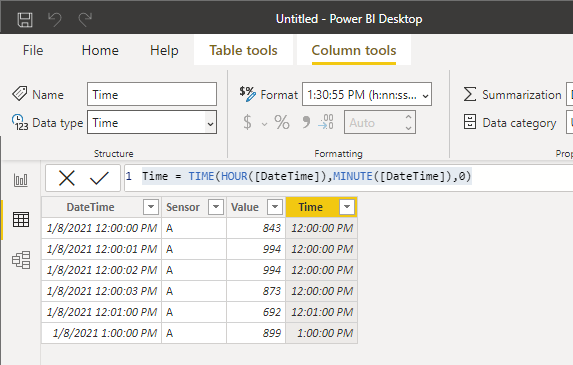
You can create a calculated column like
Time = TIME(HOUR([DateTime]),MINUTE([DateTime]),0)
Best Regards,
Stephen Tao
If this post helps, then please consider Accept it as the solution to help the other members find it more quickly.
Hi Stephen,
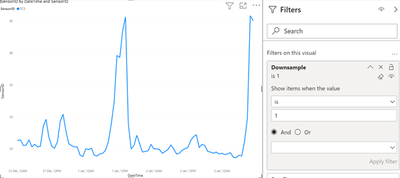
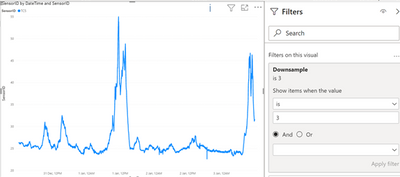
With your solution in mind, I found a way to downsample the data. I created 2 calculated column, Time_1min and Time_H and wrote another DAX measure and put it into the chart filter. I then key in the number into the filter to determine which sampling:
Downsample = SWITCH( TRUE(), SUM(Sensor[Time]) == SUM(Sensor[Time_H]),1, SUM(Sensor[Time]) == SUM(Sensor[Time_1min]),3 ) |
per min
Hi @JrKoh ,
You can create a calculated column like
Time = TIME(HOUR([DateTime]),MINUTE([DateTime]),0)
Best Regards,
Stephen Tao
If this post helps, then please consider Accept it as the solution to help the other members find it more quickly.
Hi Stephen,
With your solution in mind, I found a way to downsample the data. I created 2 calculated column, Time_1min and Time_H and wrote another DAX measure and put it into the chart filter. I then key in the number into the filter to determine which sampling:
Downsample = SWITCH( TRUE(), SUM(Sensor[Time]) == SUM(Sensor[Time_H]),1, SUM(Sensor[Time]) == SUM(Sensor[Time_1min]),3 ) |
per min
Share feedback directly with Fabric product managers, participate in targeted research studies and influence the Fabric roadmap.
Check out the February 2026 Power BI update to learn about new features.
| User | Count |
|---|---|
| 49 | |
| 40 | |
| 37 | |
| 14 | |
| 13 |
| User | Count |
|---|---|
| 85 | |
| 70 | |
| 37 | |
| 28 | |
| 27 |