
Join us at FabCon Atlanta from March 16 - 20, 2026, for the ultimate Fabric, Power BI, AI and SQL community-led event. Save $200 with code FABCOMM.
Register now!The Power BI Data Visualization World Championships is back! Get ahead of the game and start preparing now! Learn more
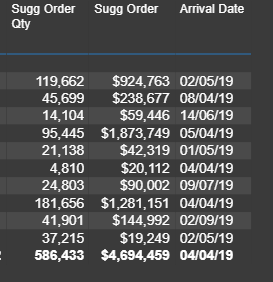
I have a column called ETA Date, where its not populated for all records.
First I would like not like to display the summary value at bottom. I have set it as DO NOT SUMMARIZE, yet it still does.
View
Settings
Second, I won't want to display the date when group is collapsed. Rather have it only display when its expanded.
Solved! Go to Solution.
@V-lianl-msft , ISINSCOPE function works great.
I can't opt to disable to Row Subtotal, since it will disable total for all columns. I'm just looking for Date columns here.
Anyway, the ISINSCOPE does the trick in this case.
Hi @randeep ,
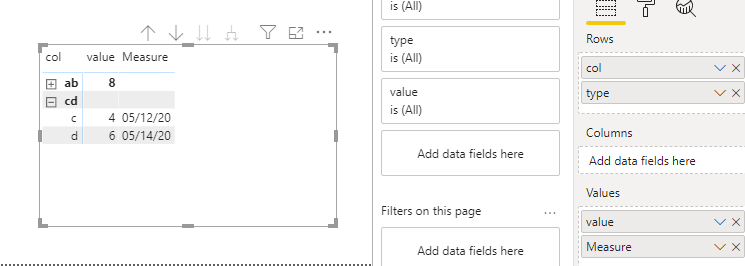
1. You can turn off the row subtotal in the matrix.
2. Using the isinscope function to determine if it is in the hierarchy
Measure = IF(ISINSCOPE('Table (2)'[type]),MAX('Table (2)'[date]))
Best Regards,
Liang
If this post helps, then please consider Accept it as the solution to help the other members find it more quickly.
@V-lianl-msft , ISINSCOPE function works great.
I can't opt to disable to Row Subtotal, since it will disable total for all columns. I'm just looking for Date columns here.
Anyway, the ISINSCOPE does the trick in this case.
@randeep , if you use them in values you can not use don't summarize.
Use a table or refer the different ways you can display matrix
ps://www.burningsuit.co.uk/blog/2019/04/7-secrets-of-the-matrix-visual/
https://docs.microsoft.com/en-us/power-bi/visuals/desktop-matrix-visual
Check out the November 2025 Power BI update to learn about new features.
Advance your Data & AI career with 50 days of live learning, contests, hands-on challenges, study groups & certifications and more!