cancel
Showing results for 
Search instead for 
Did you mean: 

The Power BI Data Visualization World Championships is back! Get ahead of the game and start preparing now! Learn more

Reply
adriansuteu
Advocate I
Advocate I

Does a desktop report connected to a Dynamics CRM database auto-refresh?

I have created a Desktop report in Power BI Free. I have published it as a Dashboard on the internet. This report contains data from our Microsoft Dynamics CRM System.


Does this report/and it's dashboard ever Refresh automatically? Consider that data is modified/added in CRM very often.


1 ACCEPTED SOLUTION

No. It is Microsoft Dynamics online, hosted by Microsoft.


I had issues with my other table (local file), the Calendar.

That is why I had to use the PBI Gateway.


Thank you.

View solution in original post

5 REPLIES 5
Greg_Deckler
Community Champion
Community Champion

Yes, you can configure automatic refresh on this and it will be free. With the new licensing I believe you can do refreshes up to 8 times a day.


Wait, assuming that you are using Microsoft Dynamics CRM Online and not on-premises. If on-premises you will need a gateway and Pro license to refresh.


Follow on LinkedIn
@ me in replies or I'll lose your thread!!!
Instead of a Kudo, please vote for this idea
Become an expert!: Enterprise DNA
External Tools: MSHGQM
YouTube Channel!: Microsoft Hates Greg
Latest book!:
DAX For Humans

DAX is easy, CALCULATE makes DAX hard...

@Greg_Decklerlooks like what I was in need of for my local file was a Personal Gateway.


I have insalled it and now it works.


Thanks for the support!

Awesome, glad you got it working, is your Dynamics CRM instance on prem? 


Follow on LinkedIn
@ me in replies or I'll lose your thread!!!
Instead of a Kudo, please vote for this idea
Become an expert!: Enterprise DNA
External Tools: MSHGQM
YouTube Channel!: Microsoft Hates Greg
Latest book!:
DAX For Humans

DAX is easy, CALCULATE makes DAX hard...

No. It is Microsoft Dynamics online, hosted by Microsoft.


I had issues with my other table (local file), the Calendar.

That is why I had to use the PBI Gateway.


Thank you.

@Greg_DecklerI have managed to link the report to my CRM database, by using as data source Dynamics 365 Online.

But in order to analyze it I had to add a data calendar. I downloaded and used this one: DateStream.


Then I published the report.

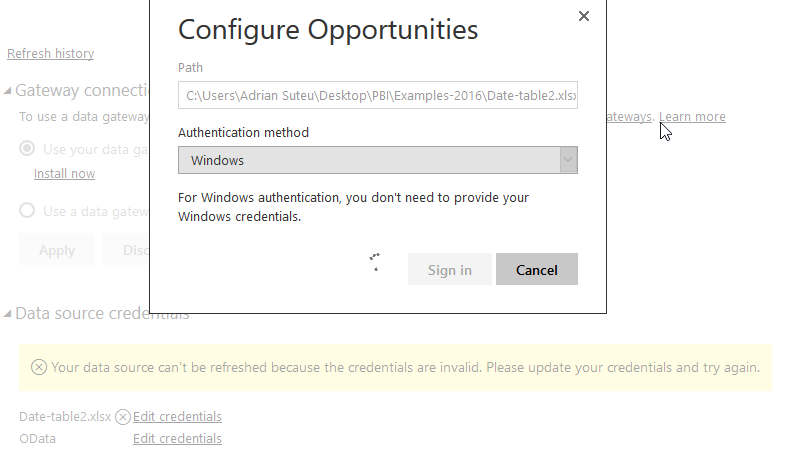
But when I click on the datasource (in PBI Service and click on Schedule Refresh I get an error): "Your data source can't be refreshed because the credentials are invalid. Please update your credentials and try again."


I have managed to update the credentials for the connection to CRM, but the one to my local file is not working. I get to the following screen, I click on Sing In and nothing happens, it just gets stuck here:


error-Edit credentials for data source - service.png

Helpful resources

Announcements
Power BI DataViz World Championships

Power BI Dataviz World Championships

The Power BI Data Visualization World Championships is back! Get ahead of the game and start preparing now!

November Power BI Update Carousel

Power BI Monthly Update - November 2025

Check out the November 2025 Power BI update to learn about new features.

FabCon Atlanta 2026 carousel

FabCon Atlanta 2026

Join us at FabCon Atlanta, March 16-20, for the ultimate Fabric, Power BI, AI and SQL community-led event. Save $200 with code FABCOMM.