Forum Discussion

 Helper I
Does Power BI support sorting established in a data model?
- 11 years ago
Ok - after reviewing the tabular model, the sort is set correctly (and I am exploring the model in Desktop)
BUT -
Power BI doesn't seem to recognize hierarchies established in a tabular model. The sort order was set to support the hierarchy, not the attribute on its own, so we have to change the sort key.
Closing this topic.

 Memorable Member
AlexDantin if you are connecting to the tabular instance, then whoever built that instance for you can add that sort by logic to the date dimension in Visual Studio. He/She will need to click on the column and then pick Sort By Column in Properties window on the right
 Helper I
We've done that and Power BI is ignoring it - that's why my question was phrased as "established in a data model"
- andre11 years ago
sorry, I misunderstood your question. The Sort By columns seem to work fine for me in Desktop (I just tried itagain just to make sure against an AS model in explore mode). Are you saying that when you connect to your tabular model using Excel, sorting works, but when you are connecting to it using Desktop, sorting does not work?
- AlexDantin11 years agoCorrect. When I connect to the model in Excel, the date attribute is sorted per how it is designed in the model (in this case, Q# YYYY). In desktop Power BI, while I can "sort by" other dimensions selected for a particular visualization (like "Net Amt" or "# of whatever") it does not list the members in the same order (it just alpha sorts so all the Q1s across multiple years come first, then the Q2s, etc)
- Greg_Deckler11 years ago
Community Champion
Are you certain that you are using Desktop and not Designer? I am using Desktop and went through the following excercise:
Imported the following data:
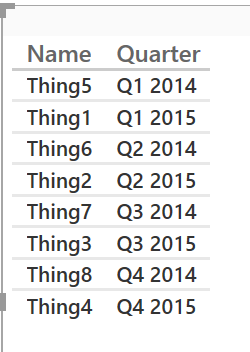
Name,Quarter,QuarterSort
Thing1,Q1 2015,2015Q1
Thing2,Q2 2015,2015Q2
Thing3,Q3 2015,2015Q3
Thing4,Q4 2015,2015Q4
Thing5,Q1 2014,2014Q1
Thing6,Q2 2014,2014Q2
Thing7,Q3 2014,2014Q3
Thing8,Q4 2014,2014Q4Note that there is NO visual indicator of sorting here but I clicked the "Quarter" column heading and it sorts this way (perhaps this is the issue??)
Went back to data model, selected the Quarter column and changed Sort by column to QuarterSort and then went back to my report and it looked like this (without me touching anything):