Join us at FabCon Atlanta from March 16 - 20, 2026, for the ultimate Fabric, Power BI, AI and SQL community-led event. Save $200 with code FABCOMM.
Register now!The Power BI Data Visualization World Championships is back! Get ahead of the game and start preparing now! Learn more
Hello everyone,
I am currently struggling with what actually appears quite simple:
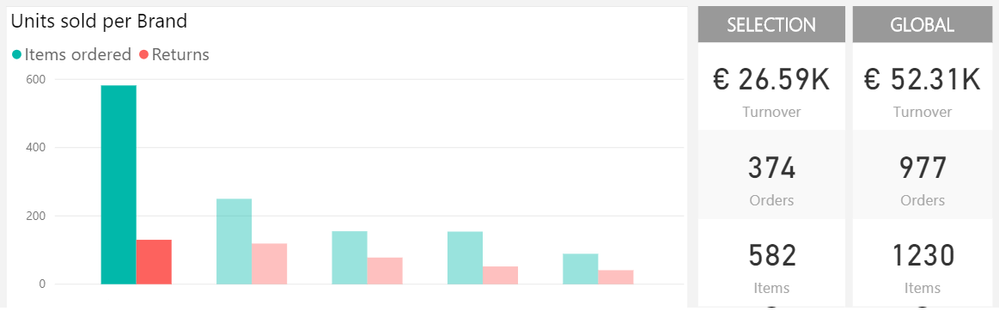
As you can see on the screeshots below, I have different amounts distributed per category on a graph, and the corresponding figures written on two columns.
To get a comparision, I unlinked the graph and the "GLOBAL"column so the value is not affected by the selection, while the "SELECTION" column display the filtered value.
However, I would like to get the "SELECTION" value as a percentage of the Global.
Global values
Filtered values per selectionProblem is, if I create a measure like :
Solved! Go to Solution.
Hey,
This should work.... normally.
SUM('Table_1'[Quantity orders])/calculate(SUM('Table_1'[Quantity orders]);all(Table_1'[Global]))
Let me know how it turned out / mark it as solved if it works for you.
Hey,
This should work.... normally.
SUM('Table_1'[Quantity orders])/calculate(SUM('Table_1'[Quantity orders]);all(Table_1'[Global]))
Let me know how it turned out / mark it as solved if it works for you.
It does work !
Thanks a lot
The Power BI Data Visualization World Championships is back! Get ahead of the game and start preparing now!
| User | Count |
|---|---|
| 41 | |
| 38 | |
| 36 | |
| 31 | |
| 28 |
| User | Count |
|---|---|
| 128 | |
| 88 | |
| 79 | |
| 68 | |
| 63 |