I have the following data model:
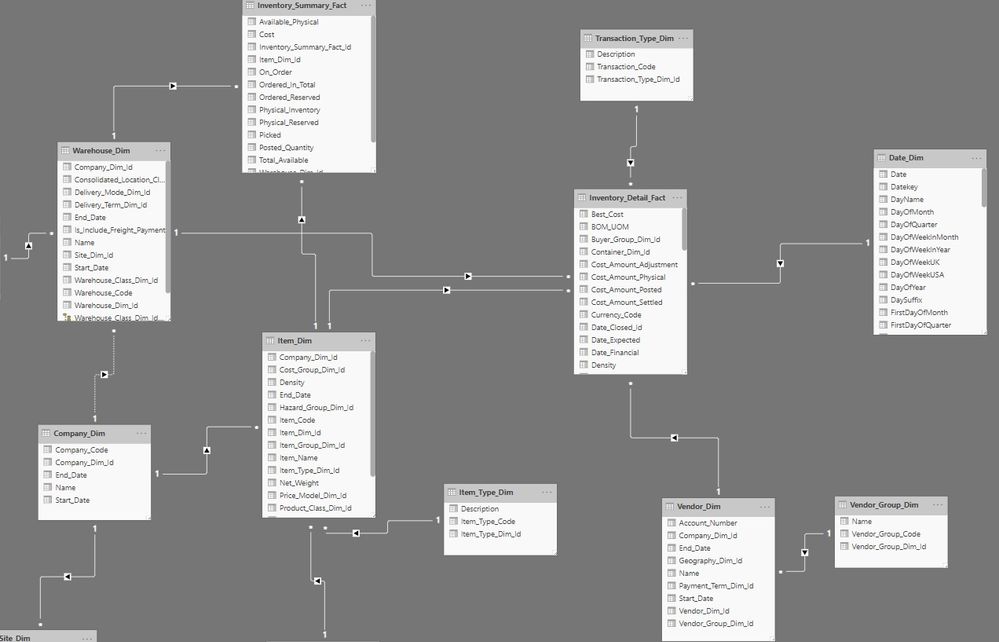
With this model I’m reporting the 30 and 90 day Inventory values:

With this data I need to calculate Beginning /Ending/Previous/Current/Average Inventory values, Purchases During Period, COGS and Inventory Turns.
These calculations are as follows:
Beginning Inventory = CALCULATE( SUM(Inventory_Detail_Fact[Best_Cost]) , DATESBETWEEN(Date_Dim[Datekey], SELECTEDVALUE(CurrentStartDate[Date]), SELECTEDVALUE(CurrentStartDate[Date]) ))
Ending Invenory = CALCULATE( SUM(Inventory_Detail_Fact[Best_Cost]) , DATESBETWEEN(Date_Dim[Datekey], SELECTEDVALUE(CurrentEndDate[Date]), SELECTEDVALUE(CurrentEndDate[Date])))
Previous Inventory 30 = CALCULATE( SUM( Inventory_Detail_Fact[Best_Cost] ) , DATESBETWEEN(Date_Dim[Datekey],
SELECTEDVALUE('Start Date'[Date]), SELECTEDVALUE('End Date Previous'[Date])))
Current Inventory = CALCULATE( SUM( Inventory_Detail_Fact[Best_Cost] ) , DATESBETWEEN(Date_Dim[Datekey],
SELECTEDVALUE(CurrentStartDate[Date]), SELECTEDVALUE(CurrentEndDate[Date])))
Average Inventory = DIVIDE( ( [Current Inventory] + [Previous Inventory 30] ) , 2 , 0)
Purchases During Period = CALCULATE( SUM( Inventory_Detail_Fact[Best_Cost] ) , Inventory_Detail_Fact[Transaction_Type_Dim_Id] = 3 || Inventory_Detail_Fact[Transaction_Type_Dim_Id] = 2 ,
DATESBETWEEN(Date_Dim[Datekey],
SELECTEDVALUE(CurrentStartDate[Date]), SELECTEDVALUE(CurrentEndDate[Date])))
COGS = [Beginning Inventory] + [Purchases During Period] - [Ending Invenory]
Inventory Turns = DIVIDE([COGS] , [Average Inventory] , 0)
Everything works fine until I attempt to calculate Inventory Turns. When the Average Inventory is zero the Divide function does not return 0 as coded above and I get erroneously large results and infinity.
Any help would be appreciated.


