
This is best Fabric, Power BI, SQL and AI community event. How do we know? The last event sold out! Save €200 with code FABCMTY200.
Register nowA new Data Days event is coming soon! This time we’re going bigger than ever. Fabric, Power BI, SQL, AI and more. Don't miss out.
Hi Experts,
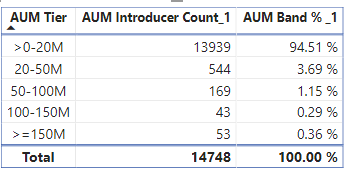
This is my Table
Below is the measure for AUM Introducer Count 1, but I dont know how to create measure for AUM Band %_1.
Anyone Please help.
Thank you,
Re
Solved! Go to Solution.
Hi @Anonymous
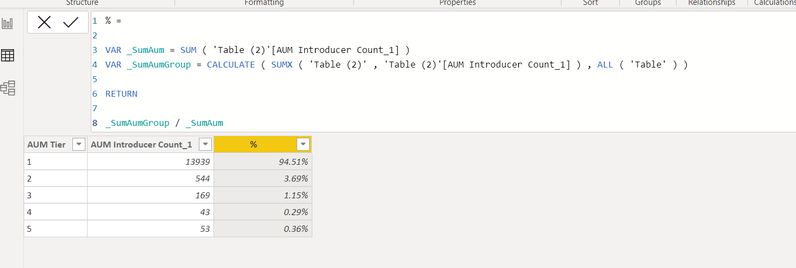
You can create Calculated Column as per below or replicate using measures.
% =
VAR _SumAum = SUM ( 'Table (2)'[AUM Introducer Count_1] )
VAR _SumAumGroup = CALCULATE ( SUMX ( 'Table (2)' , 'Table (2)'[AUM Introducer Count_1] ) , ALL ( 'Table' ) )
RETURN
_SumAumGroup / _SumAum
Hope this helps 🙂
Theo
If I have posted a response that resolves your question, please accept it as a solution to formally close the post.
Also, if you are as passionate about Power BI, DAX and data as I am, please feel free to reach out if you have any questions, queries, or if you simply want to connect and talk to another data geek!
Want to connect?www.linkedin.com/in/theoconias
Hi @Anonymous
You can create Calculated Column as per below or replicate using measures.
% =
VAR _SumAum = SUM ( 'Table (2)'[AUM Introducer Count_1] )
VAR _SumAumGroup = CALCULATE ( SUMX ( 'Table (2)' , 'Table (2)'[AUM Introducer Count_1] ) , ALL ( 'Table' ) )
RETURN
_SumAumGroup / _SumAum
Hope this helps 🙂
Theo
If I have posted a response that resolves your question, please accept it as a solution to formally close the post.
Also, if you are as passionate about Power BI, DAX and data as I am, please feel free to reach out if you have any questions, queries, or if you simply want to connect and talk to another data geek!
Want to connect?www.linkedin.com/in/theoconias
Check out the May 2026 Power BI update to learn about new features.
Sign up to receive a private message when registration opens and key events begin.
If you have recently started exploring Fabric, we'd love to hear how it's going. Your feedback can help with product improvements.
| User | Count |
|---|---|
| 27 | |
| 27 | |
| 25 | |
| 19 | |
| 14 |
| User | Count |
|---|---|
| 56 | |
| 48 | |
| 37 | |
| 21 | |
| 20 |