Forum Discussion

Distinct count measure
Hi everyone,
I would like to do this measure :
calculate the number of interventions using the distinctcount function for which there is neither the "A61" nor the "A62" intervention, but also does not take into account other interventions including the co-response codes A61 AND A62 Here is the table. Table name: Table. So for this example, the result will be : 3
Another information: there are a lot of data like this.
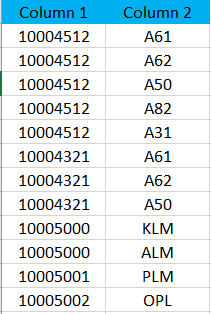
Thank you, My best regards.
- Anonymous7 years ago
Add a column that tracks if your Column1 has one A61/2 row
Has6162=
VAR thisOpCode=Table[Column1]
RETURN
IF(SUMX(FILTER(Table;Table[Column1]=thisOpCode);IF(Table[Column2] IN {"A61";"A62"};1;0))>=1;1;0)this column will (should :-) ) contain 1 if that opcode has at least one A61, A62
Now your measure will count only the ones where that value is 0
Measure=DISTINCTCOUNT(FILTER(Table;Table[Has6162] =0);Table[Column1])
Check syntax and test, but should work
1 Reply
- AnonymousNot applicable
Add a column that tracks if your Column1 has one A61/2 row
Has6162=
VAR thisOpCode=Table[Column1]
RETURN
IF(SUMX(FILTER(Table;Table[Column1]=thisOpCode);IF(Table[Column2] IN {"A61";"A62"};1;0))>=1;1;0)this column will (should :-) ) contain 1 if that opcode has at least one A61, A62
Now your measure will count only the ones where that value is 0
Measure=DISTINCTCOUNT(FILTER(Table;Table[Has6162] =0);Table[Column1])
Check syntax and test, but should work