Join us at FabCon Atlanta from March 16 - 20, 2026, for the ultimate Fabric, Power BI, AI and SQL community-led event. Save $200 with code FABCOMM.
Register now!The Power BI Data Visualization World Championships is back! Get ahead of the game and start preparing now! Learn more
I have a data set that contains two columns; UniqueID and Result. Result can be either Pass or Fail. We will have the same unique ID in multiple rows and the result could be either Pass or Fail. I need to get two distinct counts from this data:
1) I need to get a count of each UniqueID that contains a Pass; but only the first time it contains a Pass. The same unique ID getting a Pass on another row should only be counted once. Containing a Pass and a Fail is fine, but at least once we need a Pass. I believe I've achieved this with this Measure:
Total Unique Pass = CALCULATE(DISTINCTCOUNT(testInfo[UniqueID]), FILTER(VALUES(testInfo[UniqueID]),AND(CALCULATE(HASONEVALUE(testInfo[Result])),FIRSTNONBLANK ( testInfo[Result], 0 ) = "PASS")))
If anyone see's an issue with how I do this, please let me know. I can't sanity check against values it gives me until I can also pull my second request....
2) I need to get a distint count of each UniqueID that only contains Fail. Any uniqueID with a Pass gets caught in the above measure, I just want to see the ones that do not Pass . Using the measure as above I get close, I'm just not sure what to use for the filter.
Any help is appreciated!
EDIT: added some clarity.
Solved! Go to Solution.
Hey @Zxero,
based on your sample data I first created a calculated column that flags the most recent time per UniqueID:
Is most recent =
var currentID = 'Sheet1'[uniqueID]
var mostRecenttime =
CALCULATE(
MAX('Sheet1'[time])
,FILTER(
ALL(Sheet1)
,'Sheet1'[uniqueID] = currentID
)
)
return
IF('Sheet1'[time] = mostRecenttime, "yes", "no")
Then I created two measures
cnt Distinct Pass =
CALCULATE(
DISTINCTCOUNT('Sheet1'[uniqueID])
,ALL(Sheet1)
,'Sheet1'[Is most recent] = "yes"
,'Sheet1'[result] = "pass"
)
and
cnt Distinct Fail =
CALCULATE(
DISTINCTCOUNT('Sheet1'[uniqueID])
,ALL(Sheet1)
,'Sheet1'[Is most recent] = "yes"
,'Sheet1'[result] = "fail"
)
used on a Multi-row card
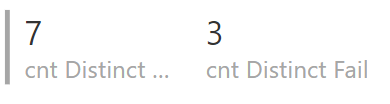
It looks like what you are now looking for ![]()
Regards,
Tom
P.S.: maybe you have to experiment with the ALL(...), depending on other slicer that should still filter the table like so
,ALL('Sheet1'[Is most recent],Sheet1[uniqueID],Sheet1[result])
@TomMartens You mentioning indexing got me thinking a bit more, and my requirments have changed a bit now. So now lets assume I have a third column with the date/time of the test performed. Linked a dropbox download of an excel sheet with some sample data. I need:
1) A measure that is a distinct count by UniqueID of the Passed Results, but only when looking at the most recent entry for that UniqueID;
and 2) A measure that is a distinct count by UniqueID of the Failed Results, but only when looking at the most recent entry for that UniqueID.
Does that make more sense? I know I changed up the requirments but discussions today with my team and you mentioning indexing had me start thinking about it.
Honestly what I really need to figure out is how the logic of the DAX expressions work. Something about them hasnt quite clicked yet for me, but I'm not sure what/why.
Sample data: Link to excel sample data
EDIT: forgot to actually link the sample data.
Hey @Zxero,
based on your sample data I first created a calculated column that flags the most recent time per UniqueID:
Is most recent =
var currentID = 'Sheet1'[uniqueID]
var mostRecenttime =
CALCULATE(
MAX('Sheet1'[time])
,FILTER(
ALL(Sheet1)
,'Sheet1'[uniqueID] = currentID
)
)
return
IF('Sheet1'[time] = mostRecenttime, "yes", "no")
Then I created two measures
cnt Distinct Pass =
CALCULATE(
DISTINCTCOUNT('Sheet1'[uniqueID])
,ALL(Sheet1)
,'Sheet1'[Is most recent] = "yes"
,'Sheet1'[result] = "pass"
)
and
cnt Distinct Fail =
CALCULATE(
DISTINCTCOUNT('Sheet1'[uniqueID])
,ALL(Sheet1)
,'Sheet1'[Is most recent] = "yes"
,'Sheet1'[result] = "fail"
)
used on a Multi-row card
It looks like what you are now looking for ![]()
Regards,
Tom
P.S.: maybe you have to experiment with the ALL(...), depending on other slicer that should still filter the table like so
,ALL('Sheet1'[Is most recent],Sheet1[uniqueID],Sheet1[result])
Hi,
Try these measures
Students that passed = COUNTROWS(FILTER(SUMMARIZE(VALUES(testInfo[UniqueID]),[UniqueID],"ABCD",CALCULATE(COUNTROWS(testInfo),testInfo[Result]="Pass")),[ABCD]>0))
Students that failed = COUNTROWS(FILTER(SUMMARIZE(VALUES(testInfo[UniqueID]),[UniqueID],"ABCD",CALCULATE(COUNTROWS(testInfo),testInfo[Result]="fail"),"EFGH",COUNTROWS(testInfo)),[ABCD]=[EFGH))
Hope this helps.
Hey,
I guess these measures should work:
cnt pass =
CALCULATE(
DISTINCTCOUNT(testInfo[UniqueID])
,FILTER(
ALL(testInfo[Result])
,testInfo[Result] = "PASS"
)
)
and this one
cnt fail =
CALCULATE(
DISTINCTCOUNT(testInfo[UniqueID])
,FILTER(
ALL(testInfo[Result])
,testInfo[Result] = "FAIL"
)
)
I'm not 100% sure about your description "... but only the 1st time it contains a PASS"
Are you saying that a UNIQUEID can be measured with a PASS and FAIL (2 records in your table) and PASS has to be the 1st occurrence. If this is the case then I recommend urgently to introduce an Index column, because it's not safe to rely on the order from you data.
Regards,
Tom
The Power BI Data Visualization World Championships is back! Get ahead of the game and start preparing now!
| User | Count |
|---|---|
| 38 | |
| 38 | |
| 36 | |
| 28 | |
| 28 |
| User | Count |
|---|---|
| 124 | |
| 89 | |
| 73 | |
| 66 | |
| 65 |