cancel
Showing results for 
Search instead for 
Did you mean: 

The Power BI Data Visualization World Championships is back! Get ahead of the game and start preparing now! Learn more

Reply
Anonymous
Not applicable

Distinct Count by Date

Hello,


I am trying to do a distinct count by date.

Ex: When the Slicer is set to "July 2020", I want it to show 10 and count Account ID 1 once for 7/1/20 and Account ID 1 again for 7/2/20. Right now, it shows 9 instead of 10:

Service DateAccount IDSlicer on DayDesired Result: Slicer on Month (July)
7/1/20201510
7/1/20202
7/1/20203
7/1/20204
7/1/20205
7/2/202015
7/2/20206
7/2/20207
7/2/20208
7/2/20209


I am trying:

Measure = Calculate(DistinctCount(Table[UniqueID]), Filter(Table,Table[Date]=Earlier(Table,Table[Date]))

It says "The second argument of function EARLIER must be an integer greater than zero."

I have made sure the Date field is formated as a Date in the Data Table.

It's linked to a Key and a DateDimension Table like so:

Relationship.png
*Disclaimer: I understand the preference is for data files to be posted. Unfortunately, I am not allowed to do that. Completely understand if you chose not to respond because of the lack of files. I am terribly sorry I cannot post files. Any ideas - even a link or somewhere to start is appreciated. TYIA.
**Edit for clarity: Distinct Count needs to be on Service Date; but table is connected to the Date Dimension and Filter is based on a different column - Post Date.

4 REPLIES 4
Anonymous
Not applicable

Hi @Anonymous ,


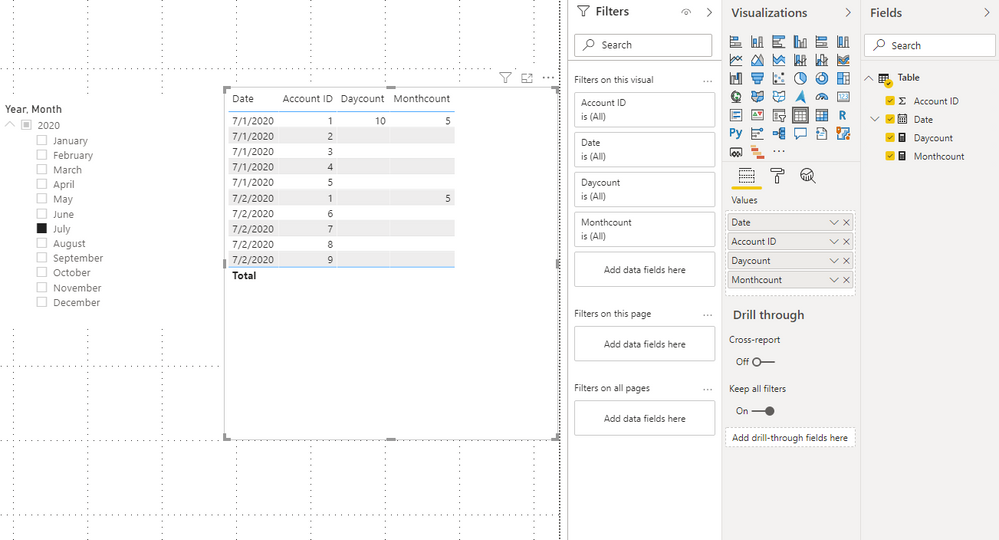
Here's my sample data.

6.png


DISTINCTCOUNT counts the number of distinct values in a column. If you want to get 10, use COUNT.

Monthcount =
IF (
    MAX ( 'Table'[Account ID] ) = 1,
    CALCULATE (
        COUNT ( 'Table'[Account ID] ),
        ALLEXCEPT ( 'Table', 'Table'[Date] )
    )
)
Daycount = 
VAR _sele =
    SELECTEDVALUE ( 'Table'[Date].[Month] )
VAR _minD =
    MINX ( FILTER ( ALL ( 'Table' ), [Date].[Month] = _sele ), [Date] )
RETURN
    IF (
        MAX ( 'Table'[Account ID] ) = 1
            && MAX ( 'Table'[Date] ) = _minD,
        CALCULATE (
            COUNT ( 'Table'[Account ID] ),
            ALLEXCEPT ( 'Table', 'Table'[Date].[Month] )
        )
    )

7.png


You can check more details from here.


Best Regards,

Stephen Tao


If this post helps, then please consider Accept it as the solution to help the other members find it more quickly.

Anonymous
Not applicable

The issue is the Distinct Count needs done based on one date (Service Date) and the Filter/Slicer and all other data is done based on another date (Post Date). This cannot be changed.
I think I need a calculated column that counts as a "1" distinct account IDs by the Service Date.. and for repeating lines counts as "0".
Then I can roll up by the existing filter (on Post Date).
Any idea on an equation I could use that uses the Service Date as a criteria to achieve a distinct count?

Anonymous
Not applicable

Hi @Anonymous ,


Calculated columns will not be affected by slicers or filters. You can only use measures instead.

You can use SELECTEDVALUE function to use another date column B to filter date column A.


Best Regards,

Stephen Tao


If this post helps, then please consider Accept it as the solution to help the other members find it more quickly.

lbendlin
Super User
Super User

Instead of EARLIER() use variables. Construct your measure step by step and validate the intermediate result with CONCATENATEX()


- get slicer value

- get all VALUES() of account IDs, filter as needed

- get row count

- return result

Helpful resources

Announcements
Power BI DataViz World Championships

Power BI Dataviz World Championships

The Power BI Data Visualization World Championships is back! Get ahead of the game and start preparing now!

December 2025 Power BI Update Carousel

Power BI Monthly Update - December 2025

Check out the December 2025 Power BI Holiday Recap!

FabCon Atlanta 2026 carousel

FabCon Atlanta 2026

Join us at FabCon Atlanta, March 16-20, for the ultimate Fabric, Power BI, AI and SQL community-led event. Save $200 with code FABCOMM.