cancel
Showing results for 
Search instead for 
Did you mean: 

The Power BI Data Visualization World Championships is back! It's time to submit your entry. Live now!

Reply
Anonymous
Not applicable

Distance between locations - calculated column error

Hi,
I used this below formula in a test report to calculate distance between a series of locations based on their contractual and actual location lats/longs in table 'Totalmonthdrop'. Now that I have come to use this formula in the real report, I am getting the error "An argument of function ACOS has the wrong data type or the result is too large or too small"


All lats/longs that I have are listed as decimal numbers.


Anyone have any thought as to how to solve this issue?

distance_issue.JPG

1 ACCEPTED SOLUTION
Anonymous
Not applicable

you can wrap the function in IFERROR(...,Blank()) and see if that helps

View solution in original post

4 REPLIES 4
Anonymous
Not applicable

you can wrap the function in IFERROR(...,Blank()) and see if that helps

Anonymous
Not applicable

Hi Nick - that seems to have addressed the issue - weirdly


When using the iferror, it only highlighted 1 row of the thousands I have as an error, which then allowed all rows to have correct info load in.


Any thoughts on why 1 row would cause all rows of this calculated column to fail, and why the below lats/ long would error in the first place, as have checked and numbers are correct?


Captussre.JPG

Many thanks for your solution anyway - have marked it accordingly.


Anonymous
Not applicable

"Any thoughts on why 1 row would cause all rows of this calculated column to fail, and why the below lats/ long would error in the first place, as have checked and numbers are correct?"


DAX operates on an all or nothing basis since everything happens in columns vs. individual cells like excel. Which is why in excel you can get an error for a specific cell but the rest of the formulas are fine. Just a different way of thinking of things, and the thinking in columns and filters is the biggest hurdle from someone coming from excel ( at least that was and really still is my experience). 


I honestly dont know enough about the functions you are using. but looking at the Dax help, there is something in your data where it violates the definition of must be between -1 and 1:
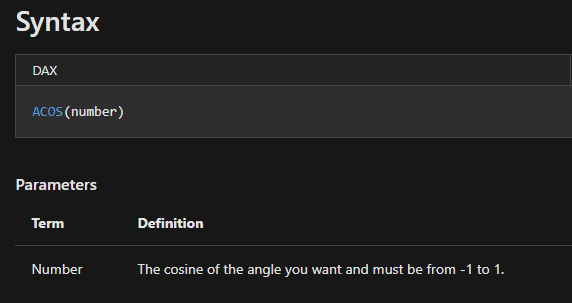
ACOS.png


I run into the same type of thing in my day-to-day job since I use the POWER function, and if there is something wierd in the data it will error, Ideally, would fix the data in the ETL stage or catch it w/o using an IFERROR since IFERROR can be a performance hit, but when you start going a few levels deep in calculations I find it easier to just use the IFERROR. 


Anonymous
Not applicable

@Anonymous  Thanks Nick - you have been a great help. 🙂

Helpful resources

Announcements
FabCon Atlanta 2026 carousel

FabCon Atlanta 2026

Join us at FabCon Atlanta, March 16-20, for the ultimate Fabric, Power BI, AI and SQL community-led event. Save $200 with code FABCOMM.

