Join us at FabCon Atlanta from March 16 - 20, 2026, for the ultimate Fabric, Power BI, AI and SQL community-led event. Save $200 with code FABCOMM.
Register now!The Power BI Data Visualization World Championships is back! Get ahead of the game and start preparing now! Learn more
I have a matrix as a sort of summary table for multiple companies where I am showing various key figures for them. I am using SWITCH as my column headers and then I am using various CALCULATION function to calculate these key figures.
However my problem is that I want to show the category that these companies are in, which is a column in my data. I have not been able to figure out how to do this in a measure. The closest I got was with SELECTEDVALUE and filtering with the specific category. That way the correct category was displayed in the matrix but I would like to do this for all categories without filters.
Any help would be greatly appriciated.
Solved! Go to Solution.
Hi @hlg551 ,
In the category banch of Companyoverview measure, use the following measure:
LOOKUPVALUE(Category[CategoryName],Category[CategoryID],MAX(Companies[CategoryID]))
If this post helps, then please consider Accept it as the solution to help the other members find it more quickly.
Best Regards,
Dedmon Dai
@v-deddai1-msft @amitchandak
I'll try to explain my problem better.
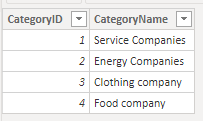
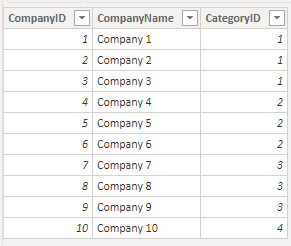
I have a matrix where I am showing information about various companies. The companies are in the rows and the columns is a SWITCH sentence where I calculate various things I want to show. What I am having problem with is displaying the category of each company. I need to find a function that allows me to display a string in a measure, similar to SELECTEDVALUE but I don't want to have to filter for a specific category I want to show all of them at the same time.
I tried to create a sample for what I am trying to do.
This is what I want it to look like:
This is my measure:
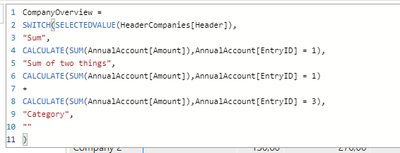
My tables are connected through IDs:
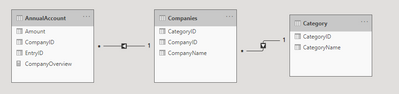
So I want to display the Category name for every company in my matrix.
My sample example is very simple but my real measure has a lot of information in it so I need to be able to use a matrix, not a table.
I hope this explains it better, any help would be appriciated 🙂
Hi @hlg551 ,
In the category banch of Companyoverview measure, use the following measure:
LOOKUPVALUE(Category[CategoryName],Category[CategoryID],MAX(Companies[CategoryID]))
If this post helps, then please consider Accept it as the solution to help the other members find it more quickly.
Best Regards,
Dedmon Dai
I want to display the category the companies fall under in the category column in my matrix.
I created very simple sample pbix file for what it is I'm trying to do to share, however when I try to attach it says that the file type (.pbix) is not supported, do you know how to get around that?
Hi @hlg551 ,
You can't attach it directly. You can share your sample pbix by shared drive and share us the download link.
Best Regards,
Dedmon Dai
Check out the November 2025 Power BI update to learn about new features.
Advance your Data & AI career with 50 days of live learning, contests, hands-on challenges, study groups & certifications and more!
| User | Count |
|---|---|
| 57 | |
| 44 | |
| 41 | |
| 21 | |
| 18 |
| User | Count |
|---|---|
| 183 | |
| 114 | |
| 93 | |
| 61 | |
| 45 |