cancel
Showing results for 
Search instead for 
Did you mean: 

We've captured the moments from FabCon & SQLCon that everyone is talking about, and we are bringing them to the community, live and on-demand. Starts on April 14th. Register now

Reply
abukapsoun
Post Patron
Post Patron

Display zero value in filled map

Hi,


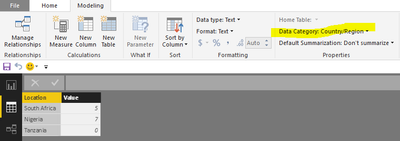
I have the following table,

South Africa   5

Nigeria           7 

Tanzania         0


I am using filled map, but Tanzania is not showing because it has zero value. Is there a way to still fill the zero value with the lightest color?


Thanks,


1 ACCEPTED SOLUTION

Hi @abukapsoun,

I use your sample table, it works fine as follows.

1. I set the address as country/region category.


3.png

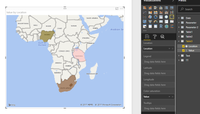
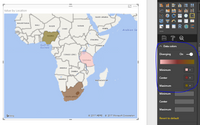
2. Create filled map visual, select the Location field as Location level, the value as color saturation. Please review the expected result shown in screenshots below. The place with 0 shows correctly.

2.PNG1.PNG

Best Regards,
Angelia

View solution in original post

4 REPLIES 4
fhill
Resident Rockstar
Resident Rockstar

Have you tried setting your Minimum Value under Data Colors to -1?  


Did I answer your question, or help you along the way?
Please give Kudos or Mark as a Solution!


https://www.linkedin.com/in/forrest-hill-04480730/

Proud to give back to the community!
Thank You!


Negative, it didn't work out 😞

Hi @abukapsoun,

I use your sample table, it works fine as follows.

1. I set the address as country/region category.


3.png

2. Create filled map visual, select the Location field as Location level, the value as color saturation. Please review the expected result shown in screenshots below. The place with 0 shows correctly.

2.PNG1.PNG

Best Regards,
Angelia

I wasn't able to duplciate you results using just the small sample you provided.  (My 0 did show up.)  Can you post a more complete sampleing of your data / measures?


FOrrest


Did I answer your question, or help you along the way?
Please give Kudos or Mark as a Solution!


https://www.linkedin.com/in/forrest-hill-04480730/

Proud to give back to the community!
Thank You!


Helpful resources

Announcements
New to Fabric survey Carousel

New to Fabric Survey

If you have recently started exploring Fabric, we'd love to hear how it's going. Your feedback can help with product improvements.

Power BI DataViz World Championships carousel

Power BI DataViz World Championships - June 2026

A new Power BI DataViz World Championship is coming this June! Don't miss out on submitting your entry.

Join our Fabric User Panel

Join our Fabric User Panel

Share feedback directly with Fabric product managers, participate in targeted research studies and influence the Fabric roadmap.

March Power BI Update Carousel

Power BI Community Update - March 2026

Check out the March 2026 Power BI update to learn about new features.