Join us at FabCon Atlanta from March 16 - 20, 2026, for the ultimate Fabric, Power BI, AI and SQL community-led event. Save $200 with code FABCOMM.
Register now!The Power BI Data Visualization World Championships is back! Get ahead of the game and start preparing now! Learn more
Hello Everybody,
I have a big problem for me.
It's very urgent
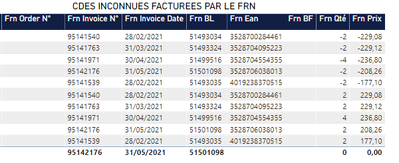
Until now, the display of this visual table was correct.
It no longer works.
It must to add the line.
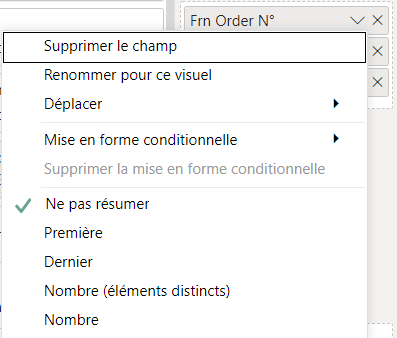
"Frn Order N°" is on "do not resume". But i don't resume this column, i can't choose last or first. If not, le lines would be false.
Thanks in advance.
Have a nice day
Solved! Go to Solution.
Hi @Sylvine_Wyz
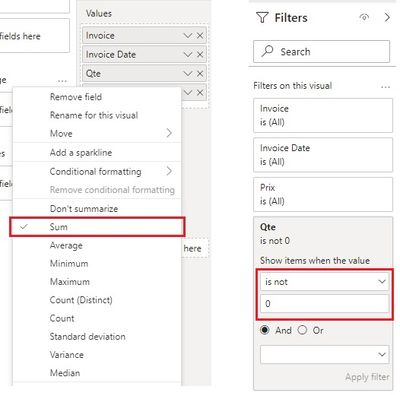
OK. For "Frn Qte" and "Frn Prix" columns, you can select Sum to aggregate them. Then in Filter pane, set "Frn Qte" to show items when the value is not 0. Do this to "Frn Prix" if needed.
Best Regards,
Community Support Team _ Jing
If this post helps, please Accept it as Solution to help other members find it.
Hi @Sylvine_Wyz
Sorry I don't understand what the problem is. From the screenshot, "Frn Order N°" all display blank. Do you want to show their exact values in the column?
Best Regards,
Community Support Team _ Jing
Hello,
Thanks for your return.
No, for once, these lines do not have order numbers. But if the first line and the 6th had the same number, then the line total would be 0 and the line would not appear in the table.
Do you understand ?
Hi @Sylvine_Wyz
OK. For "Frn Qte" and "Frn Prix" columns, you can select Sum to aggregate them. Then in Filter pane, set "Frn Qte" to show items when the value is not 0. Do this to "Frn Prix" if needed.
Best Regards,
Community Support Team _ Jing
If this post helps, please Accept it as Solution to help other members find it.
Hello,
Thanks for your answer 🙂
But the settings are already like this and it does not work..
Have a nice day
Please provide sanitized sample data that fully covers your issue. Paste the data into a table in your post or use one of the file services. Please show the expected outcome.
Check out the November 2025 Power BI update to learn about new features.
Advance your Data & AI career with 50 days of live learning, contests, hands-on challenges, study groups & certifications and more!