
cancel
Showing results for 
Search instead for 
Did you mean: 

Learn from the best! Meet the four finalists headed to the FINALS of the Power BI Dataviz World Championships! Register now

Reply
StuartSmith
Power Participant
Power Participant

Display only matching Measure values. Example file Included (file now added).

I have the below measure...


Test 2 =
VAR FirstDatePeriod = CALCULATE(MIN('Date Table'[Date]),ALLSELECTED('Date Table'[Date]))
VAR AttritionDate = SELECTEDVALUE('Attrition'[Attrition Date])
VAR FirstDateWorkfore = SELECTEDVALUE('Attrition'[First Day Workforce])
Return
IF(FirstDatePeriod = AttritionDate, FirstDateWorkfore, 0)
 
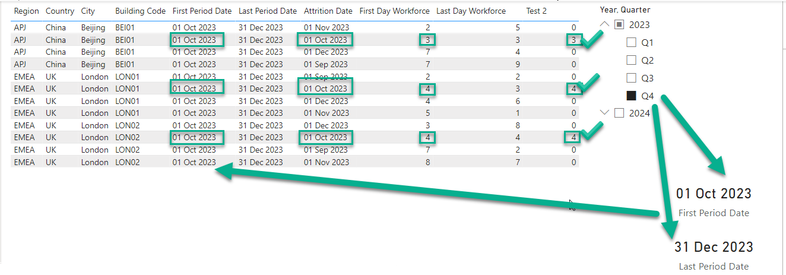
The measure gets the First Date (FirstDatePeriod) from the selected (MIN) slicer date range, then gets the Attrition Date (Attrition Date) and then finally gets the First Date Workforce (First Date Workforce) value.  It then compares the "First Date" value with the "Attrition Date" value and if it matches it gets the corospnding "First Date Workforce" value.
 
StuartSmith_0-1702655598953.png

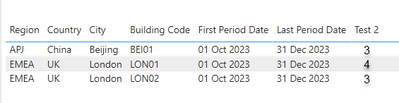
The measure works great if the table includes the "Attrition Date", etc.columns, and eiter displays the "First Day Workforce or "0".  But I just want to display the rows where the dates match and not the rows with 0. 

StuartSmith_1-1702657246228.png
Example File: PBIX File 
Thanks in advance.
1 ACCEPTED SOLUTION

The Last Period Date is picking the last date of Dec 31st where the Attrition table has values which are the begining of each month. So essentially you are comparing 31 Dec 2023 to 01 Dec 2023.
Try this calculated column...

Test 4 =
var _lastDatePeriodTable =
SELECTCOLUMNS('Date Table', "_startOfMonth", STARTOFMONTH('Date Table'[Date]))
var _lastDatePeriod =
MAXX(_lastDatePeriodTable, [_startOfMonth])
var _vTable =
FILTER(Attrition, Attrition[Attrition Date] = _lastDatePeriod)
return
MINX(_vTable, [Last Day Workforce])


Did I answer your question? Mark my post as a solution!

Proud to be a Super User!


View solution in original post

5 REPLIES 5
jgeddes
Super User
Super User

Test 3 =
var _firstDatePeriod =
CALCULATE(MIN('Date Table'[Date]),ALLSELECTED('Date Table'[Date]))
var _vTable =
FILTER(Attrition, Attrition[Attrition Date] = _firstDatePeriod)
return
MINX(_vTable, [First Day Workforce])

Something like this might get you pointed in the right direction.


Did I answer your question? Mark my post as a solution!

Proud to be a Super User!


Thanks and that seems to do the trick 👍 


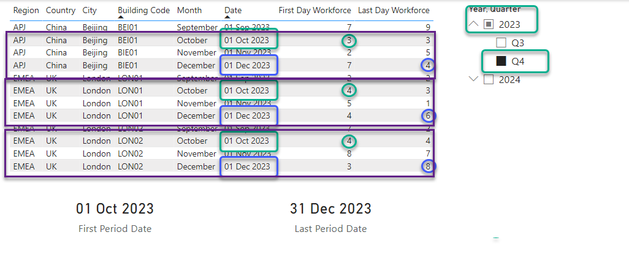
I then also wanted to get the "Last Day Workforce" figures (in Blue)...


StuartSmith_0-1702755385456.png

and simply changed your to code to (in Red)...

Test 3 =
var _LastDatePeriod =
CALCULATE(MAX('Date Table'[Date]),ALLSELECTED('Date Table'[Date]))
var _vTable =
FILTER(Attrition, Attrition[Attrition Date] = _LastDatePeriod)
return
MAXX(_vTable, [Last Day Workforce])

but its not displaying any figures

StuartSmith_2-1702755518570.png

What am I missing?


Is anyone able to assit with getting the "Last Date Workforce" values, similar to the "First Date Workforce" code? as tried various things, but cant figure it out.


Thanks in advance.

The Last Period Date is picking the last date of Dec 31st where the Attrition table has values which are the begining of each month. So essentially you are comparing 31 Dec 2023 to 01 Dec 2023.
Try this calculated column...

Test 4 =
var _lastDatePeriodTable =
SELECTCOLUMNS('Date Table', "_startOfMonth", STARTOFMONTH('Date Table'[Date]))
var _lastDatePeriod =
MAXX(_lastDatePeriodTable, [_startOfMonth])
var _vTable =
FILTER(Attrition, Attrition[Attrition Date] = _lastDatePeriod)
return
MINX(_vTable, [Last Day Workforce])


Did I answer your question? Mark my post as a solution!

Proud to be a Super User!


Stupid me, should have spotted that.  So thanks very much for taking the time to help me and its really appreciated. You scripts work great.

Helpful resources

Announcements
Join our Fabric User Panel

Join our Fabric User Panel

Share feedback directly with Fabric product managers, participate in targeted research studies and influence the Fabric roadmap.

March Power BI Update Carousel

Power BI Community Update - March 2026

Check out the March 2026 Power BI update to learn about new features.