cancel
Showing results for 
Search instead for 
Did you mean: 

The Power BI Data Visualization World Championships is back! Get ahead of the game and start preparing now! Learn more

Reply
SevsBo
Resolver III
Resolver III

Display & Count number of individuals with non-actions?

Say I have a list of people that did certain interactions over a year. The table might look like this:


DATENAMEACTION 1ACTION 2
JanuaryJimYesYes
JanuaryAlice Yes
FebruaryBillYes 
MarchJim Yes
MarchFreddy Yes


If I want to see who took actions in March and February, I can easily do that, but is there a way to build a visual in Power BI that shows who hasn't taken any action in that time frame? A list of non-action takers, if you will? (in this case the only result should be Alice)

3 ACCEPTED SOLUTIONS
lbendlin
Super User
Super User

To report on things that are not there you need to use disconnected tables and/or crossjoins

View solution in original post

Ashish_Mathur
Super User
Super User

Hi,

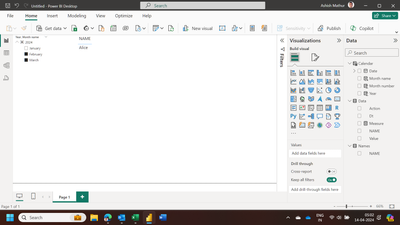
PBI file attached.

Hope this helps.

Ashish_Mathur_0-1713051192646.png


Regards,
Ashish Mathur
http://www.ashishmathur.com
https://www.linkedin.com/in/excelenthusiasts/

View solution in original post

Anonymous
Not applicable

Hi @SevsBo 


Thanks for the reply from @lbendlin  and @Ashish_Mathur , please allow me to provide another method:


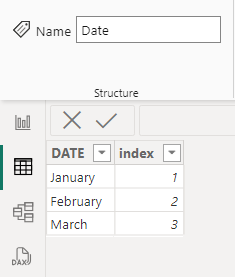
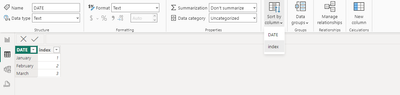
1. Enter a new table as the slicer where the index column serves to sort the Date column.

vxuxinyimsft_0-1713170370040.png


vxuxinyimsft_1-1713170459419.png


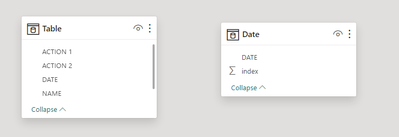
no relationship between two tables

vxuxinyimsft_2-1713170615462.png


2. Create a measure as follows


noactionname = 
VAR _count = CALCULATE(COUNT('Table'[NAME]), FILTER(ALLEXCEPT('Table', 'Table'[NAME]), 'Table'[DATE] IN VALUES('Date'[DATE])))
VAR _name = CALCULATE(MAX([NAME]), FILTER('Table', _count = BLANK()))
RETURN
IF(MAX([NAME]) = _name, 1, 0)


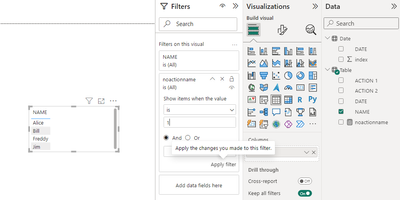
3. Put the measure into the filter so that the visual only shows data where the measure is equal to 1.

vxuxinyimsft_3-1713170696269.png


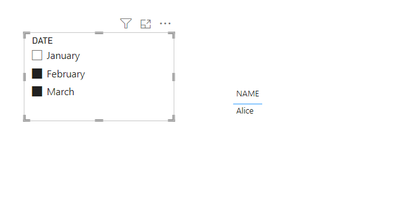
Result:

vxuxinyimsft_4-1713170723087.png


Best Regards,
Yulia Xu


If this post helps, then please consider Accept it as the solution to help the other members find it more quickly.

View solution in original post

3 REPLIES 3
Anonymous
Not applicable

Hi @SevsBo 


Thanks for the reply from @lbendlin  and @Ashish_Mathur , please allow me to provide another method:


1. Enter a new table as the slicer where the index column serves to sort the Date column.

vxuxinyimsft_0-1713170370040.png


vxuxinyimsft_1-1713170459419.png


no relationship between two tables

vxuxinyimsft_2-1713170615462.png


2. Create a measure as follows


noactionname = 
VAR _count = CALCULATE(COUNT('Table'[NAME]), FILTER(ALLEXCEPT('Table', 'Table'[NAME]), 'Table'[DATE] IN VALUES('Date'[DATE])))
VAR _name = CALCULATE(MAX([NAME]), FILTER('Table', _count = BLANK()))
RETURN
IF(MAX([NAME]) = _name, 1, 0)


3. Put the measure into the filter so that the visual only shows data where the measure is equal to 1.

vxuxinyimsft_3-1713170696269.png


Result:

vxuxinyimsft_4-1713170723087.png


Best Regards,
Yulia Xu


If this post helps, then please consider Accept it as the solution to help the other members find it more quickly.

Ashish_Mathur
Super User
Super User

Hi,

PBI file attached.

Hope this helps.

Ashish_Mathur_0-1713051192646.png


Regards,
Ashish Mathur
http://www.ashishmathur.com
https://www.linkedin.com/in/excelenthusiasts/
lbendlin
Super User
Super User

To report on things that are not there you need to use disconnected tables and/or crossjoins

Helpful resources

Announcements
Power BI DataViz World Championships

Power BI Dataviz World Championships

The Power BI Data Visualization World Championships is back! Get ahead of the game and start preparing now!

December 2025 Power BI Update Carousel

Power BI Monthly Update - December 2025

Check out the December 2025 Power BI Holiday Recap!

FabCon Atlanta 2026 carousel

FabCon Atlanta 2026

Join us at FabCon Atlanta, March 16-20, for the ultimate Fabric, Power BI, AI and SQL community-led event. Save $200 with code FABCOMM.