cancel
Showing results for 
Search instead for 
Did you mean: 

The Power BI Data Visualization World Championships is back! Get ahead of the game and start preparing now! Learn more

Reply
ApurvaKhatri
Helper III
Helper III

Display 12 weeks data

Hi, I am trying to print last (Previous) 12 weeks data of nuumber of new customers joined without having a slicer in the report.

I have two columns Date and CustomeNumber.


Date has every Friday of month. e.g 13 oct, 6th oct, 29sept, 22 sept and so on....


Customer Number is count of customers e.g 100, 200, 300 .......


I need to display data for previous 12 weeks like

Date                13oct 6oct 29sept 22sept  ... .... .... .... ... 28th july

CustNumber    100   200   300   400 ..........  ..... .... .... .... 50


How can i acheive this?

Thanks for help..!!!!


1 ACCEPTED SOLUTION

I've based this code on the below table structure.  The way you worded 'Count of Customers' made me think there's a table somewhere that is being SUM'ed by every Friday to create a Measured Value.  If this is the case, you may need to change the code to account for the raw data source.  If you raw table looks like the first two columns below, you should be good to go.


1. (I'll explain why later.) Create a Custom Column in Query Editor called 12_Weeks that only has = "Customers".


Capture2.PNG


2:  Here's my code for the rolling 12 weeks (84 days).  Since Dates are technnically just 5 digit numbers masked to look like dates in most databases, the straight math works fine.


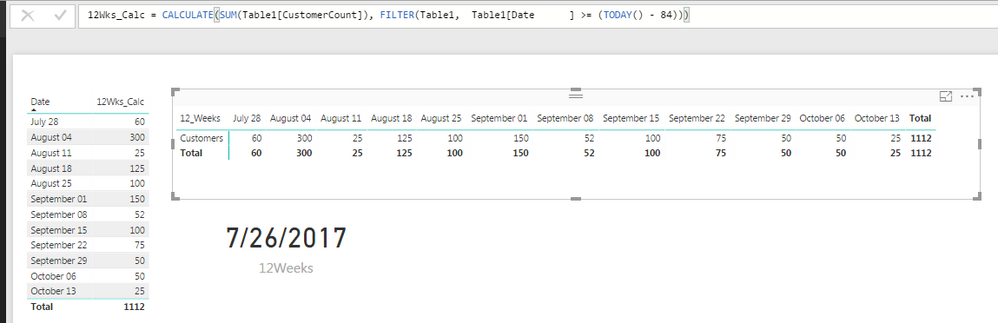
12Wks_Calc = CALCULATE(SUM(Table1[CustomerCount]), FILTER(Table1,  Table1[Date] >= (TODAY() - 84)))


3:  Finally create a Matrix with Rows = '12_Weeks', Columns = 'Date', & Values = '12Wks_Calc'.  Without the "Customers" text column, you won't see the header records you are expecting.


Hope this helps, FOrrest
 

Capture.PNG


Did I answer your question, or help you along the way?
Please give Kudos or Mark as a Solution!


https://www.linkedin.com/in/forrest-hill-04480730/

Proud to give back to the community!
Thank You!


View solution in original post

3 REPLIES 3
fhill
Resident Rockstar
Resident Rockstar

Please post a sample of your raw data.  Thank You


Did I answer your question, or help you along the way?
Please give Kudos or Mark as a Solution!


https://www.linkedin.com/in/forrest-hill-04480730/

Proud to give back to the community!
Thank You!


Above mentioned is the raw data.


Date Column 


Count of Customer Column


Date                         CustomerCount

2017/10/13                     25

2017/10/06                     50

2017/09/29                     50

2017/09/22                      75

2017/09/15                     100

2017/09/08                      52   

2017/09/01                    150

2017/08/25                     100

2017/08/18                      125

2017/08/11                      25

2017/08/04                        300 

2017/07/28                         60

2017/07/21                         25  

2017/07/14                       35

2017/07/07                       100

2017/06/30                        40 

..........                                   .........


I need to display previous 12 weeks data i.e from 2017/07/28 to 2017/10/13.


Thanks.


I've based this code on the below table structure.  The way you worded 'Count of Customers' made me think there's a table somewhere that is being SUM'ed by every Friday to create a Measured Value.  If this is the case, you may need to change the code to account for the raw data source.  If you raw table looks like the first two columns below, you should be good to go.


1. (I'll explain why later.) Create a Custom Column in Query Editor called 12_Weeks that only has = "Customers".


Capture2.PNG


2:  Here's my code for the rolling 12 weeks (84 days).  Since Dates are technnically just 5 digit numbers masked to look like dates in most databases, the straight math works fine.


12Wks_Calc = CALCULATE(SUM(Table1[CustomerCount]), FILTER(Table1,  Table1[Date] >= (TODAY() - 84)))


3:  Finally create a Matrix with Rows = '12_Weeks', Columns = 'Date', & Values = '12Wks_Calc'.  Without the "Customers" text column, you won't see the header records you are expecting.


Hope this helps, FOrrest


Capture.PNG


Did I answer your question, or help you along the way?
Please give Kudos or Mark as a Solution!


https://www.linkedin.com/in/forrest-hill-04480730/

Proud to give back to the community!
Thank You!


Helpful resources

Announcements
Power BI DataViz World Championships

Power BI Dataviz World Championships

The Power BI Data Visualization World Championships is back! Get ahead of the game and start preparing now!

December 2025 Power BI Update Carousel

Power BI Monthly Update - December 2025

Check out the December 2025 Power BI Holiday Recap!

FabCon Atlanta 2026 carousel

FabCon Atlanta 2026

Join us at FabCon Atlanta, March 16-20, for the ultimate Fabric, Power BI, AI and SQL community-led event. Save $200 with code FABCOMM.