Join us at FabCon Atlanta from March 16 - 20, 2026, for the ultimate Fabric, Power BI, AI and SQL community-led event. Save $200 with code FABCOMM.
Register now!Vote for your favorite vizzies from the Power BI Dataviz World Championship submissions. Vote now!
Hi there!
Is there a way of making a table in Power BI "static" or basically disable sorting?
Thank you in advance!
Solved! Go to Solution.
Hi, @Anonymous
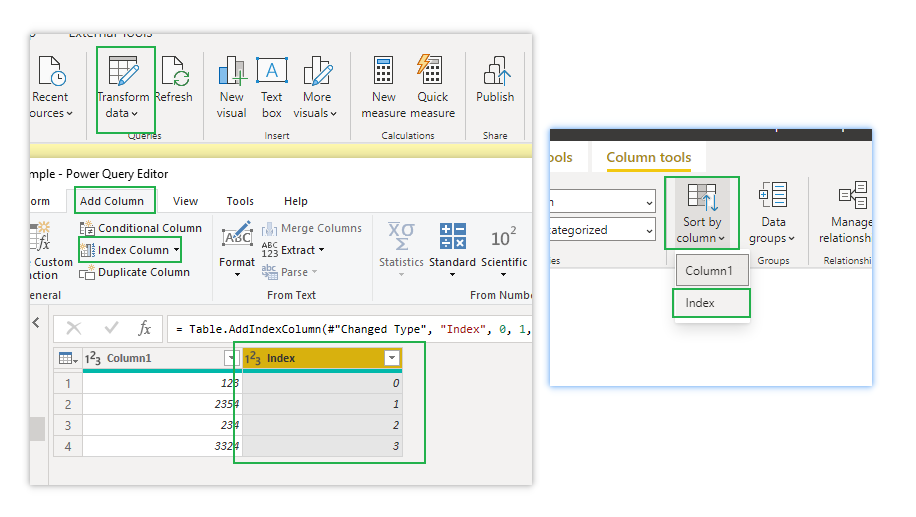
Fields are automatically sorted implicitly in visual. If you want to keep the order of the original table, you can add an index column to the original table in PQ, and then use it in visual, which is equivalent to disabling this function.
Like this:
If it doesn’t solve your problem, please feel free to ask me.
Best Regards
Janey Guo
If this post helps, then please consider Accept it as the solution to help the other members find it more quickly.
Hi, @Anonymous
Fields are automatically sorted implicitly in visual. If you want to keep the order of the original table, you can add an index column to the original table in PQ, and then use it in visual, which is equivalent to disabling this function.
Like this:
If it doesn’t solve your problem, please feel free to ask me.
Best Regards
Janey Guo
If this post helps, then please consider Accept it as the solution to help the other members find it more quickly.
@Anonymous , You can disable, visual header in desktop and that will not show the three dots menu in the power bi service. Option in three dotes will go away. But I doubt that will stop click and sort.
Vote for your favorite vizzies from the Power BI World Championship submissions!
If you love stickers, then you will definitely want to check out our Community Sticker Challenge!
Check out the January 2026 Power BI update to learn about new features.
| User | Count |
|---|---|
| 56 | |
| 52 | |
| 45 | |
| 17 | |
| 16 |
| User | Count |
|---|---|
| 108 | |
| 106 | |
| 39 | |
| 33 | |
| 25 |