cancel
Showing results for 
Search instead for 
Did you mean: 

The Power BI Data Visualization World Championships is back! Get ahead of the game and start preparing now! Learn more

Reply
JohanBrink
Frequent Visitor

Disable drillthroughpages for specific visuals

HI,


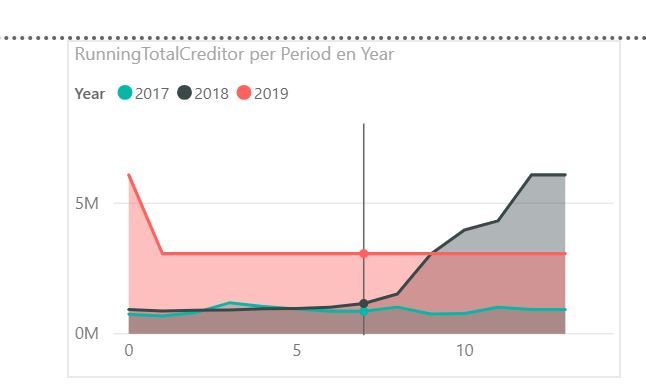
I'm working on a financial dashboard wich displays de balance of accounts receivable and payable. This amount is displayed in a line graph by Year and Month.


Now I like to make a drillthrough 'by relation'. Therefore i maked this page to show a the balance by relation. 


I have two relation tables: Debtors and Creditors, so i have to Drillthrough pages: by debtor and by creditor. When i use drillthroug i can choose for both pages. The visual about balance of creditors has a drilthrough option 'by debtor'. And the visual about debtors has a drillthrough option 'by creditor'.


For a user, this is confusing. Is there a way to solve this? Maybe by disabling a specific drillthroug option on one of the visuals? Other solutions?

3 REPLIES 3
v-yuta-msft
Community Support
Community Support

@JohanBrink ,


I'm working on a financial dashboard wich displays de balance of accounts receivable and payable. This amount is displayed in a line graph by Year and Month.


Now I like to make a drillthrough 'by relation'. Therefore i maked this page to show a the balance by relation. 


Could you clarify more details about "drillthrough by relation" and share some sample data?


Community Support Team _ Jimmy Tao

If this post helps, then please consider Accept it as the solution to help the other members find it more quickly.


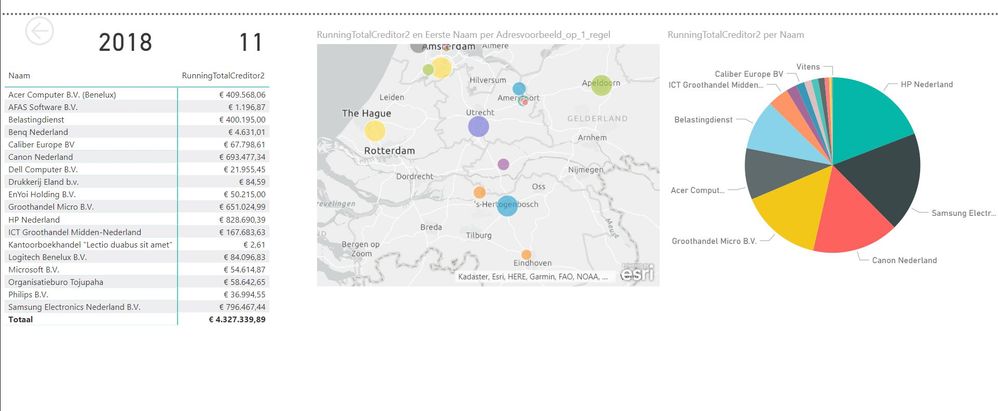
The total balance of e.g. creditors is a sum of balances from different creditors. In my overviewpage I present the total balance of al creditors as a running total over a year.

From that visual i like to drillthrough to a detailpage where some detailed information is shown. Like the balances of al creditors at that specific moment in year.


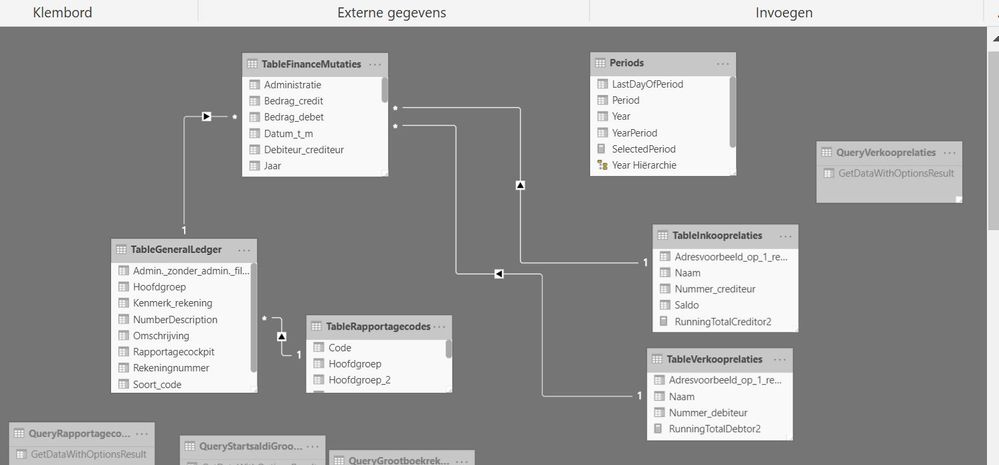
I got two tables with relations, one with creditors (suppliers) - one with debtors (customers), so i need to create two detailpages. Cause they are both have drillthroughfilters 'Year' and 'Period', both appear when i click on 'drillthrough'. But, when i'm click in the visual with the total balance of creditors - drillthrough to the detailpage of debtors makes no sense. But, in PBI the option is just there... This is confusing for endusers..


Possible solutions i thinked about:

1. combine the two relationtables (but they don't share a column - so how to merge/combine)

2. disable drillthrough for specific pages (is this possible?)


Any other solution?

detailscreditor.JPGrunningtotalcreditor.JPGtable.JPG

Helpful resources

Announcements
Power BI DataViz World Championships

Power BI Dataviz World Championships

The Power BI Data Visualization World Championships is back! Get ahead of the game and start preparing now!

December 2025 Power BI Update Carousel

Power BI Monthly Update - December 2025

Check out the December 2025 Power BI Holiday Recap!

FabCon Atlanta 2026 carousel

FabCon Atlanta 2026

Join us at FabCon Atlanta, March 16-20, for the ultimate Fabric, Power BI, AI and SQL community-led event. Save $200 with code FABCOMM.