Join us at FabCon Atlanta from March 16 - 20, 2026, for the ultimate Fabric, Power BI, AI and SQL community-led event. Save $200 with code FABCOMM.
Register now!Vote for your favorite vizzies from the Power BI Dataviz World Championship submissions. Vote now!
When you work with Power BI slicers and noting is selected, it show the measures by "select all".
Can you disable those option? Because in some cases it shows weird data.
kind regards,
Davina
hi @Anonymous - At this point if nothing is selected in the slicer the calculations will return value based on all values in the slicer.
If you want to achieve this you would have to build logic in your DAX to default to a certain value if nothing is selected in the slicers.
You can refer to the below link on how to set a default value for slicer if nothing is selected -
https://littledumbo.com/2019/05/23/how-to-set-default-value-for-slicers-in-power-bi-using-dax/
Please mark the post as a solution and provide a 👍 if my comment helped with solving your issue. Thanks!
Proud to be a Super User!
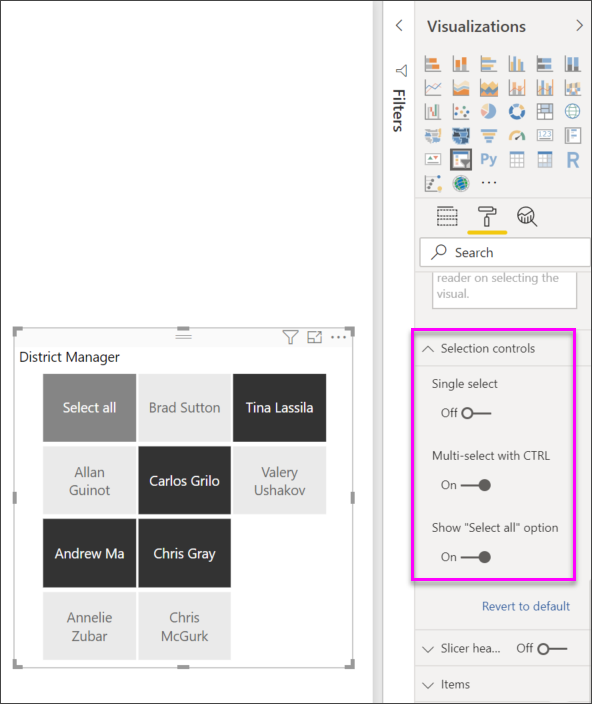
@Anonymous , Not very clear. You have the option in format to show select all. See if disabling that can help. else log an idea -https://ideas.powerbi.com/ideas/
Vote for your favorite vizzies from the Power BI World Championship submissions!
If you love stickers, then you will definitely want to check out our Community Sticker Challenge!
Check out the January 2026 Power BI update to learn about new features.
| User | Count |
|---|---|
| 64 | |
| 56 | |
| 43 | |
| 20 | |
| 17 |
| User | Count |
|---|---|
| 123 | |
| 108 | |
| 44 | |
| 32 | |
| 26 |