Join us at FabCon Atlanta from March 16 - 20, 2026, for the ultimate Fabric, Power BI, AI and SQL community-led event. Save $200 with code FABCOMM.
Register now!The Power BI Data Visualization World Championships is back! Get ahead of the game and start preparing now! Learn more
I have a date table and the March 2019 Power BI update automatically created hierarchy in the Date field of my date table. How can I disable this?!
Thanks!
Solved! Go to Solution.
Hi donaldm,
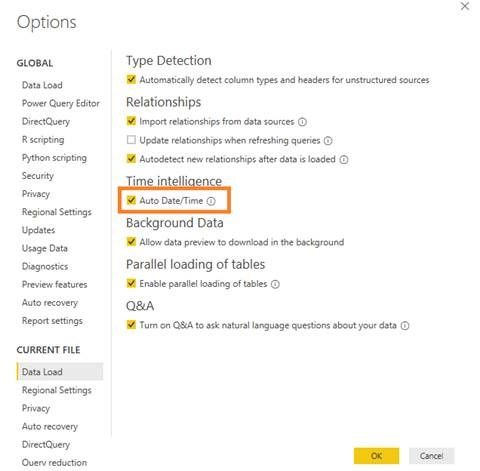
You can disable date hierarchy by File->Options and Settings ->Options to enter Options page, and don't check the box Auto Date/Time. After that, restart the Power BI Desktop to take this change effective.
Best Regards,
Amy
If this post helps, then please consider Accept it as the solution to help the other members find it more quickly.
Hi donaldm,
You can disable date hierarchy by File->Options and Settings ->Options to enter Options page, and don't check the box Auto Date/Time. After that, restart the Power BI Desktop to take this change effective.
Best Regards,
Amy
If this post helps, then please consider Accept it as the solution to help the other members find it more quickly.
Thank you! This is great info!
Check out the November 2025 Power BI update to learn about new features.
Advance your Data & AI career with 50 days of live learning, contests, hands-on challenges, study groups & certifications and more!