
cancel
Showing results for 
Search instead for 
Did you mean: 

The Power BI Data Visualization World Championships is back! Get ahead of the game and start preparing now! Learn more

Reply
pstanek
Post Patron
Post Patron

Direct Query Year , month

Hi , I created  two calculated  columns in DAX  by functions Year , Month from date( It is direct query mode!!!!!).  But Table  where it was calculated is now too large. 

Is there equivalent to calculate year, month, from date in Query editor in Direct query mode? An is it faster?


Do you have another idea how to make it faster? Maybe create table calendar in database.


I use thse columns as filter nad that is the problem, You can see empty square and that is exactly filter with calculated column year.


Capture.PNG


2 REPLIES 2
v-qiuyu-msft
Community Support
Community Support

Hi @pstanek,


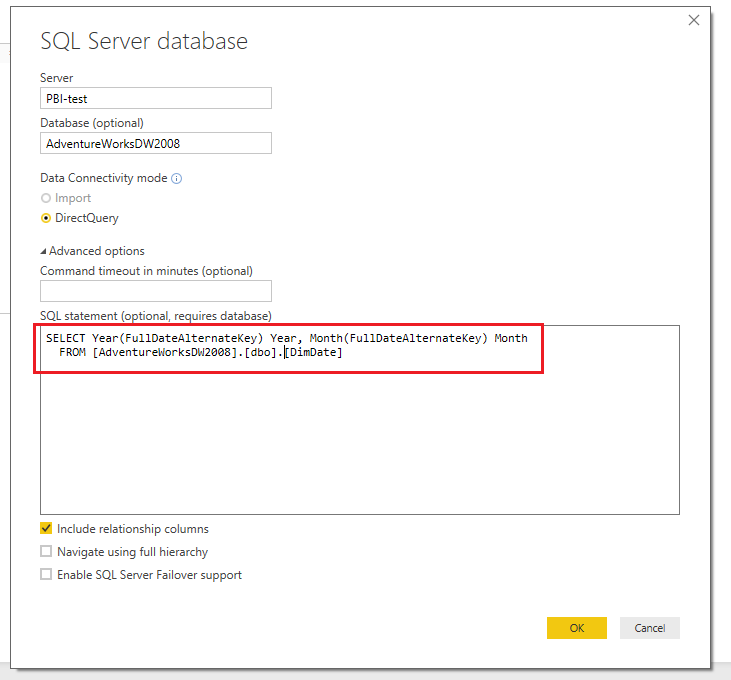
Assume you connect to SQL Server database, you can get Year and Month columns use T-SQL Query like below:


q1.PNG


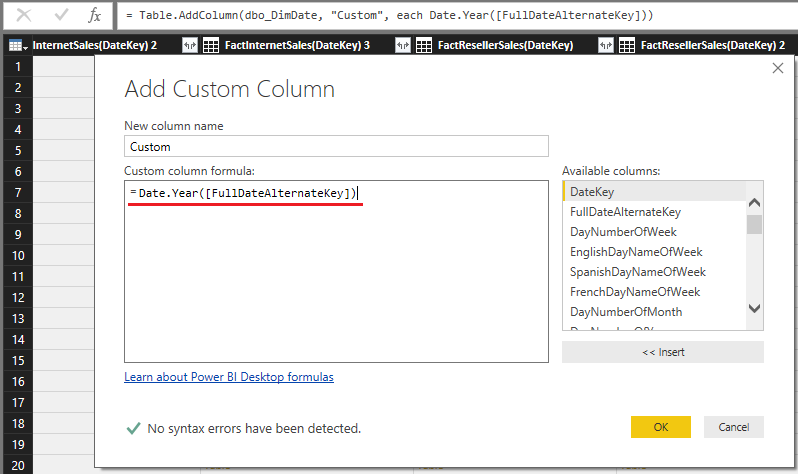
Also you can use the Date.Year() and Date.Month() function to create columns in Query Editor.


q2.PNG


Best Regards,
Qiuyun Yu

Community Support Team _ Qiuyun Yu
If this post helps, then please consider Accept it as the solution to help the other members find it more quickly.

Thanks for idea, we are going to fix by spark connection.

Helpful resources

Announcements
Power BI DataViz World Championships

Power BI Dataviz World Championships

The Power BI Data Visualization World Championships is back! Get ahead of the game and start preparing now!

December 2025 Power BI Update Carousel

Power BI Monthly Update - December 2025

Check out the December 2025 Power BI Holiday Recap!

FabCon Atlanta 2026 carousel

FabCon Atlanta 2026

Join us at FabCon Atlanta, March 16-20, for the ultimate Fabric, Power BI, AI and SQL community-led event. Save $200 with code FABCOMM.