cancel
Showing results for 
Search instead for 
Did you mean: 

The Power BI Data Visualization World Championships is back! Get ahead of the game and start preparing now! Learn more

Reply
beppe_62
Advocate II
Advocate II

Direct Query (Oracle SQL) with input parameter behaviour

I realized a strange behaviour (both in PBI Desktop and Service) related  input paramaters  in my SQL statement.

Below the example :

-------------------------------------------------------------------------------------------------------------------------

Datadd=Date.Day(DateTime.LocalNow),
Datamm=Date.Month(DateTime.LocalNow),
DataYYYY=Date.Year(DateTime.LocalNow),
DateToday = (DataYYYY *10000) + (Datamm *100) + Datadd,
DateStart = (DataYYYY *10000) + (Datamm *100) + 01,
DataEnd = (DataYYYY *10000) + (Datamm *100) + 31,
DataStartPrevYear = ((DataYYYY -1) *10000) + (Datamm *100) + 01,
DataEndPrevyea= ((DataYYYY -1) *10000) + (Datamm *100) + 31,
Origine = Oracle.Database ........ Query="select ((Item= "Number.ToText(DateStart)" and Item  = "Number.ToText(DateEnd)") .....

--------------------------------------------------------------------------------------------------------------

Sql get perfectly the period I calculate in the variable parameters but at the end of period (Month) the change of the period happens not in real time (both in pbi desktop and service, it happens if I refresh the data in the Editor).

Is there any buffer managed in the system ?

I'm not able to understand this strange behavoiur.

Someone has already addressed this issue ?


2 REPLIES 2
beppe_62
Advocate II
Advocate II

The issue/behaviour I'm referring is not the SQL Query that is performed in real time or when I push refresh button, is the parameter that I set before the SQL statement that are not refreshed /updated (see my example)

v-xiaotang
Community Support
Community Support

Hi @beppe_62 

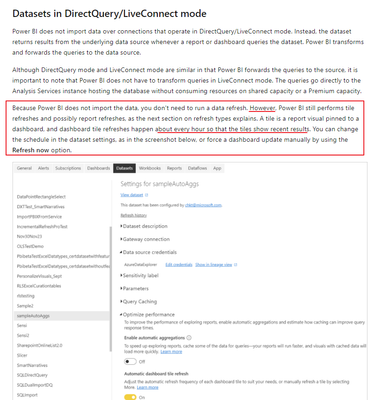
The reason for this behavior is

vxiaotang_0-1638928466156.png

when you interact with a visual, then the visual will update data, or you can also click on refresh button. Besides, here is an article showing how to deal with it, https://www.credera.com/insights/power-bi-directquery-automatically-refresh-less-than-every-15-minut...


Best Regards,

Community Support Team _Tang

If this post helps, please consider Accept it as the solution to help the other members find it more quickly.

Helpful resources

Announcements
Power BI DataViz World Championships

Power BI Dataviz World Championships

The Power BI Data Visualization World Championships is back! Get ahead of the game and start preparing now!

December 2025 Power BI Update Carousel

Power BI Monthly Update - December 2025

Check out the December 2025 Power BI Holiday Recap!

FabCon Atlanta 2026 carousel

FabCon Atlanta 2026

Join us at FabCon Atlanta, March 16-20, for the ultimate Fabric, Power BI, AI and SQL community-led event. Save $200 with code FABCOMM.

Top Solution Authors