
Join us at FabCon Atlanta from March 16 - 20, 2026, for the ultimate Fabric, Power BI, AI and SQL community-led event. Save $200 with code FABCOMM.
Register now!The Power BI Data Visualization World Championships is back! Get ahead of the game and start preparing now! Learn more
Good day Guys!
I just want to ask why is that the refresh datetime in Powerbi Desktop is different in Scheduled refresh in dashboard?
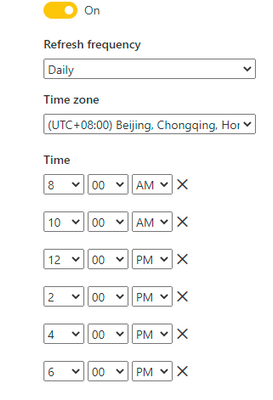
For example this is my refresh datetime on Desktop manual refresh vs schedule refresh, the time in schedule refresh date is not exact in time setup, like it was AM instead of PM, all is set in same TIMEZONE.REFRESH (MANUAL IN PBI DESKTOP) - manual refresh in pbi desktop
REFRESH ( SCHEDULED REFRESH)- scheduled refresh
Want to know why is that? Thanks in advance!
Solved! Go to Solution.
Hi, @RanHo
This is a situation that may be encountered when refreshing.
Based on my research, it turns out that the start time for schedule refresh shown on the refresh history is not exact time the refresh started. It's the time that Power BI started to prepare for the refresh, and that's why additional requests are sent(for preparation)
A more detailed explanation is in the thread below:
(2MB) PBI Refresh via Webservice - Extrem slow
Best Regards,
Community Support Team _ Zeon Zheng
If this post helps, then please consider Accept it as the solution to help the other members find it more quickly.
Hi, @RanHo
This is a situation that may be encountered when refreshing.
Based on my research, it turns out that the start time for schedule refresh shown on the refresh history is not exact time the refresh started. It's the time that Power BI started to prepare for the refresh, and that's why additional requests are sent(for preparation)
A more detailed explanation is in the thread below:
(2MB) PBI Refresh via Webservice - Extrem slow
Best Regards,
Community Support Team _ Zeon Zheng
If this post helps, then please consider Accept it as the solution to help the other members find it more quickly.
@RanHo , Desktop shows timezone based on Machine setting, and Service can show based on Browser setting.
I still doubt the issue is there only
https://4pbi.com/resolving-timezone-issue-on-power-bi-service/
The Power BI Data Visualization World Championships is back! Get ahead of the game and start preparing now!
| User | Count |
|---|---|
| 40 | |
| 37 | |
| 35 | |
| 34 | |
| 28 |
| User | Count |
|---|---|
| 136 | |
| 99 | |
| 73 | |
| 66 | |
| 65 |