cancel
Showing results for 
Search instead for 
Did you mean: 

The Power BI Data Visualization World Championships is back! Get ahead of the game and start preparing now! Learn more

Reply
Anonymous
Not applicable

Difference from previous date aggregate on graph

Hello world, 
I have made this calculation to obtain some specific data

Unapp = 
CALCULATE(COUNT('Dim - Sales'[AR Id]),filter('Fact - Receipts','Fact - Receipts'[AR Status]=="UNAPP"))

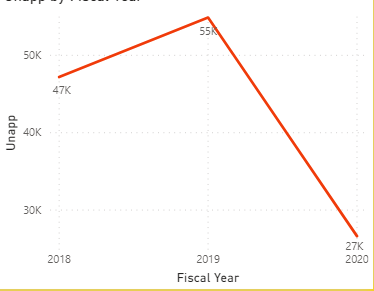
and I create this graph
question.png 

What  i want to get is the difference from previous time aggregation, depending on that the user chose form the drill down 
E.G on the current graph it would show for 2019->7k and 2020->-28k , but once the user opens it for month view it would show e.g data for February 2020-data for January 2020
In tableau this is done with difference from previous, over here how can I do it?
Thanks everyone!!

3 REPLIES 3
v-eachen-msft
Community Support
Community Support

Hi @Anonymous ,


You could add two fields in x-axis: Year and your date column. Then use ISINSCOPE() function to show the result.

[Sum] is the result of every month, [Measure] is the difference from previous year.

Measure =
VAR a =
    CALCULATE (
        SUM ( 'Table'[Value] ),
        FILTER ( ALLSELECTED ( 'Table' ), 'Table'[YEAR] = MAX ( 'Table'[YEAR] ) - 1 )
    )
RETURN
    IF ( ISINSCOPE ( 'Table'[Date] ), [SUM], [SUM] - a )

Here is my test file for your reference.


Community Support Team _ Eads
If this post helps, then please consider Accept it as the solution to help the other members find it.
amitchandak
Super User
Super User

@Anonymous , you have to create diff between each period and merge then into one measure

using

refer : https://www.kasperonbi.com/use-isinscope-to-get-the-right-hierarchy-level-in-dax/


Or refer last period Employee in https://community.powerbi.com/t5/Community-Blog/HR-Analytics-Active-Employee-Hire-and-Termination-trend/ba-p/882970

Share with Power BI Enthusiasts: Full Power BI Video (20 Hours) YouTube
Microsoft Fabric Series 60+ Videos YouTube
Microsoft Fabric Hindi End to End YouTube
Anonymous
Not applicable

To be honest I don't really get how this isinscope would function with the graph/my data. 

Helpful resources

Announcements
Power BI DataViz World Championships

Power BI Dataviz World Championships

The Power BI Data Visualization World Championships is back! Get ahead of the game and start preparing now!

December 2025 Power BI Update Carousel

Power BI Monthly Update - December 2025

Check out the December 2025 Power BI Holiday Recap!

FabCon Atlanta 2026 carousel

FabCon Atlanta 2026

Join us at FabCon Atlanta, March 16-20, for the ultimate Fabric, Power BI, AI and SQL community-led event. Save $200 with code FABCOMM.